
Why did the agent hand off? Every handoff reason explained
The handoff reason is written in the conversation itself, under the From here the agent handed it to a person line, on a line that starts with Reason:. It is in the alert your team received too. The agent hands off when a case is sensitive, when it does not have the answer, or when it cannot do what it was about to tell the customer.
In every case the agent pauses in that one conversation, and the customer is waiting for someone on your team.
Where do I find the handoff reason?
Section titled “Where do I find the handoff reason?”In two places: the conversation itself, and the alert your team gets the moment it is handed off.
- Open the conversation from the alert, or from the Needs human button in Inbox.
- Find the From here the agent handed it to a person line among the messages, with the time of the handoff.
- Read the line under it, which starts with Reason:.
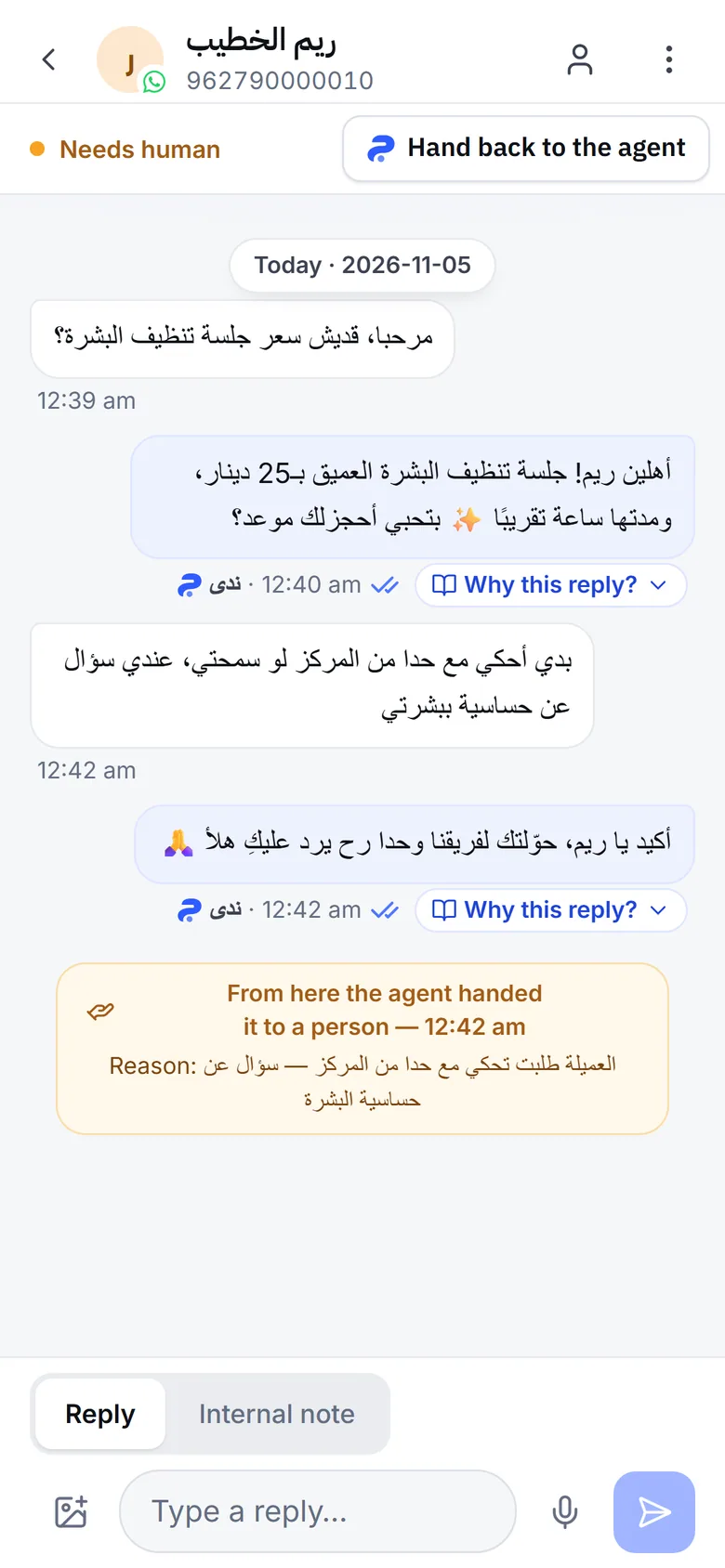
If the agent gave no reason, you see The agent asked for a person, with no reason given. Sometimes the agent writes the reason in its own words, such as the customer asking to speak to the manager, and it shows as written.
What does each handoff reason mean?
Section titled “What does each handoff reason mean?”The reasons Mujib writes fall into four groups. Here is what each means and what to do:
| Reason as shown | Why the agent handed off | What to do |
|---|---|---|
| Emergency | The customer described an emergency, so the conversation was handed off before the agent wrote anything | Reply right away |
| The customer is a minor | The customer seems to be a minor, or is asking about one | Someone on your team takes it |
| Pregnancy or breastfeeding, a chronic illness, or an eating disorder, with “needs a specialist” | A health case the agent never answers | A specialist replies to the customer |
| The agent asked to hand this to a person, or a sentence the agent wrote | The agent decided the customer needs a person: something missing from your knowledge, a complaint, an upset customer, or one of the cases you wrote for it | Reply to the customer, and add the answer to your knowledge if it was missing |
| A complex request beyond the agent | The agent could not finish the request with the steps it has | Finish the request yourself |
| The agent promised the customer a person would reply | The agent was about to promise a follow-up from your team, so Mujib handed the conversation off to make the promise real | Reply quickly: the customer is waiting for you |
| The agent couldn’t answer the customer’s request | The agent was about to say “let me check and get back to you” with no way to come back, so that reply was not sent | Answer the customer’s question, and add the missing information |
| The agent said an appointment was booked, but none was | The appointment the agent talked about was not recorded | Book it yourself, or tell the customer |
| The agent said an appointment was cancelled or moved, but nothing changed | The appointment still stands as it was | Tell the customer it still stands, or change it yourself |
| A technical fault, no reply at all, or a reply that was cut off | The agent could not finish its reply | Reply to the customer; if it happens a lot, email us |
Appointment reasons appear only in a business that takes appointments. When the agent hands off sensitive cases is covered in detail in Human handoff.
What do I do after I reply to the customer?
Section titled “What do I do after I reply to the customer?”Hand the conversation back to the agent when you are done; otherwise it stays paused there.
- Reply to the customer in the conversation. It leaves the Needs human list.
- When you are done, press Hand back to the agent, or switch Agent replies here on.
- The agent answers the customer’s next message and does not go back to earlier ones.
Rather not remember every time? Turn on Agent auto-resume, and the agent returns to the conversation by itself after a quiet period.
How do I cut handoffs without losing the cases that matter?
Section titled “How do I cut handoffs without losing the cases that matter?”By fixing the reason that keeps coming back, not by blocking handoffs altogether.
- Watch the rate: the master switch card in Agent Studio shows With staff stepping in and Staff intervention rate for the last thirty days.
- Fill the gaps in your knowledge: if handoffs repeat because information is missing, add it to the knowledge base. If it is there and the agent did not use it, see AI agent wrong answer.
- Review your own cases: open the agent’s settings, then Handoff to your team, and read what you wrote in When it hands off to staff. A case written too broadly hands off many conversations that need no one.
- No team to follow up? Turn on no-handoff mode with No-handoff mode — the agent never hands off to staff, and the agent carries every conversation itself. Read what changes first in Human handoff.
When should I contact the Mujib team?
Section titled “When should I contact the Mujib team?”When a technical reason repeats across many conversations, or a reason appears that does not match the conversation at all.
- Write to
abdalrahman@mujib.ai, or use Report a problem in your account menu. - Include the conversation, the reason as it appeared, and when the handoff happened.
Frequently asked questions
Does the customer know the conversation was handed off?
Yes. They get the handoff message saying a staff member will reply, unless the agent is off at the master switch or auto reply is off on the channel.
Why did the agent hand off a question my knowledge answers?
Usually the entry did not reach the agent for that message, or it was paused or outside its dates. Check that on the knowledge troubleshooting page in this section.
Can I stop health cases from being handed off?
Only no-handoff mode stops every handoff. Otherwise sensitive cases always stay with your team, because the agent gives no advice in them.
The reason is a sentence I never wrote. Where does it come from?
Sometimes the agent writes the handoff reason in its own words, and it shows as written. Read the conversation to see what the customer asked for.
Does a handoff stop the agent in every conversation?
No. It pauses in the handed-off conversation only, and keeps answering your other customers.