
WhatsApp voice messages: the agent understands and replies by voice
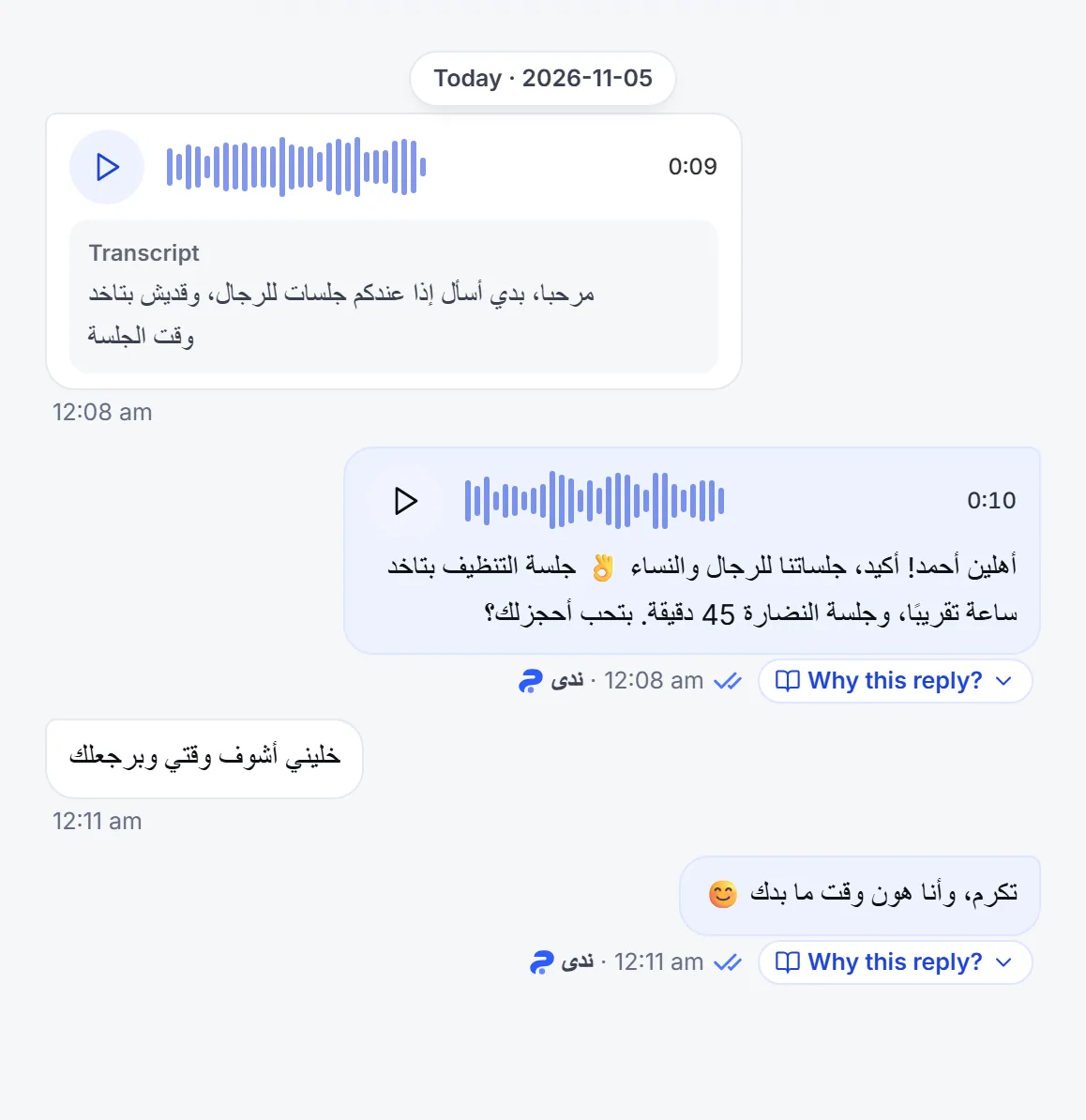
When a customer sends a WhatsApp voice message, or one on Messenger or Instagram, Mujib turns it into text, the agent answers it like a typed message, and you see the transcript in the conversation. On WhatsApp the agent can also reply by voice in the voice you choose, and falls back to text when it cannot.
Does the agent understand voice messages?
Section titled “Does the agent understand voice messages?”Yes. Mujib transcribes every voice message that arrives on WhatsApp, Messenger and Instagram, and the agent answers that text. There is nothing to set up, as the editor reminds you: Voice notes are always transcribed and answered — this switch is for images only.
- You see the text in the conversation: under the audio in Inbox there is a Transcript, even when the agent is off and you reply yourself.
- In a conversation the spam detector paused: its voice messages are not transcribed and nothing automated answers them; you can still play them. See Spam messages.
- If the text is unclear: a transcript can mishear a word, so when it reads garbled the agent asks the customer to type the message rather than guess.
- If it cannot be transcribed at all: the customer gets a short, fixed message that apologises and asks them to type it, and it is not repeated if it was the last thing sent to them.
- If the audio file itself did not arrive: the agent does not reply, and you get a notification that the message needs your answer.
Does the agent reply with a voice message?
Section titled “Does the agent reply with a voice message?”Yes, on WhatsApp only, when the customer sent a voice message, Voice replies is on, and you have chosen a voice. If any of these is missing, the agent replies in text as usual.
| Condition | What happens without it |
|---|---|
| The customer sent a voice message | Typed messages always get a text reply |
| The conversation is on WhatsApp | On Messenger and Instagram the reply is always text |
| Voice replies is on | It replies in text |
| You chose a voice under Voice | It replies in text until you choose one |
When the agent replies by voice, it writes the reply to be heard: short, in a few sentences, with no emoji, links or lists, and with numbers said as words. The voice reply is sent instead of the text, not with it, while you see its words under the audio in the conversation. Images and branch locations still arrive as separate messages.
How does the voice reply reach the customer?
Section titled “How does the voice reply reach the customer?”It arrives as an ordinary WhatsApp voice message, with its waveform, as if a team member had recorded it on their phone, not as an attachment to download. Your team sees it in the conversation as audio with the reply’s words under it, so they know what the agent said without listening.
How do I turn on voice replies and choose a voice?
Section titled “How do I turn on voice replies and choose a voice?”In the Voice & images section of the agent editor. Each agent has its own voice setting.
- Open Agent Studio and press Edit on the agent’s card.
- Go to the Voice & images section and make sure Voice replies is on.
- Under Voice you find 16 voices in two groups, Female voices and Male voices, each with a description of its tone.
- Press the play button beside a voice to hear a sample, then press the voice itself to choose it.
- Press Save.
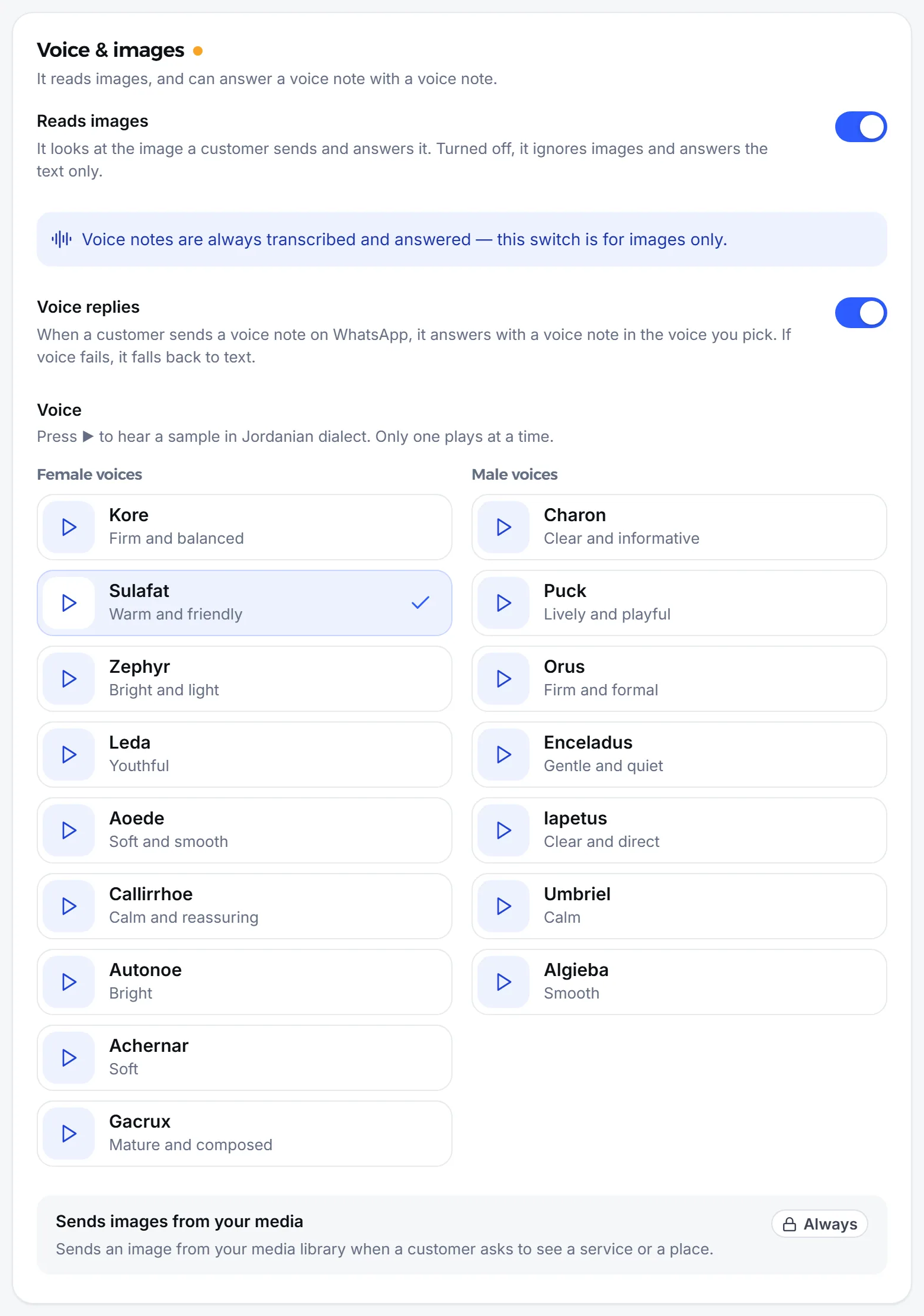
The voice speaks with a Jordanian accent, as in the samples, whatever Dialect you chose for writing. To stop voice replies, switch Voice replies off and the agent answers voice messages in text.
When does the agent fall back to text?
Section titled “When does the agent fall back to text?”Whenever a voice reply is not possible, so the customer is never left without an answer. That happens when:
- No voice is chosen, or Voice replies is off.
- The conversation is on Messenger or Instagram.
- The reply is long, or holds a link that makes no sense spoken.
- The voice could not be produced for a technical reason.
Still stuck? See Voice message problems.
Frequently asked questions
Do I need to switch anything on for the agent to understand voice messages?
No. Voice messages are always transcribed with no setup; the “Reads images” switch is about images only.
Why does the agent reply in text even though voice replies are on?
Usually because no voice has been chosen yet. The customer may also be on Messenger or Instagram, may have typed their message, or the reply was long or held a link. In all of these cases the reply goes as text.
Does the customer get the text along with the voice reply?
No. The voice reply is sent instead of the text. You still see the reply's words under the audio in the conversation.
Can I choose the accent of the voice?
No. Voice replies are spoken with a Jordanian accent, as in the samples, whatever dialect you chose for written replies.
What does the customer see if their voice message could not be understood?
A short message that apologises and asks them to type it instead. The agent does not repeat it if it was the last thing sent.