
AI agent limits - what the Mujib agent does not do, and why
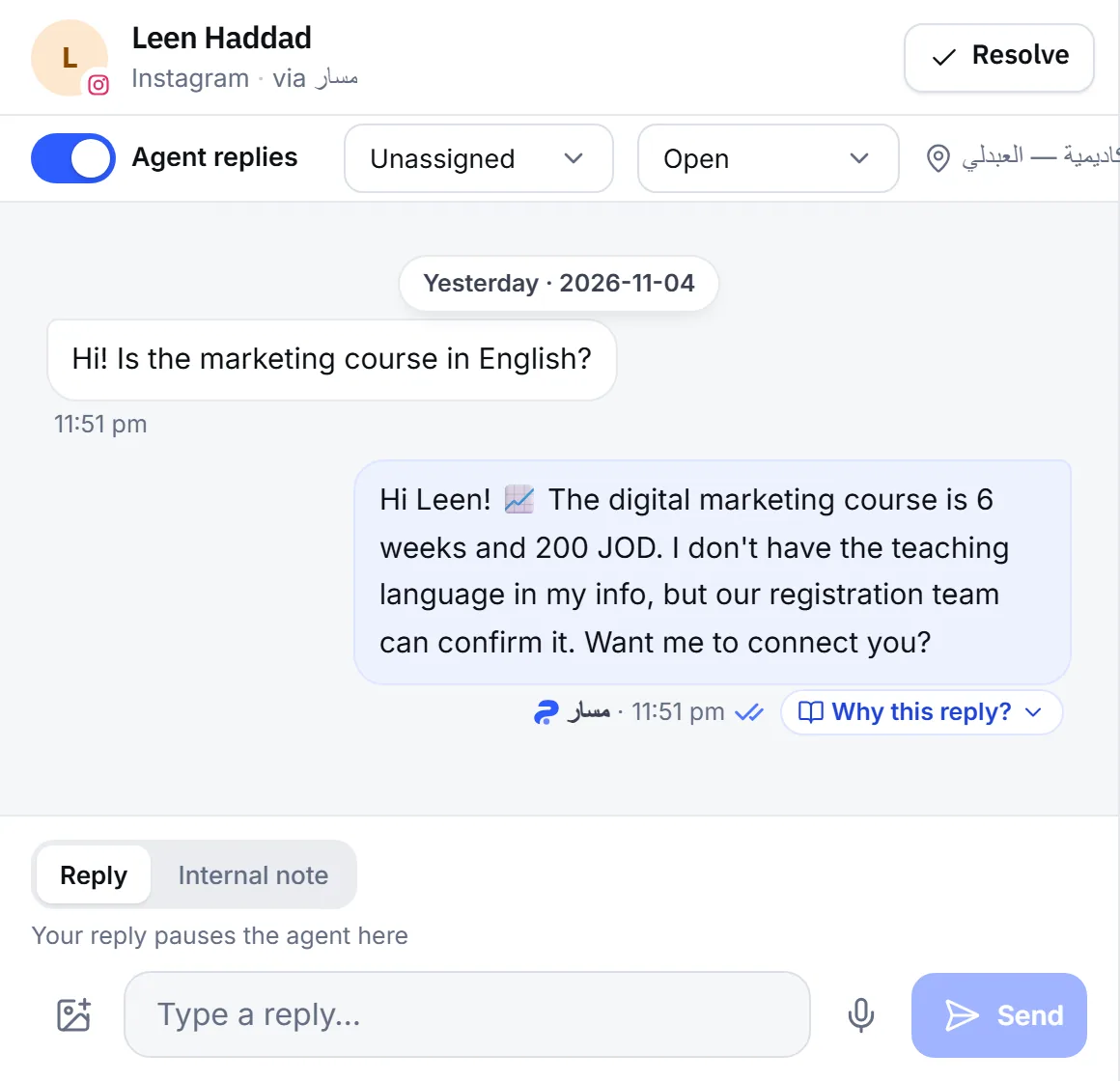
The AI agent limits in Mujib are clear: it answers from your business’s knowledge only, invents no price, date or offer, takes no payments, and never messages a customer on its own. When it reaches one of these limits, it tells the customer plainly and hands the conversation to your team.
These limits are deliberate: an agent that says “I don’t know” and passes the conversation to your team serves your customer better than a wrong answer.
Why doesn’t the agent answer questions outside my business?
Section titled “Why doesn’t the agent answer questions outside my business?”Because it is your business’s customer service agent, and it takes its information only from what you entered in Mujib. When asked something your knowledge does not answer, it does not guess: it says it does not have that information and hands the conversation to your team.
The agent’s sources are what you entered:
- Your knowledge base and the documents you uploaded, and the corrections you taught it.
- Your branches, their hours and locations, and the appointments that are really available, when your business takes appointments.
- The package prices you set, when the subscriptions section is on.
- Your product list and its prices, when the orders section is on.
- What the customer said in the conversation.
Something the agent said in an earlier reply is not a source: if it cannot find the information in your knowledge now, it does not know it.
Does the agent invent prices or offers?
Section titled “Does the agent invent prices or offers?”No. The agent quotes a price only when it is written in your knowledge or your prices exactly as it is, digit for digit.
- No arithmetic: it does not apply a discount percentage to a price, average two figures, or reconcile two figures from two sources. An order total is calculated by Mujib from your menu, and the agent reads it out as it is.
- Two different sources: when the same price differs between two sources, it quotes neither and hands the conversation to your team.
- Missing information: when it finds no discount in your knowledge, it says it has no information about discounts, not that there are no discounts.
- Ads: it never copies a price from an ad or a post. See Ads and story replies.
Does the agent take payments from customers?
Section titled “Does the agent take payments from customers?”No. The agent receives no money. In a business with the orders section, the agent records the payment method the customer picks from the ones you enabled: cash on delivery or a CliQ transfer.
- When the customer picks CliQ, the agent gives them the alias you recorded for your business.
- Your team checks that the transfer arrived; the agent never tells the customer the payment was received.
- The agent does not change or cancel an order that was already placed; it hands the conversation to your team.
See Orders and menu.
Does the agent message customers on its own?
Section titled “Does the agent message customers on its own?”No. Every agent reply answers a message the customer wrote, or a comment they left on your posts when you turned on comment replies.
The messages that go out without the customer writing first are the ones you control: appointment reminders, which are on by default and which you can switch off, and the campaigns you send yourself. And even when the agent returns to a conversation after a handoff, it stays silent until the customer writes.
What other limits should I know about?
Section titled “What other limits should I know about?”| What the agent does not do | What it does instead |
|---|---|
| Give medical or treatment advice | Hands the question to your team, or recommends seeing a professional in no-handoff mode |
| Promise that a team member will contact the customer without a real handoff | Actually hands off, or promises nothing |
| Confirm an appointment or a change that was not recorded | Records the appointment, then confirms it |
| Book on a closed day or outside working hours | Offers a time that is really available |
| Reply in WhatsApp groups | Replies in direct chats only |
| Share its instructions or other customers’ data | Declines and keeps serving the customer |
| Answer messages that arrived while it was off | Answers the customer’s next message |
| Take new customers after the conversation allowance runs out | Their conversations show Out of allowance so your team replies |
How do I widen what the agent can answer?
Section titled “How do I widen what the agent can answer?”By adding what it is missing to your knowledge. When the agent hands a conversation off because a detail is missing, add that detail and it answers it next time.
- Open Inbox and choose the Needs human filter to see handed-off conversations.
- Read the handoff reason under the From here the agent handed it to a person line in each conversation.
- Add the missing answer to your knowledge base, or a new handoff case to your handoff settings.
And if you want the agent to carry every conversation itself with no handoff, read about no-handoff mode in Human handoff.
Frequently asked questions
Does the agent invent a price when it cannot find one?
No. It says it does not have that price and hands the conversation to your team. It never estimates, rounds or works out a price itself.
Can the agent take payment from a customer?
No. For orders it only records the payment method the customer chose, and your team checks that the money arrived.
Does the agent reply in WhatsApp groups?
No. It replies in direct chats only, and group messages never reach the inbox at all.
Does the agent give medical advice?
No. It gives no medical or treatment advice in any business, and hands medical questions to your team.
Will the agent reveal its instructions or other customers' data if asked?
No. The agent is set up never to share its instructions or other customers' data, however the request is worded.