
Customer response time: why it matters and how to answer at any hour
Customer response time is the time between a customer’s message and the first useful reply they receive, not the first automated “we’ll get back to you”. Answering at any hour does not need someone awake all night: a system that answers frequent questions the moment they arrive, and hands what needs a person to your team, is enough.
This article explains why speed matters, what really counts as a fast reply, and how to measure and improve it without doubling your team.
Why does customer response time matter?
Section titled “Why does customer response time matter?”Response time matters because customers ask when they are ready to decide, and every hour of waiting gives them time to ask someone else or lose interest.
- The customer is comparing right now: someone asking about a price may have asked several businesses at once, and the first answer reaches them first.
- The question goes cold: a customer who wrote at eleven at night may not come back to the chat in the morning if nothing answered them.
- On Messenger and Instagram, delay has an extra cost: the Messenger Platform and Instagram Messaging API policy says the standard messaging window lasts 24 hours for most user actions, and sending after it is limited to specific cases. A reply two days later may not be allowed at all. The details are in the 24-hour window.
- The first impression: how fast you reply before the sale is the first clue customers have about your service after it.
What really counts as a fast reply?
Section titled “What really counts as a fast reply?”A fast reply is the first reply that answers the customer’s question or sets the next step, not just a notice that their message arrived.
| Type of reply | Is it a useful reply? |
|---|---|
| An automated away message: “we are closed right now” | No. It reassures without answering |
| “We got your message and will reply” | No. It only postpones the answer |
| An answer to the question itself | Yes |
| A specific clarifying question: “which branch suits you?” | Yes, because it moves the conversation forward |
| A handoff to a person, telling the customer what happens next | Yes, if someone really follows up |
The away message in the WhatsApp Business app can go out always or only outside business hours, as WhatsApp’s help page on away messages explains. It is better than silence, but it does not shorten the customer’s wait by a single minute.
How do you answer customers at any hour?
Section titled “How do you answer customers at any hour?”You have three options: staff shifts, an away message promising a reply in the morning, or an AI agent that answers at once and hands what needs a person to your team.
| Option | What the customer gets at night | Cost and effort |
|---|---|---|
| A night shift | An answer from a person | The highest: extra salaries and fatigue |
| An away message | A promise of a reply in the morning | Free, but the question waits |
| An AI agent | An instant answer to frequent questions, booking, and a handoff for what needs a person | Setting up the information and reviewing it continuously |
The third option does not replace your team; it leaves them what really needs a person: complaints, special cases, and decisions the written information cannot make.
The Mujib agent starts replying the moment a message arrives, at any hour, on WhatsApp, Messenger and Instagram, from the information you approved for your business; connecting Messenger and Instagram depends on your subscription. It can also answer comments on your posts with a private message to the person who commented. The details are in what Mujib is and comments.
What happens when a customer needs a person?
Section titled “What happens when a customer needs a person?”At that point the customer needs a quick, clear handoff, and someone who actually receives it.
- Always make a handoff possible: for businesses on the official WhatsApp Business Platform, the WhatsApp Business Messaging Policy allows automated responses but requires prompt, clear and direct escalation paths, such as transferring the chat to a person, and it is a sound rule for any automation.
- Tell the customer what happens next: “someone from our team will follow up during working hours” is more honest than “one moment please” followed by silence until morning.
- Alert the staff member at once: a handoff nobody knows about is worse than no handoff.
- Never both at once: when a person takes over a chat, the automated replies there must stop.
In Mujib the agent hands the conversation to your team when it cannot find the answer or the customer asks for a person, you get an alert with the reason, and it stops replying in that conversation. If someone on your team replies from the dashboard or from the phone, the agent stops replying there too. The details are in human handoff, and how alerts reach your phone is in the app and notifications.
What slows down replies to customers?
Section titled “What slows down replies to customers?”Replies are usually slowed by how the work is organised, not by a lack of staff: scattered messages, unclear ownership, and information that is hard to reach.
| Cause | What it looks like | Fix |
|---|---|---|
| Scattered messages | WhatsApp on one phone, Instagram on another, Messenger on a computer | A unified inbox that brings the channels into one place |
| Unclear ownership | Every staff member assumes someone else will reply | Assigning each conversation to one person |
| Information out of reach | Staff search a file for the price or ask a colleague | Answers written in one place everyone relies on |
| Muted alerts | The message arrives and nobody knows until they open the app | Phone notifications for conversations that need a person |
| Repeated questions | Much of the team’s time goes on typing the same answer | Ready replies for the team, or an agent that handles the repeats |
Fix these causes before you measure; measuring a scattered way of working gives you a number you will not know how to improve.
How do I measure and improve customer response time?
Section titled “How do I measure and improve customer response time?”Measure the median, not the average, and watch the slow replies alongside it: one reply that took a day pushes the average far up, and the median alone hides slow replies unless you look for them.
- The median: the time half of the replies come in under.
- Slow replies: the time most replies come in under, which reveals the forgotten conversations.
- Night and day: measure each separately, because the overall figure hides the weak hours.
- After the handoff: measure how long the customer waits for a person to reply, not only the automated reply.
- Handoff reasons: every reason that repeats is missing information. Add it to the agent’s knowledge, and handoffs drop and waits get shorter.
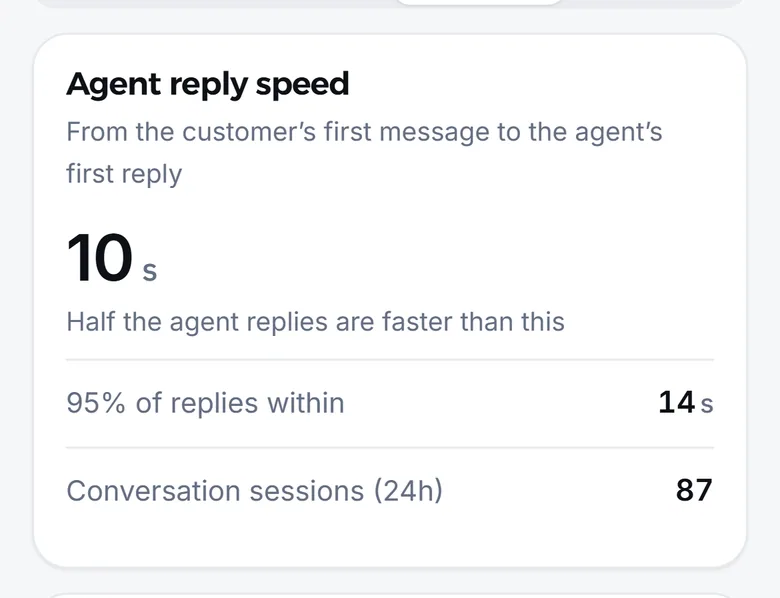
On the Analytics page in Mujib you will find the Agent reply speed card, which measures the time from the customer’s first message to the agent’s first reply. It shows the median, the time within which most of the agent’s replies arrive, and a comparison with the previous period. The details are in conversation analytics.
Speed alone is not enough: a fast wrong answer does more harm than a slow right one. Aim for every customer to reach a correct answer, or a person who follows up, in the shortest possible time.
Frequently asked questions
What counts as a fast reply to a customer?
The first reply that answers the question or sets the next step. An away message saying "we are closed right now" reassures the customer but does not answer them.
Is replying the next day good enough on Messenger and Instagram?
You may not be allowed to. Meta allows standard messages within 24 hours of the customer's last message; after that, sending is limited to specific cases.
Do I need a night shift to reply at any hour?
Not necessarily. An AI agent can answer frequent questions and book at any hour, and hand whatever needs a person to your team to follow up during working hours.
How do I measure my response time?
Measure the median, the time half of the replies come in under, and watch the slow replies alongside it. In Mujib the agent's reply speed is on the analytics page.
What happens when the agent does not know the answer?
In Mujib the agent hands the conversation to your team instead of guessing, you get an alert with the reason, and it stops replying in that conversation until someone on your team hands it back, or until it returns by itself if you turned on auto-resume.