
Human handoff from the AI agent to your staff
Human handoff means the agent stops replying in one conversation and passes it to your team, instead of guessing an answer it does not have. It happens in sensitive cases, complaints, any question your knowledge does not answer, and the cases you define yourself, and you get an alert right away so someone takes over.
The agent stops in that conversation only, and keeps answering your other customers as usual.
When does the agent hand a conversation to your staff?
Section titled “When does the agent hand a conversation to your staff?”The agent hands off when the customer needs a person from your team. The main cases:
- Sensitive cases: an emergency, pregnancy or breastfeeding, a chronic illness, an eating disorder, or a minor where their health is involved. In these cases the agent does not answer the question itself: the customer gets the handoff message, and the conversation goes straight to your team.
- Medical questions: the agent gives no medical or treatment advice, and hands the question to your team.
- Complaints: when a customer complains about something, the agent hands off instead of improvising. The agent’s settings show this as Automatic handoff when a customer is upset.
- Anything your knowledge does not cover: a fact that is not in your knowledge, or a request the agent cannot complete, such as changing an order that was already placed.
- A reply that could not be made: when the agent cannot finish its reply for a technical reason, the conversation goes to your team so the customer is not left without an answer.
- Your own cases: whatever you write in the agent’s settings, for example “hand off if the customer asks to talk to the manager”.
What happens when the agent does not know the answer?
Section titled “What happens when the agent does not know the answer?”The agent tells the customer plainly that it does not have that information, and hands the conversation to your team in the same reply. It invents no number or date, and never promises to “check and get back to you” and then goes quiet.
- The agent only says it transferred the customer when it actually did.
- When information is missing, it does not claim the thing does not exist. It says it has no information about discounts, for example, not that there are no discounts.
- The best cure for repeated handoffs is adding the answer to your knowledge base, so the agent answers it next time.
How do I set my own handoff cases?
Section titled “How do I set my own handoff cases?”You write them in your own words in the agent’s settings, and the agent reads them with every message.
- Open Agent Studio, then press Edit on the agent’s card.
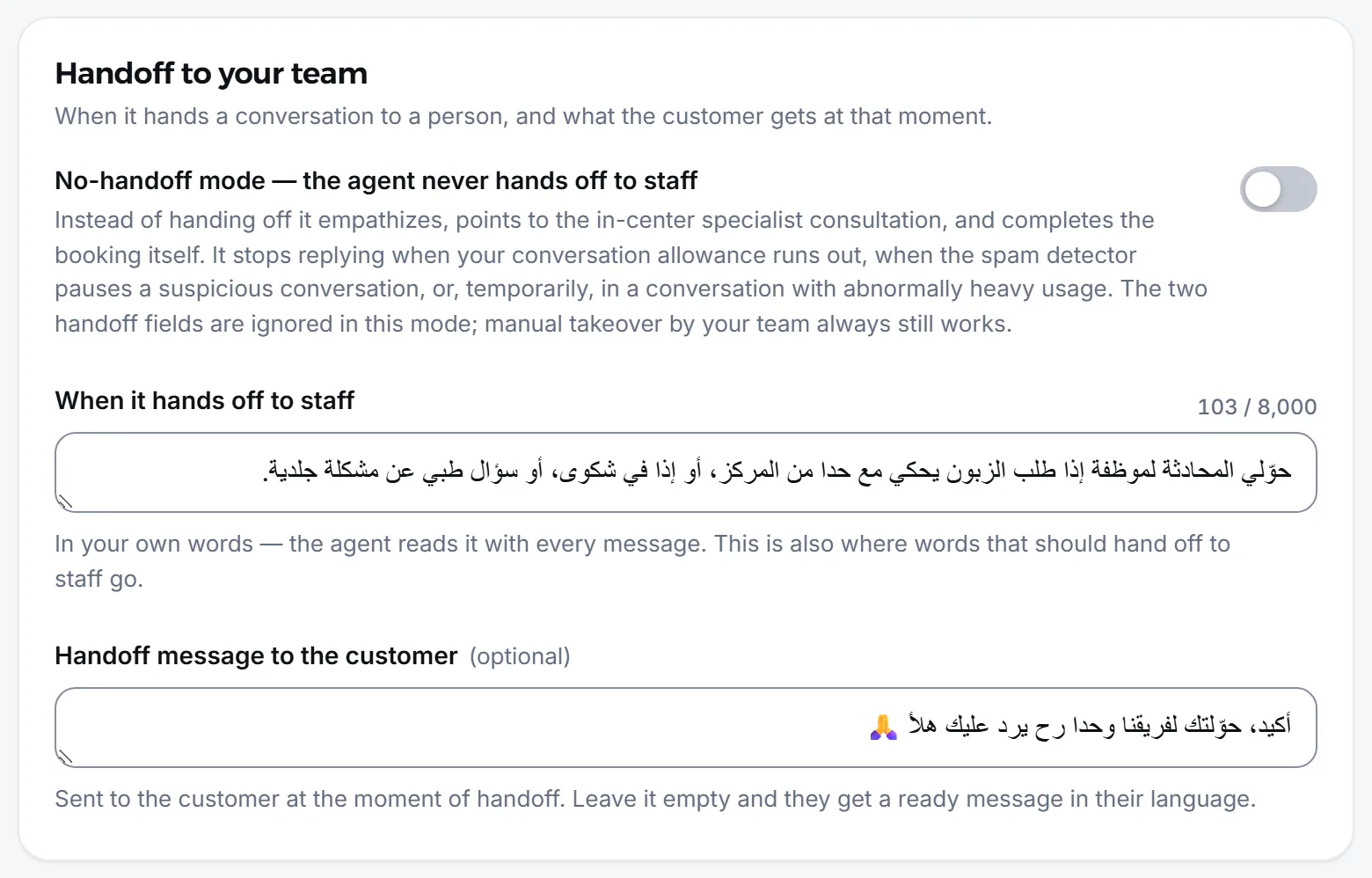
- Go to the Handoff to your team section.
- In When it hands off to staff, write your cases, for example: “hand off if the customer asks for a corporate discount”.
- Optionally write the Handoff message to the customer, the message the customer gets at the moment of handoff. Leave it empty and they get a short ready message saying a team member will reply.
- Press Save.
What do the customer and your team see at a handoff?
Section titled “What do the customer and your team see at a handoff?”The customer gets one reply saying a team member will follow up, and the conversation moves to the list of conversations waiting for your team.
- The customer: gets your handoff message, or the ready one. While the agent is off from the master switch, or Auto-reply is off on that channel, it sends nothing at all, not even the handoff message, and your team gets customers’ messages as notifications to answer.
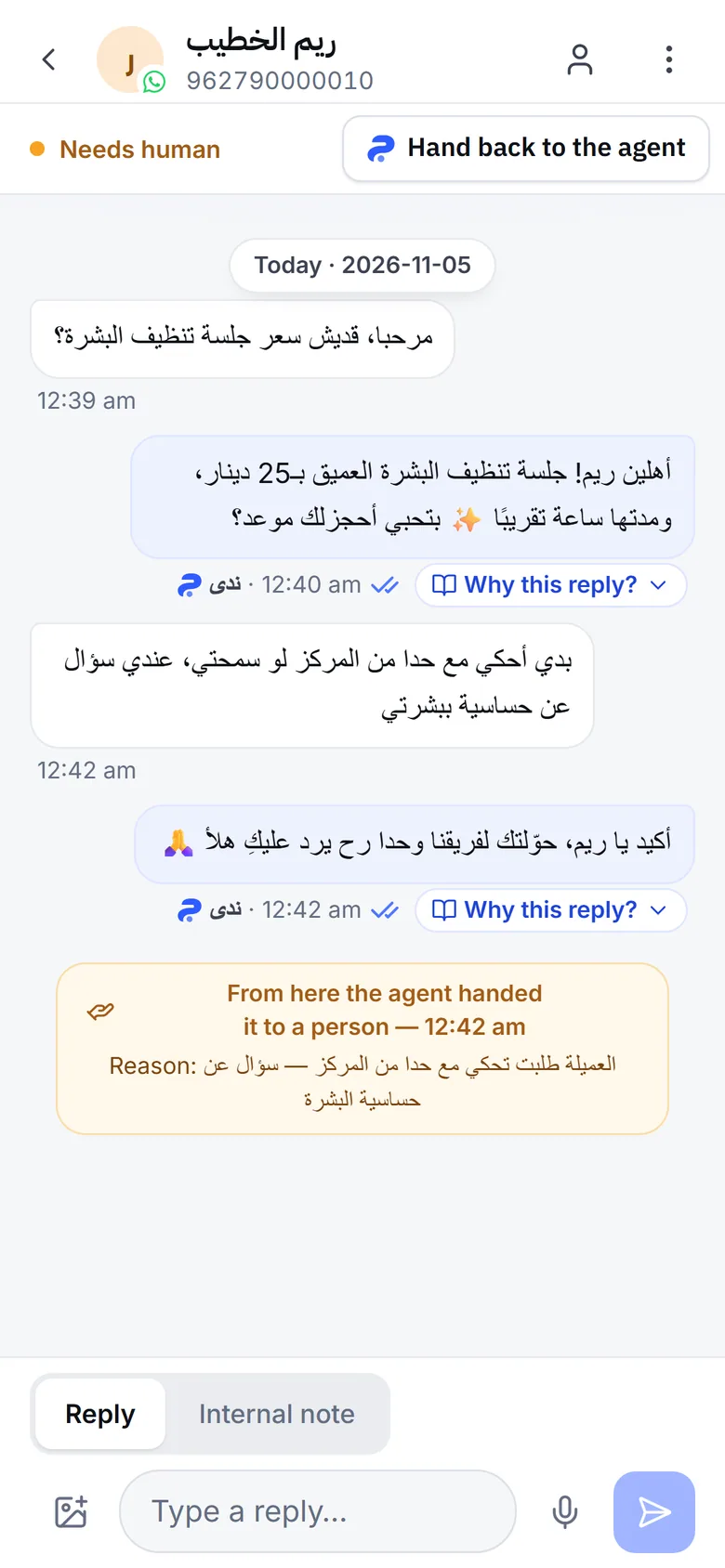
- The conversation: shows the line From here the agent handed it to a person with the time, and under it Reason: and the reason for the handoff.
- Alerts: the dashboard shows A conversation needs a human, and a phone push reaches the owner, the admins and the team members who work the inbox. A WhatsApp alert goes to one person: whoever is next in the Alert rota (taking turns) among those who take that channel, or the Notification WhatsApp number when nobody is on the list. See Notifications.
- The branch: when the customer named a branch, holds appointments at one branch, or the agent sent them a branch’s location, the conversation goes to that branch’s staff. Otherwise it stays with every branch.
The WhatsApp alert is sent from your business’s WhatsApp number. If that number is disconnected, the WhatsApp alert does not arrive; the phone push and the dashboard notice still do.
Where do handed-off conversations show up?
Section titled “Where do handed-off conversations show up?”The same state appears under different words in different places in the app:
| Where | What you see |
|---|---|
| The conversation list in Inbox | The Needs human filter, with a count |
| The open conversation’s header | The Needs human tag |
| The Status menu in the conversation | The Awaiting reply option |
| The inbox on a computer, with no conversation open | The number of conversations, then waiting for a person, oldest first |
How do I take over a conversation and hand it back?
Section titled “How do I take over a conversation and hand it back?”You take it over by replying to the customer, and you hand it back with one button.
- Open the conversation from the alert, or from the Needs human filter in Inbox.
- Write and send your reply. The conversation leaves the Needs human list, and the agent stays off in it so it does not reply at the same time as you.
- When you are done, press Hand back to the agent, or switch on Agent replies here. The agent answers the customer’s next message; it does not answer earlier ones.
Don’t want to remember to hand it back? Turn on AI agent resume and the agent returns to the conversation by itself after a full quiet period. How a team reply pauses the agent is explained in Your reply pauses the agent.
What is no-handoff mode?
Section titled “What is no-handoff mode?”No-handoff mode makes the agent carry every conversation itself and never pass it to your team. You switch it on in the Handoff to your team section with No-handoff mode — the agent never hands off to staff.
In this mode the agent behaves like this:
- Instead of a handoff: it shows empathy, answers from your knowledge only, says clearly what it does not know or cannot do, and suggests the closest real alternative.
- Health questions: it still gives no medical advice. In a business that takes appointments, it suggests a consultation with the specialist at the branch and books it. In an emergency, it tells the customer to call emergency services right away.
- No follow-up promises: it never tells the customer a team member will contact them, because nobody will be following the conversation.
- The handoff fields: When it hands off to staff and Handoff message to the customer are hidden and what you wrote is kept; they come back when you turn the mode off.
Use this mode when nobody on your team follows up handed-off conversations. When you do have a team that replies, a handoff serves the customer better in sensitive cases.
Frequently asked questions
Does a handoff stop the agent in every conversation?
No. It stops only in the conversation it handed off, and keeps answering your other customers.
Does the agent reply in a conversation after handing it off?
No. It stays off there until you hand the conversation back, or until it returns by itself after a quiet period, if you turned that on.
Why did the agent hand this conversation off?
The reason is written under the handoff line in the conversation itself, and in the alert you received. The troubleshooting section of these docs explains each reason.
Does the alert reach more than one person?
The phone push reaches the owner, the admins and the team members who work the inbox, when they have notifications on. The WhatsApp alert goes to one person, according to your notification settings.
Can I stop handoffs completely?
Yes, with no-handoff mode in the agent's settings. The agent then hands off nothing and carries every conversation itself.