
Mujib notifications not working on your phone, and how to fix them
When Mujib notifications are not working on your phone, check three things in order: that notifications are on for that phone itself, that Mujib is installed on the Home Screen if you use an iPhone, and that the Notification WhatsApp number is right and your business has a WhatsApp number connected. Each kind of notification travels its own way.
What kinds of notifications does Mujib send?
Section titled “What kinds of notifications does Mujib send?”Three, each with its own setting:
| Kind | What arrives | To whom |
|---|---|---|
| A notification on the phone or computer | Handoff request, New message, and New booking by the agent if your business uses appointments | Everyone who turned on Push notifications on this device on their device |
| A WhatsApp alert | Handoff requests, the scheduled report and branch alerts | The Notification WhatsApp number, the Alert rota (taking turns), or branch numbers |
| Dashboard bell | New message · handoff request · send failure — for anyone who opens the dashboard. | Inside the dashboard itself |
These settings are under Settings, then Notifications, and they are the owner’s. Staff turn on their own device’s notifications from the card that appears at the top of the app.
Why are phone notifications not arriving?
Section titled “Why are phone notifications not arriving?”Usually because they are not on for this particular device, or they are blocked in the phone’s or browser’s settings. The line under Push notifications on this device tells you which:
| What it says | Cause | Fix |
|---|---|---|
| Off · tap enable to get alerts | Not turned on for this device | Press Enable and accept the browser’s request |
| Blocked in your browser settings | You declined notifications before | Allow them in the phone’s or browser’s settings, as below |
| Not supported on this device | This browser cannot show notifications here | On iPhone, install Mujib first; elsewhere, try another browser |
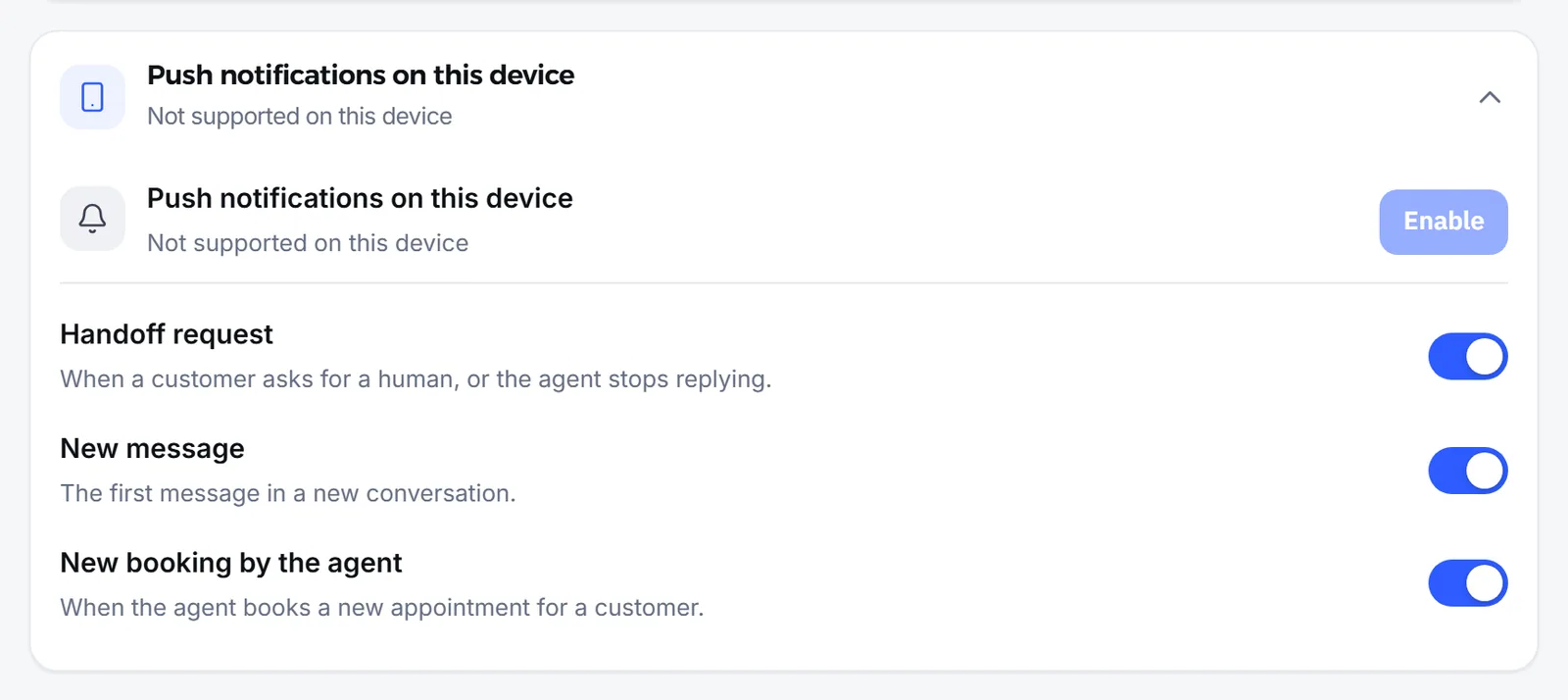
If you declined notifications before, allow them again where the device keeps that choice:
- iPhone: Settings, then Notifications, then Mujib.
- The installed Mujib app on Android: phone Settings, then Apps, then Mujib, then Notifications.
- A browser on a computer or phone: the lock next to the address, then Notifications, then Allow.
Other common causes:
- iPhone without installing: on an iPhone, Mujib can ask for notifications only from the app added to the Home Screen. Tap the Share button at the bottom of the browser; the next steps are Choose “Add to Home Screen”. and Open Mujib from its icon and turn on notifications.
- Mujib opened inside another app: the built-in browser of Instagram or Facebook cannot keep notifications. Open the link in your browser or in the installed app.
- A kind of notification is switched off: under Push notifications on this device there is a switch per kind; make sure the one you are waiting for is on.
- A staff member closed the card: it comes back after 14 days, or they turn notifications on from it when it shows.
Why don’t I get a notification for every message?
Section titled “Why don’t I get a notification for every message?”Because Mujib notifies you when a conversation needs you, not for every message the agent answers.
- A conversation the agent is answering does not notify you per message. You get Handoff request when the agent hands it to your team.
- A conversation the agent is not answering sends New message, at most once per conversation every 10 minutes; the other messages are waiting in the inbox.
- Branch staff are notified about their branch’s conversations and those no branch has picked up yet.
- A phone that is off or out of signal for more than 10 minutes: the notification is dropped and does not show when the phone comes back, but the conversation is waiting in the inbox.
- Do Not Disturb on your phone hides or delays notifications; Mujib itself does not hold them back at any hour.
Why are WhatsApp alerts not arriving?
Section titled “Why are WhatsApp alerts not arriving?”Because a WhatsApp alert is sent from your business WhatsApp number connected to Mujib to the Notification WhatsApp number, so if either number is missing, nothing goes. Open Notification log in the notifications section: each alert has a status, Delivered, Sent, Skipped or Failed, and those that did not go show why:
| The reason shown | What to do |
|---|---|
| The notification number is empty | Enter the number in Notification WhatsApp number |
| The workspace's WhatsApp is not connected | Connect your business WhatsApp number in Channels |
| The number is the workspace's own WhatsApp line | Use a number other than the business one; a number cannot alert itself |
| The saved number is not a valid WhatsApp number | Write it with the country code, such as 962790000000 |
| WhatsApp refused the send | Make sure your business WhatsApp number is connected |
| The branch has no number — add one on the Branches page | Add the branch’s number on the Branches page |
If you added people to the Alert rota (taking turns), handoff requests go to them in turn, one person per alert, by the channels you chose for each; they go to the Notification WhatsApp number only when the list is empty or nobody on it covers the conversation’s channel. The scheduled report always goes to the Notification WhatsApp number.
What do I do, step by step?
Section titled “What do I do, step by step?”Follow these in order; the most common causes come first.
- Open Settings, then Notifications, on the phone that should get the notifications, and look at the line under Push notifications on this device.
- If they are off, press Enable and accept the browser’s request. On iPhone, add Mujib to the Home Screen first and open it from its icon.
- If they are blocked, allow them in the phone’s or browser’s settings, then come back and press Enable.
- Make sure the switches for each kind are on under Push notifications on this device.
- For WhatsApp alerts, check the Notification WhatsApp number, then Notification log for the reason behind any alert that did not arrive.
- Still stuck? Write to abdalrahman@mujib.ai with the phone model and browser, and the kind of notification that did not arrive and when.
First-time setup is in App and notifications, and each option is described in Notification settings.
Frequently asked questions
Do I need to turn notifications on for every device?
Yes. Notifications are turned on per device and per person on your team, so turning them on on your computer does not turn them on on your phone.
Why can't my staff find the notification settings?
Because the Settings page is for the owner. Staff turn on their device's notifications from the card that appears at the top of the app offering it.
Do phone notifications arrive if no notification WhatsApp number is set?
Yes. Phone notifications are separate from WhatsApp alerts and reach every device where they are on.
Do my customers see these notifications?
No. Notifications are for you and your team only; none of them reach customers.
Does Mujib have quiet hours that stop notifications at night?
No. Mujib sends your team's notifications at any hour, but your phone's Do Not Disturb mode may hide them.