
AI agent wrong answer? When your knowledge is not used
An AI agent wrong answer, an outdated one, or “I don’t know” about something you wrote down means your knowledge is not used as you expect: the entry is paused or outside its dates, it did not reach the agent, or an older source outranks it. Start with Why this reply? under the reply.
How do I see where the agent’s reply came from?
Section titled “How do I see where the agent’s reply came from?”Every agent reply in Inbox has a Why this reply? button under it. It shows exactly which entries the agent relied on for that reply.
- Open the conversation in Inbox.
- Under the agent’s reply, press Why this reply?.
- Read Knowledge used. Each source shows its name and type; press the name to open that entry in Knowledge. Branch information opens the Branches page.
- If you see No knowledge sources recorded, the agent relied on no entry from your knowledge for this reply.
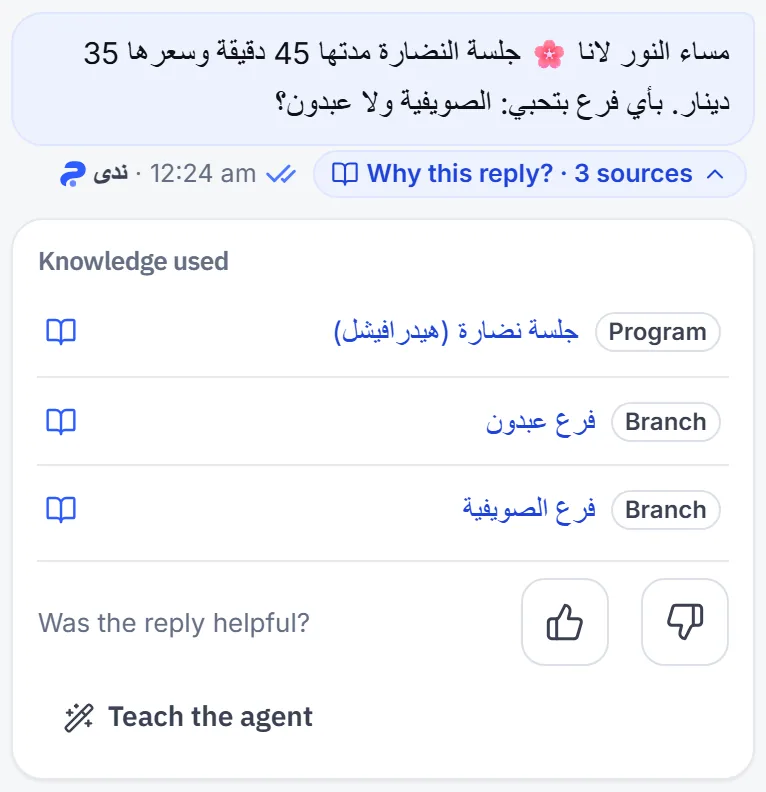
What you see there tells you where to start in the list below: a wrong source means editing that entry, and no source means the right entry never arrived.
Why does the agent not use the information I wrote?
Section titled “Why does the agent not use the information I wrote?”These causes run from most to least common. Check them in order:
- The entry is not live: a Paused entry never reaches the agent, a Not started one does not reach it before its start day, and an Expired one stopped after its last day. Open the entry and lift Pause, or fix Starts and Last day.
- The question is far from the entry: most entries are When the customer asks, meaning the agent looks for them when the question comes close, and they may not arrive when it is far off. Write the entry’s title the way your customers ask, in their words, and use the names they use for the service in the content.
- Essential information every reply needs: if the agent always needs it, make the entry With every reply — critical. Keep that for the essentials only, and write each fact there once.
- Two entries say different things: when two figures for the same thing disagree, the agent does not pick one; it hands the conversation to your team. Search Knowledge for a word from the fact, keep one correct copy, and pause or delete the rest.
- An old correction outranks the entry: corrections take priority over the rest of your knowledge, so if you changed a fact you once corrected, the old correction still wins. Open the Corrections tab and pause or delete it. See Correct the agent’s answers.
- A package price written as text: if your business sells packages, the agent takes their prices from Prices & offers, not from entry text. The knowledge page warns you when it finds a package price inside an entry, with a Review button. Update the price in the table with Open the price table.
- Outdated branch information: branch addresses, public contact numbers, opening hours and team names come straight from the Branches page, and they outrank whatever entries say about branches. Edit them there.
- The information is in a file that was not read: if it sits in an uploaded file, check that the file is Ready and that its text came through cleanly. See PDF not readable.
- Information imported from your website: it does not update by itself when you change your site. Edit it in Knowledge like any entry.
How do I fix a wrong answer quickly?
Section titled “How do I fix a wrong answer quickly?”From the conversation, or from the entry the answer came from. The first is faster; the second is cleaner.
- From the entry: if Why this reply? names an entry with wrong information, press its name to open it, edit it, then Save entry.
- From the reply: in the same panel press Not helpful, choose Wrong fact and type the correct information. Mujib saves it as a correction that outranks other entries.
- Information that is not there at all: add it with Add entry in Knowledge. See Knowledge base.
If you correct from the reply, remember the correction keeps outranking. When the fact changes later, edit or delete the correction along with the entry.
How do I check that the agent uses the information now?
Section titled “How do I check that the agent uses the information now?”Your edits reach the agent from its next reply, so test straight away.
- From another phone, ask the agent the same question it got wrong, in a customer’s words.
- Open the conversation in Inbox and press Why this reply? under the new reply.
- Check that the right entry appears in Knowledge used.
In Knowledge, each entry shows how often it was used, as the page explains: How many times the agent used each entry in the last 30 days. An entry that is never used may be a duplicate, or its title may be far from what customers ask.
When should I contact the Mujib team?
Section titled “When should I contact the Mujib team?”When the entry is live and clear, you asked using the words of its title, and Why this reply? still says No knowledge sources recorded.
- Write to
abdalrahman@mujib.ai, or use Report a problem in your account menu. - Include the question you asked, when the reply came, and the name of the entry you expected the agent to use.
Frequently asked questions
I edited the entry. When does the agent use the new information?
From its next reply, even in conversations already in progress. Replies sent before the edit do not change.
Why did the agent say it doesn't know when the information is written down?
Usually the entry did not reach the agent for that message, because the customer's question was far from its title and words, or because the entry is paused or outside its dates.
Why did the agent quote an old price after I changed it?
Usually the old price is still written in another entry, an old correction, or an uploaded file. Search for the price on the knowledge page and edit or pause every copy of it.
Does information imported from my website update when I change my site?
No. What Mujib imported from your site became entries in your knowledge, and you edit them on the knowledge page when they change.
Does the agent fall back on general information when it finds nothing in my knowledge?
No. It says it does not have that information and hands the conversation to your team, or says so and offers what it does know when it is in no-handoff mode.