
WhatsApp appointment booking with an AI agent
Appointment booking in Mujib means the agent books your customers inside the conversation itself, on WhatsApp, Messenger and Instagram, using the times that are really free at your branches. The appointment is saved in Calendar at once, and the agent never confirms an appointment that was not saved.
The agent does not guess times or names. Every time, it asks the calendar what is free at that branch on that day, and applies your opening hours, breaks, public holidays and specialists’ hours exactly as you set them.
How does the agent book an appointment?
Section titled “How does the agent book an appointment?”The agent follows the same steps for every booking and only asks the customer for what is missing.
- Branch: it knows the branch by name, or by the area the customer types when you listed it under Areas served. When unsure it asks: it never books a branch the customer did not confirm.
- Visit type: it picks from the Visit types you defined, and asks when the kind of visit is unclear.
- Specialist: it books the specialist who usually sees the customer, or the one they ask for by name. See Staff and specialists.
- Time: it offers free times only, where the whole visit ends before closing. When the day is full or the branch is closed, it offers the next days that have a free time.
- Required details: if you require the customer’s name or phone before a booking, the agent asks for them. It never asks again for a WhatsApp number Mujib already knows.
- Confirmation: it saves the appointment, then confirms it to the customer only once the save succeeded.
When a customer books for someone else, a child or a parent, the appointment carries the name of the person who will attend, not the name of whoever owns the number.
What do I set up before booking starts?
Section titled “What do I set up before booking starts?”Booking needs branches with opening hours, visit types, and specialists if more than one person takes appointments.
| What you set | Where | What it changes |
|---|---|---|
| Branches and opening hours | Branches | When each branch can be booked |
| Visit types and their lengths | Settings → Visit types | What customers book and how long it takes |
| Specialists | Branches and Team roster | Who the visit is with, and how many visits run at once |
| Visit length and reminder | Branches → Booking settings | The default length and when reminders go out |
| Public holidays | Settings → Public holidays | Closed days and short days |
Booking only works while the Bookings module is on for your business in Your business & modules. For business types that take no appointments, the agent does not offer booking at all. See Settings and modules.
Does the customer get a booking confirmation?
Section titled “Does the customer get a booking confirmation?”Yes. The agent confirms the appointment in the same conversation once it is saved in the calendar, with the branch, day and time that were actually saved.
- The agent never says an appointment is booked before the save succeeded. If the booking is refused, because the time just filled up for example, it offers another time.
- If the customer writes “confirm” again after the booking, no second appointment is created: the agent replies that it is already booked.
- Before the visit the customer gets a WhatsApp reminder. Timing and conditions are in Appointment reminders.
What does my team see for each new booking?
Section titled “What does my team see for each new booking?”The appointment shows in the calendar at once, and the team gets an alert about it.
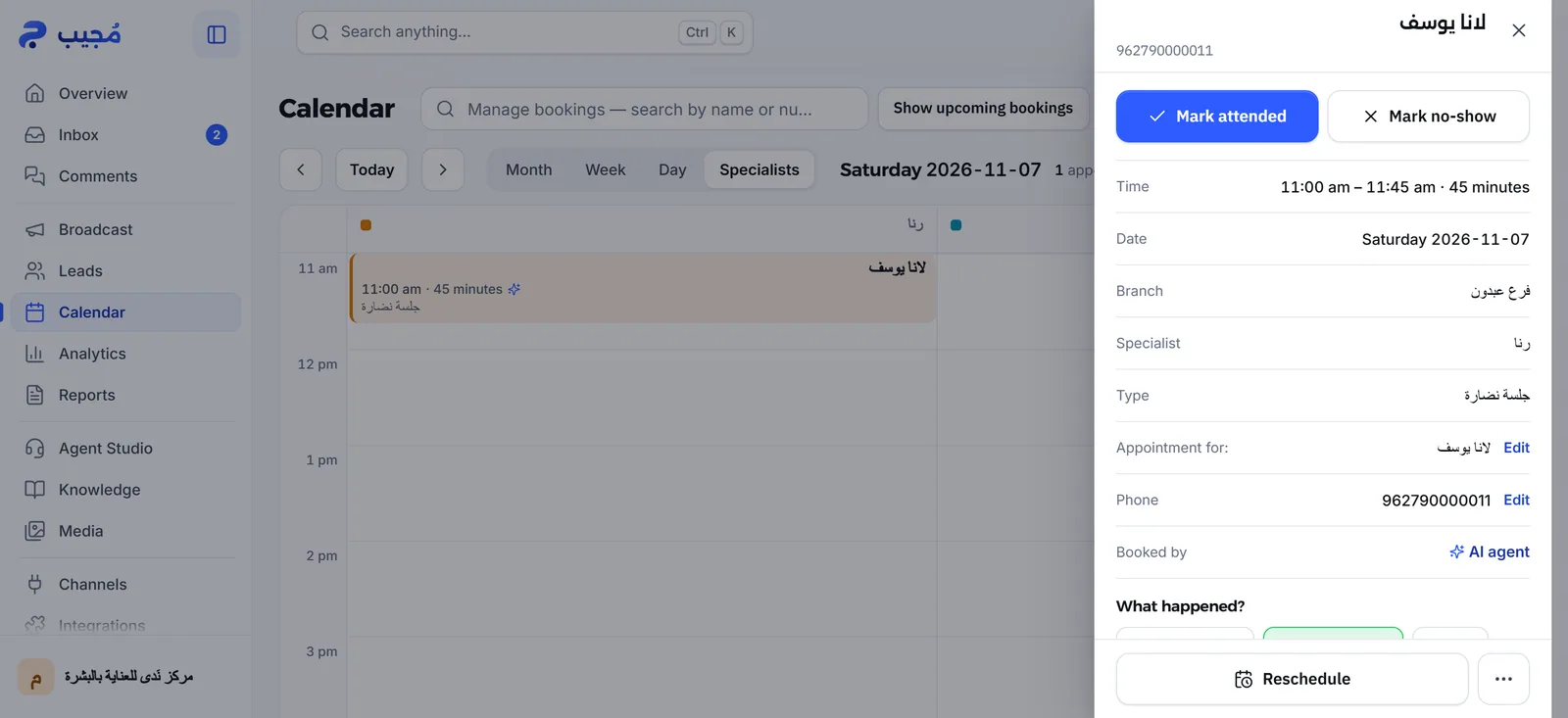
- In the calendar: the agent’s bookings carry the Booked by the agent mark, and the booking details show Booked by AI agent.
- On the branch’s number: a ”📅 New booking” message goes to the Branch WhatsApp number, or to the Manager phone when the branch number is empty. You control it in Settings → Branch alerts.
- In the app: a New booking by the agent notification reaches the owner, admins and the branch staff who see its calendar, each of whom switched it on in Notifications.
How does Mujib prevent double bookings?
Section titled “How does Mujib prevent double bookings?”Mujib counts every appointment for its full length and checks the time once more at the moment it saves, so a time that filled up seconds ago is never booked.
- An hour-long appointment takes the whole hour, not just its start time.
- A branch runs as many appointments at once as it has specialists. With no specialists added, it takes one appointment at a time.
- A specialist who works at two branches is never booked at both at the same time.
- When a customer who already holds an upcoming appointment asks for a new one for themselves, the agent asks whether to move the existing one or add another.
How does the front desk book from the calendar?
Section titled “How does the front desk book from the calendar?”Staff book with New booking in Calendar, in four steps.
- Press New booking.
- In Customer, search for an existing customer or type a new name and number.
- In Service & specialist, choose the Branch, the Type and the Specialist, or Any specialist.
- In Time, pick one of the Available times or type another time.
- In Details & confirm, check the summary and press Book appointment.
Staff may type any minute, but the whole visit must fall inside the branch’s hours, or inside the specialist’s own hours when they have them. To book inside a branch’s break they tick Exceptional booking, a time the agent never offers customers. The booking alerts the branch while Notify the branch on WhatsApp is on.
Frequently asked questions
Does the agent book appointments on WhatsApp and Instagram?
Yes. The agent books the same way on WhatsApp, Messenger and Instagram. Whether Messenger and Instagram can be connected depends on your subscription.
Does the customer get a booking confirmation?
Yes. The agent confirms the appointment in the same conversation once it is saved in the calendar, and the customer gets a reminder before the visit while reminders are on.
Can the agent book two people into the same time?
No. Mujib checks the time again at the moment it saves. If the time filled up during the chat, the booking is refused and the agent offers another time.
Can the front desk add appointments too?
Yes. Staff add a booking with “New booking” in the calendar, and their bookings sit beside the agent's in the same place.
What if a customer asks for an appointment while holding one?
The agent first asks whether they want to move the one they have or book an extra one, and books nothing until they answer.