
WhatsApp Business with the Mujib AI agent, what works and its limits
The Mujib agent works the same way on a WhatsApp Business number and on a regular WhatsApp number: it reads your customers’ text messages, voice notes and photos, answers them from your knowledge base, and hands the conversation to your team when needed. It joins the number as a linked device, so the number keeps working on your phone.
The linking steps are in Connect WhatsApp. This page covers what happens after that: what the agent understands, how it replies, and where its limits are.
Does the agent work with WhatsApp Business?
Section titled “Does the agent work with WhatsApp Business?”Yes. A WhatsApp Business app number and a regular WhatsApp number link to Mujib the same way, from Linked devices in the app, just as WhatsApp Web does.
- You do not need a new number, and you do not move your number to another service.
- WhatsApp keeps working on your phone, and you see the agent’s replies there as the customer sees them.
- One number serves one business in Mujib, and your subscription sets how many numbers you can connect.
How is this different from WhatsApp’s official platform? See WhatsApp Business API or the WhatsApp Business app.
Which kinds of WhatsApp messages does the agent understand?
Section titled “Which kinds of WhatsApp messages does the agent understand?”The agent understands text, voice notes and photos, and records everything else in the conversation for you to see.
| What the customer sends | What happens |
|---|---|
| A text message | The agent reads it and replies |
| A voice note | It is turned into text you see in the inbox, and the agent answers what the customer said |
| A photo | The agent understands what is in it, and reads any text written with it |
| A video or a file | It is recorded in the conversation; the agent does not watch the video or read the file, and answers only the text sent with it |
| A sticker | It shows in the inbox; the agent does not reply to a sticker on its own |
| An emoji reaction to a message | It is not a new message, so the agent does not reply |
| A message from an ad that opens WhatsApp | The agent knows which ad the customer came from. See Ads and stories |
How does the agent reply to customers on WhatsApp?
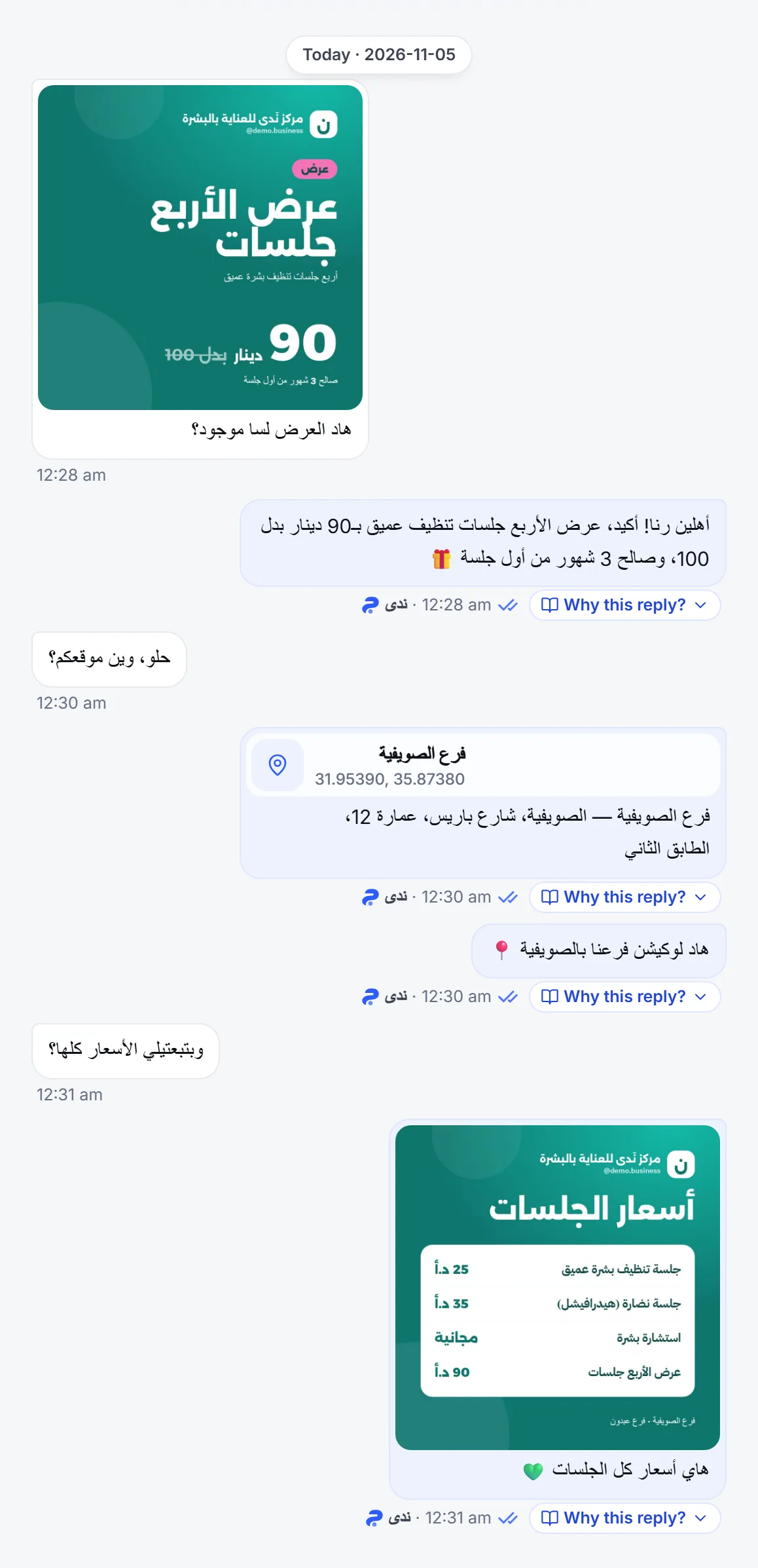
Section titled “How does the agent reply to customers on WhatsApp?”Mostly with text messages, and it can send whatever media of yours fits the question.
- Text: an answer from your knowledge base and your business details.
- Photos: it sends an image from your media library when it fits the question, such as a price list. See Images in chat.
- Voice notes: when the customer sends a voice note and you have picked a voice for the agent, it answers with a voice note; without a chosen voice it answers in text. See Voice messages.
- Branch location: when a customer asks where a branch is, the agent sends its location on the map.
What happens if I reply from my phone myself?
Section titled “What happens if I reply from my phone myself?”The agent stops replying in that conversation, because your reply means someone on your team has taken it over. Other conversations are not affected.
- Your reply shows in the inbox just as it does on your phone.
- When does the agent come back to that conversation? See Your reply pauses the agent and Agent auto-resume.
Is there a 24-hour window on WhatsApp?
Section titled “Is there a 24-hour window on WhatsApp?”No. The 24-hour window is a Meta rule for Messenger, Instagram and WhatsApp’s official platform; Mujib joins your number as a linked device, so it does not limit replies on WhatsApp.
- The agent and your team can answer a customer whenever they write, however long since their last message.
- Appointment reminders reach the customer on WhatsApp however long since their last message. See Appointment reminders.
- Campaigns are available on WhatsApp only. See Campaigns.
What are the agent’s limits on WhatsApp?
Section titled “What are the agent’s limits on WhatsApp?”The agent works in one-to-one chats with your customers only. These are the main limits:
- Groups: messages in WhatsApp groups never reach the inbox, and the agent does not answer them. The same goes for status updates, broadcast lists and channels.
- Calls: the agent does not answer voice or video calls; they stay with you on your phone.
- Videos and files: the agent answers only the text sent with them.
- Delete for everyone: from the inbox you can delete a message Mujib sent, for the customer too, within 47 hours of sending it. If the customer deletes their own message, it shows as deleted in the inbox as well. See Download and delete media.
How do I turn the agent off on one WhatsApp number?
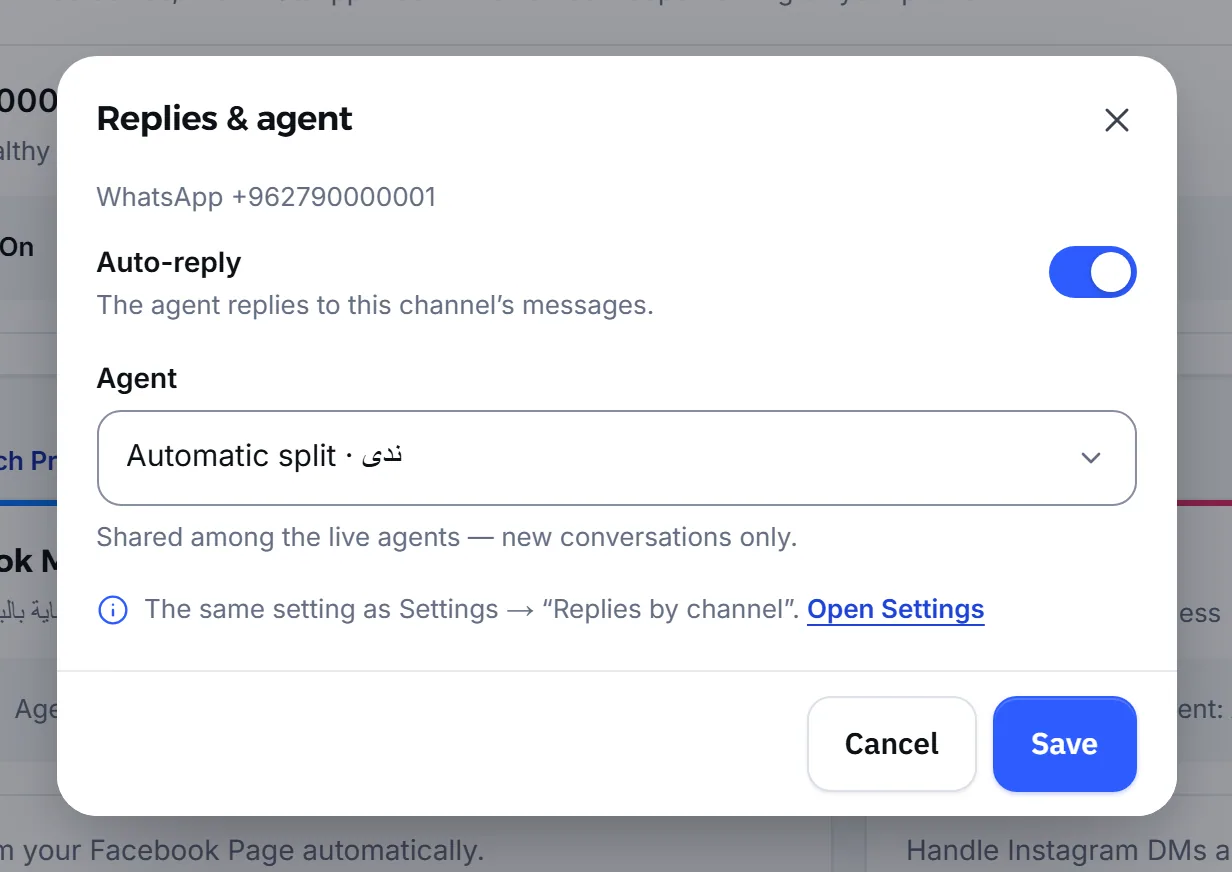
Section titled “How do I turn the agent off on one WhatsApp number?”Each connected number has a Replies & agent strip on the Channels page, and that is where you stop replies on that number alone.
- Open Channels and find the number in the WhatsApp numbers card.
- In the Replies & agent strip, press Edit.
- Turn Auto-reply off, then press Save.
- Confirm with Turn off.
From then on, that number’s messages go to Inbox and your team answers them; other numbers and channels stay as they are. The same strip lets you pick which Agent answers the number when you have more than one.
Frequently asked questions
Does the agent work with the WhatsApp Business app?
Yes. A WhatsApp Business app number and a regular WhatsApp number link the same way, from Linked devices in the app, and you do not need a new number.
Does the agent answer in WhatsApp groups?
No. Group messages never reach the inbox and the agent does not answer them, and the same goes for status updates, broadcast lists and channels. The agent works in one-to-one chats only.
Does the agent understand WhatsApp voice notes?
Yes. A voice note is turned into text you can read in the inbox, and the agent answers what the customer said. It can also answer with a voice note once you pick a voice for it.
Is there a 24-hour window on WhatsApp in Mujib?
No. Mujib links to your number as a linked device, so the agent and your team can reply whenever the customer writes, and appointment reminders go out however long ago the customer last wrote.
Does the agent answer calls?
No. The agent handles messages only; voice and video calls stay with you on your phone.