
AI agent resume after a staff reply or a handoff
AI agent resume means a conversation where the agent stopped goes back to it by itself after a full quiet period you choose, and the agent answers the customer’s next message. The agent stops when it hands a conversation off or your team replies; without this option, the conversation stays with your team.
You turn the option on and pick its period in Agent Studio. It applies to every conversation in your business and to all your agents.
When does the agent return to a conversation by itself?
Section titled “When does the agent return to a conversation by itself?”When the period you chose passes in full with no message in the conversation. The period counts from the last message, not from the moment of the handoff.
- Every message resets the clock: a message from the customer or a reply from your team starts the period again. That is why the agent never cuts into a conversation your team is still handling.
- Timing: the agent returns at most 15 minutes after the period ends, not to the second.
- After it returns: the agent sends nothing. It stays silent until the customer writes, then answers the new message.
- The waiting list: when the conversation was in the Needs human list, it leaves it when the agent returns.
- An appointment reminder: when a reminder goes out in a conversation someone on your team answered, and nobody on your team has written there for 12 hours, the agent returns before the period ends so it can answer the customer’s reply. This never happens in a conversation still waiting for a person after a handoff.
An example: the agent handed Sara’s conversation to a team member, who answered her and the exchange ended. With a one-day period, if Sara writes two days later about a new appointment, the agent answers her right away.
How do I turn on AI agent resume and choose the period?
Section titled “How do I turn on AI agent resume and choose the period?”In the Agent behavior section of Agent Studio. This setting is for the owner and admins only.
- Open Agent Studio. On a phone, choose the Behavior segment.
- On the Agent resumes automatically after a handoff card, turn the switch on. The period becomes 24 hours.
- To change the period, open the card and pick one under Resumes after silence of: 6 hours, 12 hours, one day, 2 days, 3 days and 7 days.
- Your choice saves right away, and its summary shows on the card.
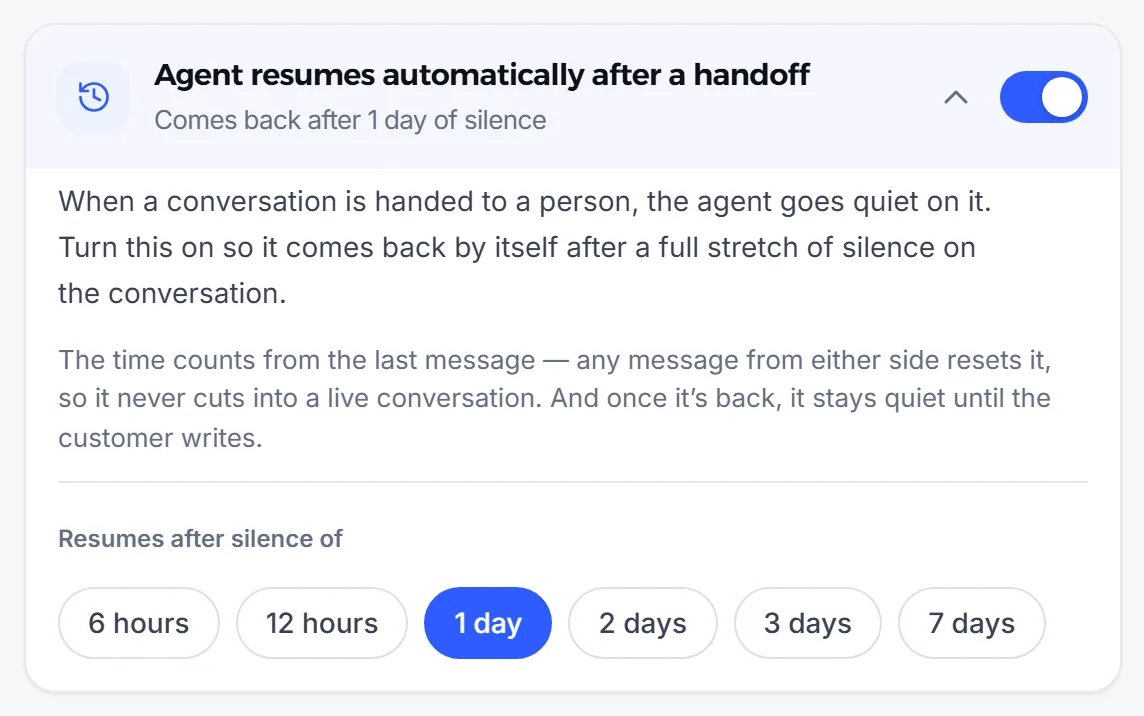
When you switch it off, the card reads Off — a handed-over conversation stays with your team: every handed-off conversation stays with your team until you hand it back.
When does the agent not return by itself?
Section titled “When does the agent not return by itself?”The agent never returns by itself to a conversation where you switched it off. It returns only when it stopped because of a handoff or a reply from your team.
| Why the agent stopped in the conversation | Does it return by itself after the period? |
|---|---|
| The agent handed the conversation to a person | Yes |
| Someone on your team replied from the Mujib dashboard or the business phone | Yes |
| Someone on your team switched off Agent replies here in the conversation | No |
| You started the conversation with the customer from the business phone | No |
| The spam detector paused the conversation | No; it has its own way back |
And the agent returns to no conversation at all while:
- the master switch is off in Agent Studio;
- Auto-reply is off on the conversation’s channel;
- the conversation is closed.
When you turn the master switch or the channel back on, the agent returns to every conversation it stopped in because of a handoff or a reply and that has been quiet for the full period, even if the quiet began while it was off. See Turn the agent off and on, and for spam see Spam.
How do I hand a conversation back before the period ends?
Section titled “How do I hand a conversation back before the period ends?”With one button in the conversation itself, no waiting.
- Open the conversation in Inbox.
- Press Hand back to the agent, or switch on Agent replies here.
- The agent answers the customer’s next message. It does not answer messages that arrived before.
This also brings the agent back to a conversation where you switched it off yourself, and it is the only way to do that.
What period suits my business?
Section titled “What period suits my business?”Choose a period longer than your team usually needs to finish a conversation with a customer.
- A short period: suits a business where the team answers quickly and the exchange ends, such as confirming an order or an appointment.
- A day or more: suits follow-ups where the customer comes back hours later, such as a consultation or a quote that needs thought.
Either way, the clock protects a live conversation: as long as someone is writing in it, the agent does not return.
Frequently asked questions
Does the agent send the customer a message when it resumes?
No. It stays silent and only replies when the customer writes a new message.
Can the agent cut in on a team member who is still replying?
No. The period counts from the last message in the conversation, and every message from the customer or your team starts it again.
I switched the agent off for one customer. Will it come back after the period?
No. Switching the agent off in a conversation is your decision, so automatic resume never undoes it. It comes back when you switch it on there.
Can I hand the conversation back before the period ends?
Yes. Press the hand-back button in the conversation itself, and the agent answers the customer's next message right away.
Who can change this setting?
The owner and admins only. The rest of the team can see the setting but cannot change it.