
Mujib agency partner program, how your agency manages client plans
The Mujib agency partner program lets a marketing or tech-solutions agency add its clients’ businesses to Mujib from the Agency panel, set each client’s plan and price, follow their subscription and usage, and earn the difference between its price and the wholesale price. A workspace owner joins by applying, and the Mujib team reviews the application.
There are no figures on this page: prices and their limits show to the agency owner inside the panel, and public prices are on the pricing page.
Who can become a partner agency?
Section titled “Who can become a partner agency?”The owner of a Mujib workspace. They apply from their own account, and the Mujib team reviews the application before the agency panel is turned on.
- Your current workspace stays as it is, and the agency panel is added to the same account.
- One account has one agency, and one workspace has one agency.
- A workspace that another agency manages cannot apply to be an agency.
- If you are not the owner, Mujib asks you to talk to the workspace owner.
How do I apply to become an agency?
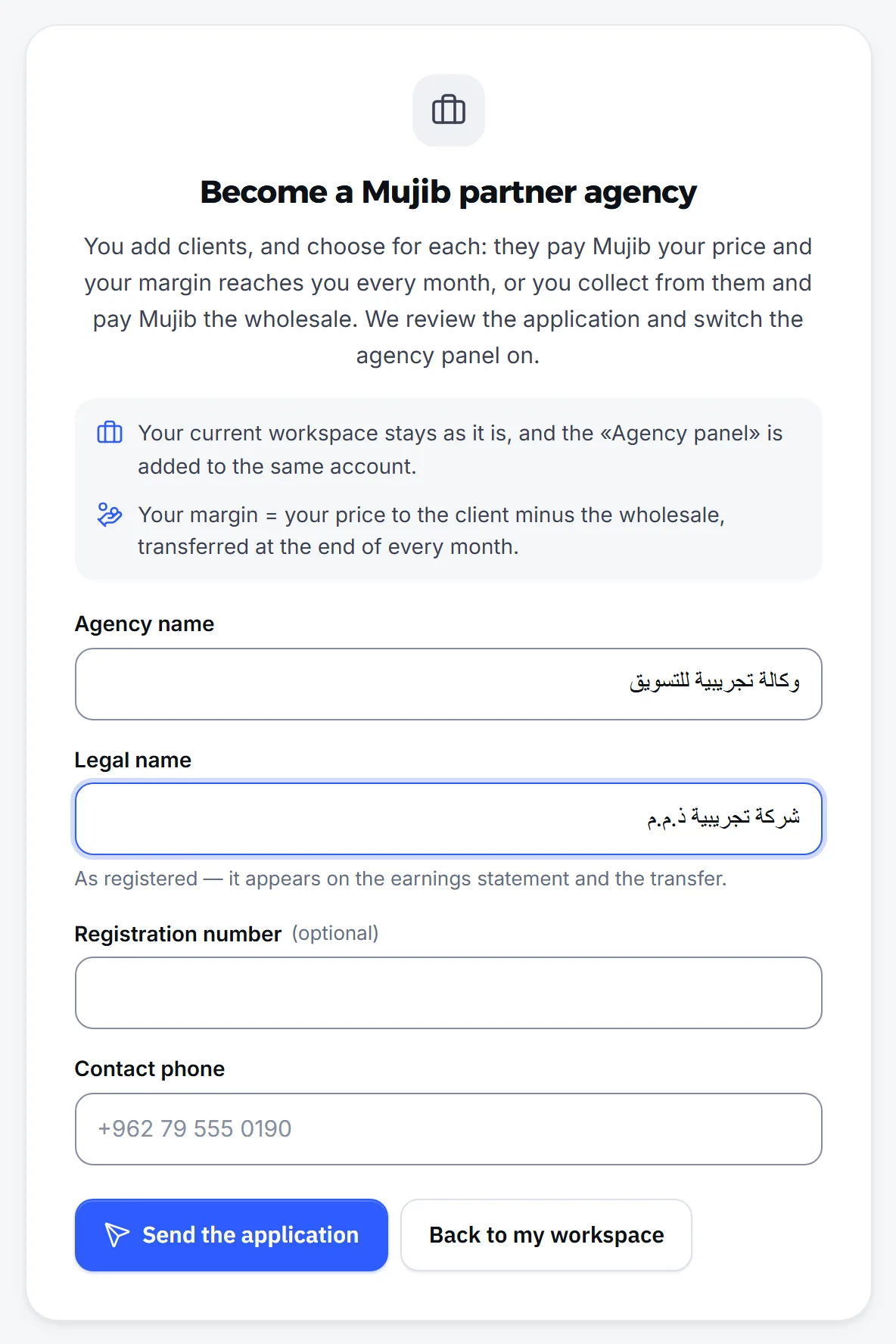
Section titled “How do I apply to become an agency?”Open the agency panel while signed in with the owner’s account, and the application form appears.
- Open
https://app.mujib.ai/agency. - Fill in Agency name as your clients know it, Legal name as registered, Registration number if you have one, and Contact phone.
- Press Send the application.
- You see Your application is under review until the Mujib team accepts the application. After that, a switcher appears in your dashboard to move to the Agency panel.
How do I add a client to my agency?
Section titled “How do I add a client to my agency?”From Clients, press Add client and go through four steps: Business, Owner, Plan and price and Review and add.
- Business: type its name and answer What does the business do?. This sets the sections of its dashboard, such as appointments, orders or subscriptions, and the business owner can change them later in settings.
- Owner: type their name, email and phone. That email must not already have a Mujib account, because the client is added as a new workspace.
- Plan and price: choose the plan, type your price for the client within the limits shown, choose who collects payment, and how the client starts: with a free trial or a Direct subscription.
- Review: confirm that the business owner agrees to your agency managing their account, then press Add the client and send the invite.
The client gets a full Mujib workspace within the plan’s limits, and its owner receives an email invite to choose their own password, which you never see and never need. The business owner then sets up their dashboard: connecting WhatsApp, adding the knowledge base and opening hours.
Who collects payment from my client?
Section titled “Who collects payment from my client?”You choose that for each client when you add them, under Who collects from the client?, and there are two options:
| Option | How it works |
|---|---|
| The client pays Mujib | Your client pays Mujib your price, and Mujib transfers your earnings to you every month. Nothing to collect yourself |
| You collect from your client | You collect from your client and pay Mujib the wholesale price within a set deadline, or the subscription stops |
- Collecting yourself is open to the agency owner only; clients added by team members pay Mujib.
- Payments to Mujib are made by CliQ transfer and confirmed by the Mujib team. If the client’s page does not show the transfer details, contact the Mujib team and they will send them to you.
- On their subscription page, your client sees their price and your agency’s name, and never the wholesale price or your earnings.
What does each client status mean?
Section titled “What does each client status mean?”Each client shows its subscription status, so you know who needs a follow-up.
| Status | What it means |
|---|---|
| Trial | In the free trial |
| Awaiting payment | Waiting for the first payment |
| Paid | The subscription is paid and active |
| In grace | The renewal is due and the payment has not arrived yet; the agent keeps answering during the grace period |
| Out of allowance | Its allowance or its payment grace ran out, so new customers go to its team |
| Paused | You paused it, and the agent does not answer its customers |
| Ended | You stopped managing it |
Each client’s page shows its plan and usage and whether its owner accepted the invite, and you can resend the invite. The agency does not open the client’s dashboard or read its customers’ conversations.
How do I pause a client or stop managing them?
Section titled “How do I pause a client or stop managing them?”On the client’s page, in the Pause or end section:
- Pause subscription: the agent stops answering the client’s customers until you bring it back with Resume subscription. Nothing is deleted.
- Stop managing: your earnings from the client stop and it leaves your active clients, while its dashboard and data stay with the business owner as they are. Only the agency owner can do this.
The business owner does not end the relationship from their own dashboard; they ask their agency to change the plan or stop the subscription, or contact the Mujib team if they have a problem with the agency.
When and how are agency earnings paid?
Section titled “When and how are agency earnings paid?”Mujib works out each month’s earnings once the month is over and transfers them to a CliQ or bank account in the agency’s name, and counts only payments the Mujib team has confirmed.
- Open Settings, then Payout.
- Choose the method, CliQ or Bank transfer, and enter the details of an account in the agency’s name; Mujib does not transfer to anyone else’s name.
- Follow your earnings in Earnings: each month’s earnings, what was Clawed back because a payment was refunded, and the transfer’s status.
- When a month’s earnings are below the minimum transfer, they show as Added to the next transfer.
- If you have not entered payout details, your earnings stay saved until you add them.
- The earnings, prices and settings pages are for the agency owner only.
Who on the agency team sees what?
Section titled “Who on the agency team sees what?”The agency team has two roles: the Owner sees everything, and a Member works on clients without prices or earnings.
- Owner: clients and their prices, earnings and payouts, and the team.
- Member: sees, adds and pauses clients, and does not see prices, earnings or payout details.
- Add a member from Settings, then Team, then Add member. Clients added by a member you remove stay as they are.
In Marketing kit you find ready-made videos, images and captions that introduce Mujib to your clients, to share under your agency’s name, without prices.
Frequently asked questions
Does my own workspace stay the same if I become an agency?
Yes. Your current workspace stays as it is, and the agency panel is added to the same account; you move between them with a switcher in the dashboard.
Can an agency read its clients' conversations?
No. The agency sees each client's subscription, status and usage, while the client's dashboard and customer conversations stay with the business owner.
Can I add a business that already has a Mujib account?
No. A client is added as a new business with its owner's email, and that email must not already have a Mujib account.
Who sets my client's subscription price?
The price is set when the client is added, within limits shown in the form, and changing it later is up to the agency owner. Your client sees their own price and your agency's name only.
What happens to a client's data if I stop managing them?
Their dashboard and data stay with the business owner as they are, and nothing is deleted. Only your earnings from them stop.