
Auto reply not working: why the AI agent is not replying
When auto reply is not working, the agent is switched off at one of its three levels, the conversation is with your team, or the message never reached it. Open the conversation itself in Inbox: its tag points to the cause in most cases. Then work through the checklist in order.
Where do I start looking for the cause?
Section titled “Where do I start looking for the cause?”Start with the conversation the agent did not answer, then the master switch card in Agent Studio. What you see there leads straight to the right item:
| What you see | Cause | What to do |
|---|---|---|
| The master switch card reads Agent is paused | The agent is off on every channel | Turn the master switch on |
| The line Auto-reply is off on this channel in the conversation | Auto reply is off on this channel | Turn Auto-reply on for the channel |
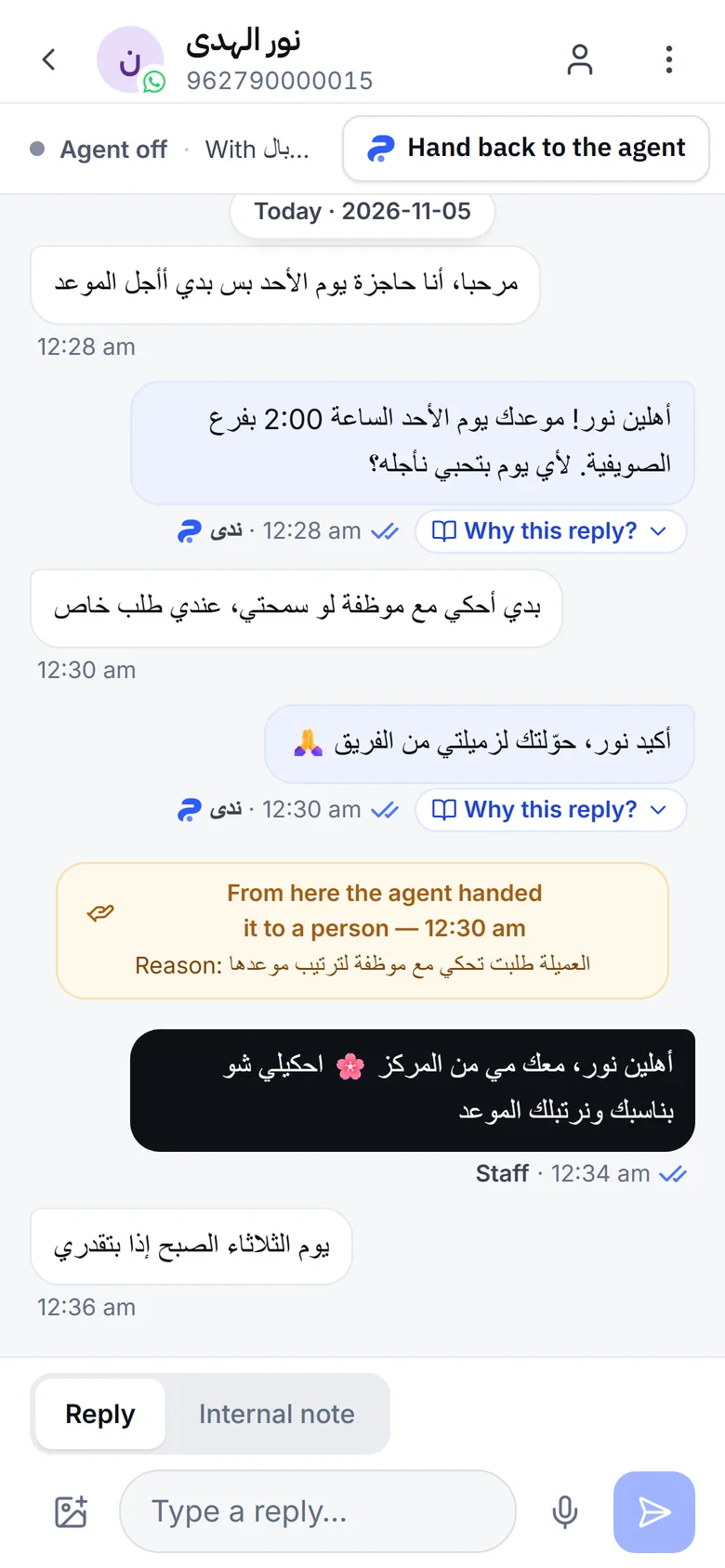
| An Agent off tag on the conversation | The agent is off in this conversation only | Switch Agent replies here on, or press Hand back to the agent on a phone |
| A Needs human tag and a From here the agent handed it to a person line | The agent handed the conversation to your team | Reply to the customer, then hand it back |
| An Out of allowance tag | A new customer after the conversation allowance ran out | Your team replies |
| A Possible spam tag | The spam detector paused the conversation | Review it, and press Not spam — resume the agent if it is not spam |
| A WhatsApp disconnected banner at the top | A WhatsApp number is not linked | Reconnect it |
| The conversation is not in the inbox | The message never reached Mujib | See Not receiving messages |
Why is the agent not replying? The checklist, in order
Section titled “Why is the agent not replying? The checklist, in order”Check the items in this order; the first ones have the widest effect and are the quickest to check:
- The master switch is off: if the card in Agent Studio reads Agent is paused, no agent replies on any channel. Press Master switch — all agents and confirm. Only the owner and admins can. Details in Turn auto reply off and on.
- Auto reply is off on the channel: the master switch card lists the channels where replies are off. Open Settings, then Replies per channel, and turn Auto-reply on in the channel’s row.
- Someone on your team replied in the conversation: any reply from the Mujib dashboard, from WhatsApp on the business phone, or from your Page inbox pauses the agent in that conversation so the two never answer at once. Bring it back with the Agent replies here switch, or Hand back to the agent on a phone, or let it return by itself if you turned on Agent auto-resume. See Your reply pauses the agent.
- The agent handed the conversation to a person: it stays paused there until you hand it back, or until it returns by itself if you turned on Agent auto-resume. The reason is written under the handoff line, and explained in Why the agent handed off.
- You paused it in the conversation yourself: if someone on your team switched off Agent replies here, or you started the conversation from your phone, the agent will not return to it by itself. Switch it on in the conversation.
- The conversation allowance ran out: once your subscription’s conversations are used, or your trial ends, the agent does not take new customers. Each new customer’s conversation is marked Out of allowance, your team is notified to reply, and the customer gets one message saying theirs arrived. The agent carries on with conversations already in progress until their session ends; a session is one customer within 24 hours. You see your allowance in Billing, where When the conversations run out lets you edit or switch off the customer message. See Billing.
- The spam detector paused the conversation: it stops replies in a conversation that looks like spam, without telling the other side. If it is a real customer, press Not spam — resume the agent. See Spam messages.
- The channel is not linked: if you see WhatsApp disconnected, the agent is not receiving WhatsApp messages at all; see WhatsApp disconnected. On Messenger and Instagram, if the card says Connected — with an issue, read the cause written on it.
- 24 hours have passed since the customer’s last message on Messenger or Instagram: Meta accepts no message from your Page after that. This rarely touches the agent’s replies, because the agent answers moments after the customer writes, but it shows when a reply or a reminder goes out late, and the card then shows Connected — with an issue with a cause that says so. There is nothing to do: the agent replies again as soon as the customer writes. See The 24-hour window.
- You are testing from your team’s number: Mujib treats messages from a number saved in Branches as Branch WhatsApp number or Manager phone as coming from your team, so the agent does not answer them. And what you send from the phone that holds the business number counts as a reply from your team, not a customer message. Test from another phone.
- A message the agent cannot read: a sticker, or a video or file with no text. The agent does not answer it, and your team is notified to reply. If a voice message is unclear, the agent asks the customer to type it; see Voice messages.
How do I check that the agent is replying again?
Section titled “How do I check that the agent is replying again?”Message your number or Page the way any customer would, from an account that is not your team’s.
- From another phone, not the business phone and not a number saved for a branch, send a question you know your knowledge answers.
- Open the conversation in Inbox and wait for the agent’s reply. It appears within moments.
- If it does not, look at the conversation’s tag and go back to the table at the top of this page.
If the agent replies but the answer is wrong or incomplete, the problem is the knowledge, not the switches: see AI agent wrong answer.
When should I contact the Mujib team?
Section titled “When should I contact the Mujib team?”Contact us when you have been through every item: the agent is on, the channel is linked, the conversation has no pause tag, and it still did not answer a new message.
- Write to
abdalrahman@mujib.ai, or use Report a problem in your account menu. - Include the channel, the customer’s number or name, and when the unanswered message arrived.
Frequently asked questions
Why does the agent reply to some customers and not others?
Because the cause sits in that conversation, not in the whole agent. Open the customer's conversation and look at its tag, such as “Agent off”, “Needs human” or “Possible spam”.
Does the agent answer messages that arrived while it was off?
No. When it is back, it answers the customer's next message only. Reply yourself to whatever came in before.
I test the agent from my phone and it does not reply. Why?
If you message the number from the business phone itself, or from a number saved for one of your branches in “Branches”, the agent will not reply. Test from another phone.
Does the whole agent stop when the conversation allowance runs out?
No. It finishes the conversations already in progress, but it does not take new customers. A new customer's conversation is marked “Out of allowance” and your team is notified to reply.
Who can turn the agent back on?
The master switch belongs to the owner and admins. Handing a single conversation back to the agent is open to anyone allowed to reply in the inbox.