
Mujib for a nutrition center: answers, subscriptions and visits
Mujib helps a nutrition center answer its customers on WhatsApp, Messenger and Instagram: the agent explains your programmes, quotes plan prices and offers exactly as you recorded them, and books measurement and follow-up visits at the nearest branch. Your team records subscriptions in the dashboard, and sensitive health cases go straight to it.
This guide fits nutrition and diet centers, and any business that sells subscriptions for a set period with regular visits, whether it has one branch or several.
How do I set Mujib up for a nutrition center, step by step?
Section titled “How do I set Mujib up for a nutrition center, step by step?”Setup takes eight steps, most of them done once:
- Business model: in the setup wizard, choose subscriptions and visits as the way your center works. You can change it later in Settings → Your business & modules by choosing Subscriptions. This adds Calendar and Subscriptions to the dashboard.
- Branches and areas: in Branches, add each branch with its hours, and list the neighbourhoods it serves in Areas served, so the agent sends each customer to the nearest branch.
- Dietitians: add each specialist to their branch with Add specialist, then record each one’s Gender in Settings → Team roster, since many customers ask for a female specialist.
- Visit types: in Settings → Visit types, name your visits, such as “First consultation”, “Measurement” and “Follow-up”, with the length of each. Keep Ask: subscribed / not subscribed? on for the sales visit and turn it off for follow-ups.
- Plans: in Settings → Plans & prices, press Add plan for each plan with its name, term, visits and price, and choose who it is for: Everyone, New customer or Renewal.
- Offers: in the same section, under Offers & discounts, press Add offer and set its start day, last day and the offer price for each plan it covers.
- Center knowledge: in Knowledge, add your programmes with the Program type, your freeze and cancellation policy with the Policy type, and your customers’ repeated questions.
- Alerts and channel: set the Notification WhatsApp number in Settings → Notifications, then connect WhatsApp.
The Plans & prices section appears only while the Subscriptions module is on. Only the account owner edits plans and prices.
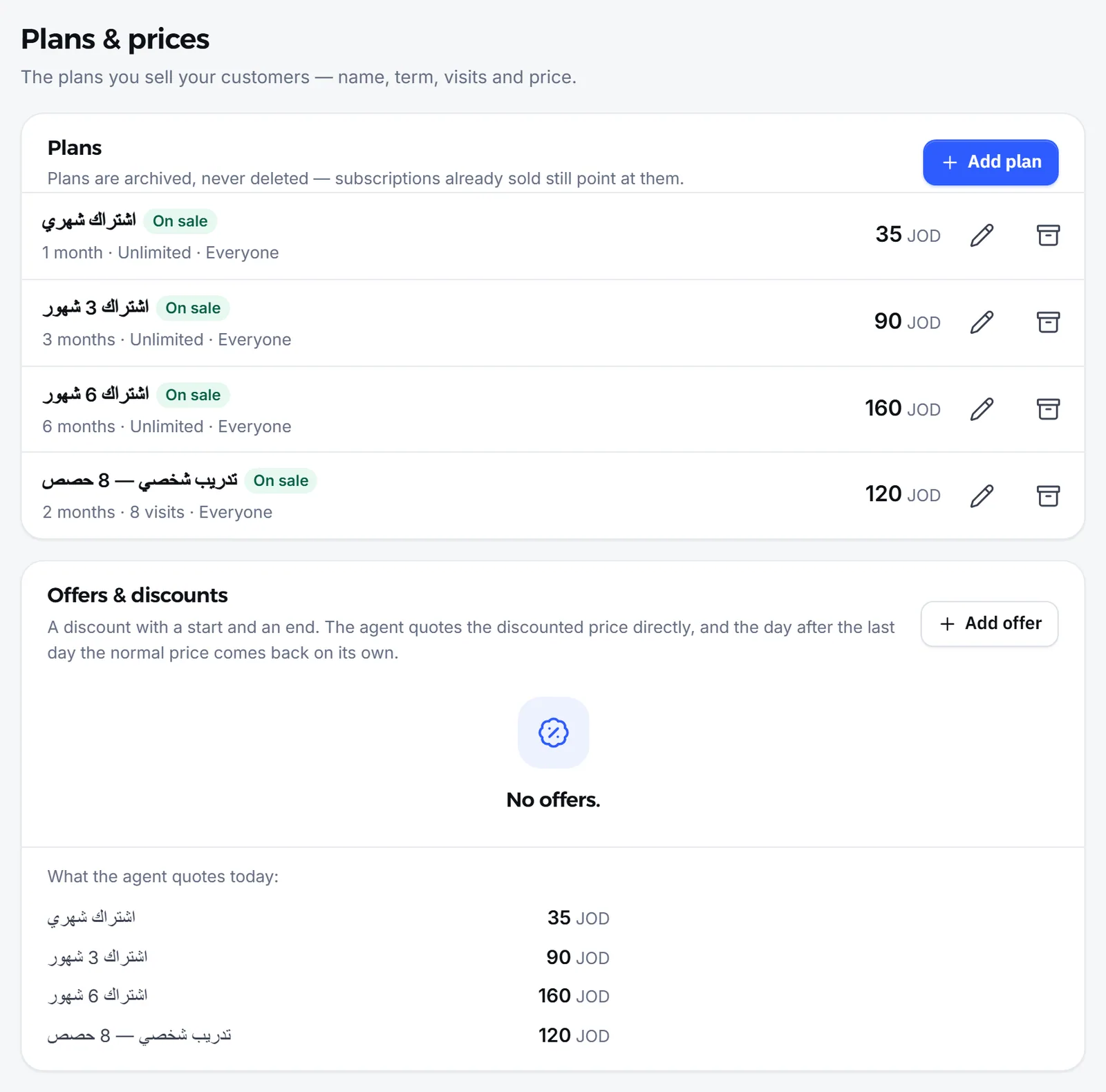
Where does the agent get plan prices and offers from?
Section titled “Where does the agent get plan prices and offers from?”The agent reads them from the Plans & prices section itself, at today’s price, so it never works out a discount or a price on its own.
- During an offer: A discount with a start and an end. The agent quotes the discounted price directly, and the day after the last day the normal price comes back on its own.
- Before you save: the section shows, under What the agent quotes today:, the prices the agent quotes to customers today.
- New customers and renewals: when you price plans differently for new customers and for renewals, the agent quotes a renewal price only to someone who says they subscribed with you before, or who has a subscription recorded in Mujib. Otherwise it asks whether they have subscribed before.
- Archived plans: the agent does not sell them, and subscriptions already sold on them stay as they are.
Can the agent see a customer’s subscription?
Section titled “Can the agent see a customer’s subscription?”No. The agent sees none of a customer’s subscription details: not the visits left, the end date, a freeze, or what they paid or owe.
- When a customer asks “How many visits do I have left?” or “When does my subscription end?”, the agent hands the question to your team. It does not ask for the customer’s number to check, and does not promise to check. In no-handoff mode it says their subscription details do not show in the chat and points them to the branch reception or its number.
- The agent knows only what concerns booking: the customer’s upcoming appointments, their last visit, and whether they have subscribed with you before.
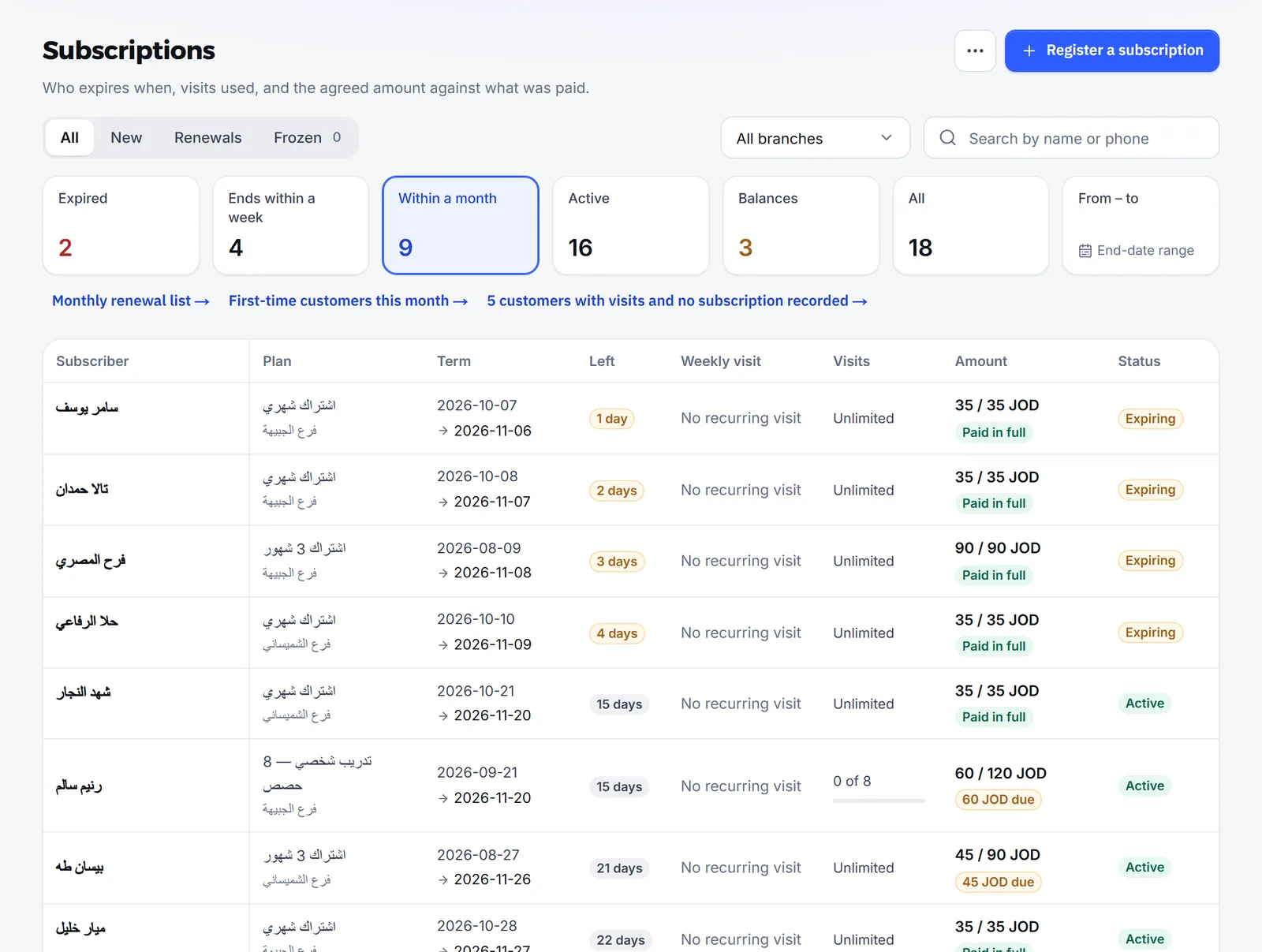
Your team sees everything in Subscriptions: Who expires when, visits used, and the agreed amount against what was paid.
How does the agent handle health conditions at a nutrition center?
Section titled “How does the agent handle health conditions at a nutrition center?”Mujib hands the conversation to your team before the agent replies when a customer mentions pregnancy or breastfeeding, a chronic illness, an eating disorder or an emergency, or when the conversation is about a child.
- The agent prescribes no diet for a health condition, recommends no supplements or medicines, and never judges a programme safe for a customer’s condition.
- In no-handoff mode the agent does not hand over, but it still gives no medical advice: it shows care, suggests a consultation with the specialist at the branch and books it, and in an emergency tells the customer to call emergency services at once.
How does your team follow subscriptions and visits?
Section titled “How does your team follow subscriptions and visits?”Your team records subscriptions in Subscriptions, follows visits on Calendar, and measures results in Reports.
- After the sales visit, staff record whether the customer came and the outcome: subscribed or not. See Appointment attendance.
- When the customer subscribes, staff press Register a subscription and pick the plan, and the subscription appears with its end date, visits and balance.
- In Settings → Branch alerts, you can turn on the Daily subscriptions summary for each branch; it stays off until you turn it on.
See Subscription renewal and Reports.
How does the agent send customers to the nearest branch?
Section titled “How does the agent send customers to the nearest branch?”The agent finds the nearest branch from the areas you listed under Areas served for each branch: the customer names their neighbourhood, and the agent sends the nearest branch’s location and hours.
- When the agent is not sure of the area, it asks the customer instead of guessing.
- The agent never books at a branch the customer has not confirmed.
- When the branch has a Google Maps link or coordinates, the agent sends its location on the map.
See How booking works.
Frequently asked questions
Can the agent see a customer's subscription or visits left?
No. The agent sees no customer's subscription details. When a customer asks about theirs, it hands the question to your team and never asks for their number to check.
Does the agent give diet plans or medical advice?
No. It prescribes no diet for a health condition, no supplements and no medicines, and it hands health cases to your team.
Where does the agent get plan prices from?
From the plans and prices section in Settings, at today's price. During an offer it quotes the offer price, and after the offer's last day the normal price returns.
Does the agent know the branch nearest to a customer?
Yes, once you list the areas each branch serves. The customer names their area and the agent sends the nearest branch's location; when it is unsure, it asks.
Does the agent quote renewal prices to new customers?
No. It quotes a renewal price only to someone who says they subscribed with you before or has a recorded subscription; otherwise it asks whether they have.