
Mujib for a training academy: course questions on WhatsApp
For a training academy, Mujib answers students and parents on WhatsApp, Messenger and Instagram: the agent explains your courses, their dates, fees and format from your own information, sends photos of your center, and hands enrolment and special discounts to your team.
The questions in this kind of business repeat endlessly: When does the course start? Is it in person or online? How much is it? What age is it for? The agent answers them in seconds, at any hour, and leaves your team whatever needs a decision.
How do I set Mujib up for my academy, step by step?
Section titled “How do I set Mujib up for my academy, step by step?”Setup takes six steps:
- Business model: in the setup wizard, choose questions and inquiries if your customers ask and then enrol with your team. If you book them appointments, such as a placement test or a trial class, choose appointments instead. You can switch later in Settings → Your business & modules between Inquiries only and Bookings and appointments.
- Courses: in Knowledge, press Add entry and add each course with the Program type: its start date, length and days, its fee, the right age or level, whether it is in person or online, and whether it comes with a certificate.
- Files: if you have a course guide as a PDF or a timetable in Excel, upload it to the knowledge base so the agent can read from it. See Upload PDF files.
- Policies: with the Policy type, add your enrolment, withdrawal and refund terms, and the enrolment steps the agent should explain.
- Photos: upload photos of your classrooms and activities to Media, and check that Sends images from your media is on in the Voice & images section of the agent’s settings.
- Handoff and channel: write your own handoff cases, as in the section below, then connect WhatsApp or Instagram and Messenger.
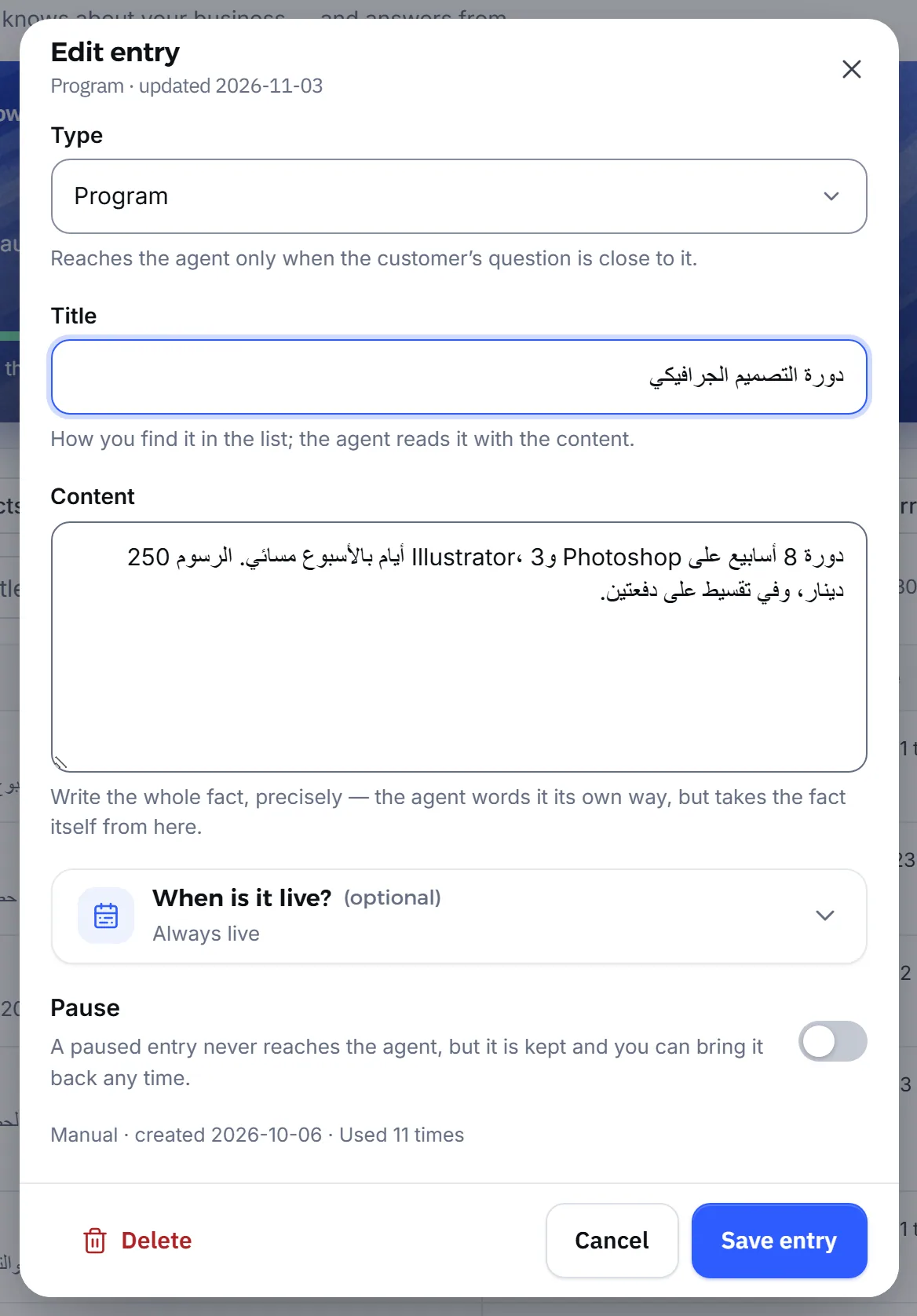
How do I make the agent know my courses and dates accurately?
Section titled “How do I make the agent know my courses and dates accurately?”The agent knows only what you wrote in the knowledge base, so give each course its own clear entry, and update it whenever the dates or fee change.
- One entry per course: the agent answers more precisely when two courses are not mixed in one entry.
- Time-bound intakes: when an intake starts on a set date, give its entry a Starts and a Last day date, and the agent does not mention that intake outside that period.
- What is not written: asked about a sibling discount that is not in your knowledge, the agent says it has no information about it, never that there is none.
When the agent gets an answer wrong, add an entry of the Correction type with the right answer, and the agent puts it ahead of the others. See Correct AI answers.
Does the agent enrol students in courses?
Section titled “Does the agent enrol students in courses?”No. The agent explains the enrolment steps from your knowledge, then hands the conversation to your team to confirm the place and take the fee; the agent never takes any payment.
- Open Agent Studio and press Edit on the agent’s card.
- In the Handoff to your team section, write your cases in When it hands off to staff, for example: “Hand off when the customer wants to enrol a student in a course” and “Hand off when they ask for a special discount”.
- Press Save.
The agent also tracks each customer’s stage from the conversation itself, so Leads shows you who asked and who became interested in enrolling. See Lead qualification.
What happens when a parent writes about their child?
Section titled “What happens when a parent writes about their child?”Mujib hands the conversation to your team before the agent replies when a parent mentions their child’s health, diet or medicine.
- A message that mentions a child may go to your team even with nothing about health in it, unless your Industry field makes clear that your business is not a health one, such as a school or a kindergarten.
- Emergencies go to your team too, as does every case you write in your handoff cases.
So an academy that teaches children needs someone to follow up the handed-off conversations. If you have no team to answer, read about no-handoff mode in Human handoff.
How do I announce a new course?
Section titled “How do I announce a new course?”Announce it with a campaign from Broadcast using New campaign, after you add the course to your knowledge, so the agent can answer whoever replies to the campaign.
- Write the course into the knowledge base first, then send the campaign.
- When you post the course on Facebook or Instagram, the agent can answer questions in the comments with a private message. See Comment auto reply.
- The agent answers in Arabic or English according to the language of each message; you set this in Tone, dialect and language.
See Campaigns.
Frequently asked questions
Does the agent enrol students in courses?
Not by itself. It explains the enrolment steps you wrote in your knowledge, then hands the conversation to your team to confirm the place.
Does the agent send photos or files about the courses?
It sends photos from your media library when sending them is on. Files you upload to the knowledge base it reads to answer, but never sends to the customer.
Does the agent answer in Arabic and English?
Yes. By default it replies in the language the student or parent wrote in, and you can make it keep to one language.
How do I announce a new course?
With a campaign from the Broadcast page. Add the course to your knowledge first, so the agent can answer whoever replies to the campaign.
What if enrolment for a course has closed?
Edit the course's knowledge entry or set its last day, and the agent stops mentioning the course after that day.