
Lead qualification in Mujib, with automatic scores and stages
Lead qualification in Mujib happens on the Leads page: it gathers everyone who messages you on WhatsApp, Messenger and Instagram, plus the contacts you add yourself. Mujib scores each lead automatically from how they engage and places them in a pipeline stage, so you see who is ready to buy and who needs a follow-up, without typing anything.
How do leads get onto the list?
Section titled “How do leads get onto the list?”By themselves: everyone who messages your business on a connected channel is saved as a contact, with their source, the channel they came from.
- For a customer who called or visited, press New contact and enter the Name and Phone. They receive no message.
- A branch account sees its branch’s leads, plus the leads not assigned to any branch.
- Accounts that may view customers see the page; editing needs the permission to manage them.
How is a lead’s score calculated?
Section titled “How is a lead’s score calculated?”The score comes from the customer’s own behaviour and updates with every message they send. Fully automatic and rule-based — no AI, no credit used.
It adds up four parts, as the page explains under How is this score calculated?:
- Engagement (up to 30): the more the customer writes, the higher the score — with diminishing returns.
- Recency (up to 30): today 30 · within 3 days 24 · a week 17 · two weeks 10 · a month 4.
- Outcome (−30 to +25): order +25 · appointment +22 · inquiry +12 · not interested / spam negative.
- Contactability (up to 15): has a phone +9 · has a name +6.
Mujib then puts the lead in a band by its score:
| Band | Score range |
|---|---|
| Cold | score 0–30 |
| Warm | score 31–60 |
| Hot | score 61+ |
To refresh every score now, open the extra menu at the top of the page and press Recompute scores.
What does each pipeline stage mean?
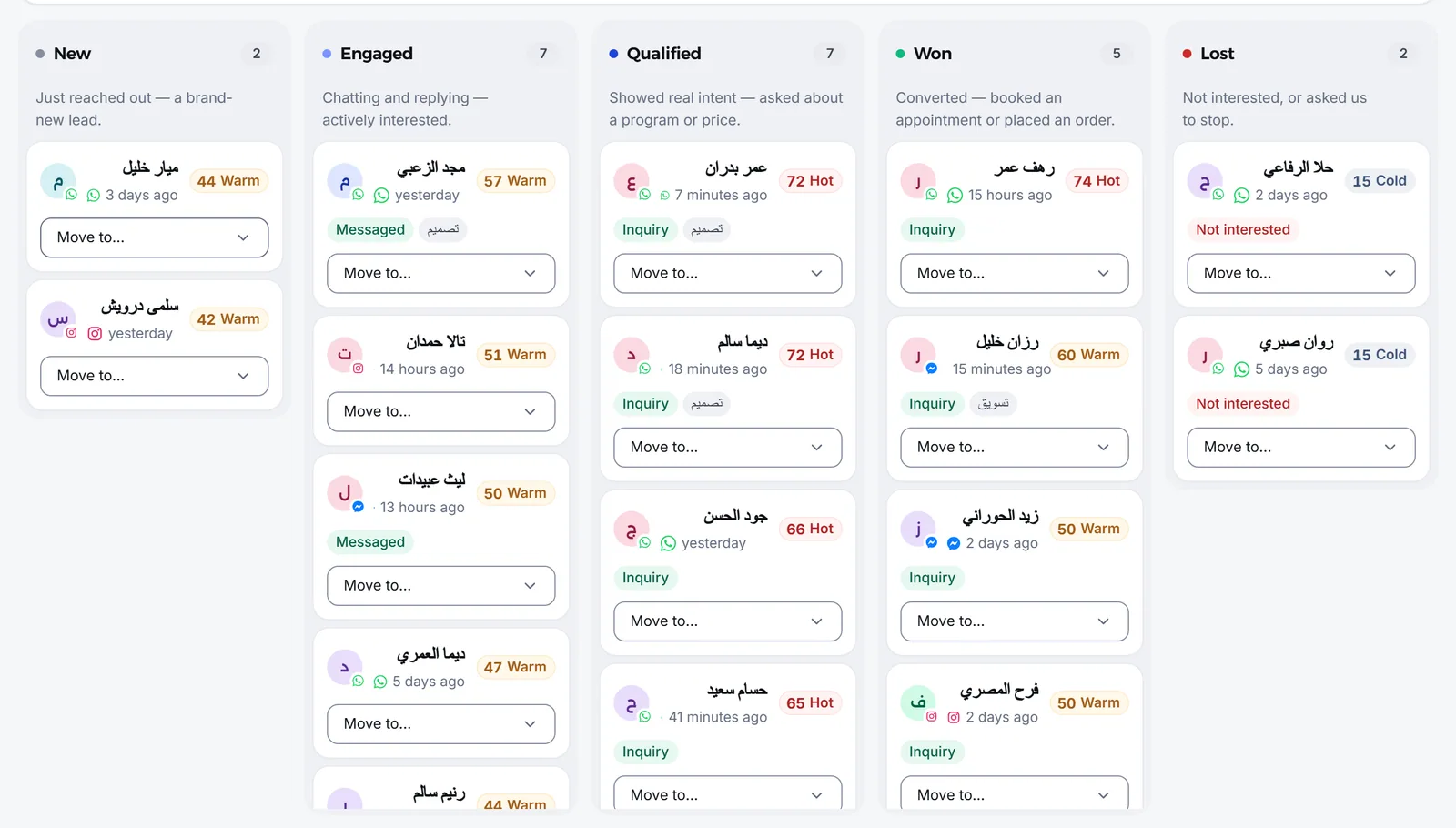
Section titled “What does each pipeline stage mean?”Every lead sits in one of five stages, shown as columns in the Pipeline view and as a strip with each stage’s count above the list.
| Stage | What it means |
|---|---|
| New | Just reached out — a brand-new lead. |
| Engaged | Chatting and replying — actively interested. |
| Qualified | Showed real intent — asked about a program or price. |
| Won | Converted — booked an appointment or placed an order. |
| Lost | Not interested, or asked us to stop. |
Mujib promotes a lead by itself as they engage: after a few messages they become Engaged; with an Inquiry outcome or a Hot score they become Qualified; when the agent books them an appointment or an Order placed outcome is recorded, they become Won.
- Automatic promotion only moves forward, so Mujib never undoes a move you made.
- An outcome of Not interested, Cancelled, Spam or Do not contact moves the lead to Lost. A won lead leaves Won only with Spam or Do not contact.
- To move a lead by hand, drag its card in the Pipeline view to the column you want.
How do I qualify leads and follow them up?
Section titled “How do I qualify leads and follow them up?”You qualify them by recording an Outcome on each lead, and you follow them up from the ready lists in the Analytics view.
- Open the lead from the list: the Lead profile shows the Lead score and the history of its stage changes.
- Press Edit contact and choose an Outcome, such as Inquiry, Appointment or No response. The scoring engine may promote this stage again automatically after saving.
- Add Tags such as “VIP” to filter by later, and Internal notes that only your team sees.
- Open conversation takes you to their conversation in the Inbox.
In the Analytics view you find Needs follow-up, the qualified or engaged leads who went quiet; Losses, to review why leads were lost; and Going stale: Active leads with no inbound message for 7 days or more
The same view shows the figures for the period you pick: New customers in period, Average score, Hot leads and Won among non-lost, along with New customer sources and the Average time between stages. You see which channel brings leads that actually convert, and how long a lead takes to move from one stage to the next.
Filters narrow the list by stage, source, outcome, score, branch and period, and sorting by Highest score or Most messages puts the strongest leads first.
What does the agent remember about a lead?
Section titled “What does the agent remember about a lead?”The lead’s profile has a What the agent remembers section showing what the agent learned from the conversations, such as their preferences and history with you. If you want the agent to start over with them, clear the memory from the same profile; clearing cannot be undone.
How do I export or delete leads?
Section titled “How do I export or delete leads?”From the extra menu at the top of the page: Export CSV downloads a file with the filters and order on screen, and stays available to accounts that cannot edit.
A lead’s outcome also affects campaigns: a lead marked Do not contact, Not interested or Spam gets no campaign.
Frequently asked questions
Does lead scoring use up the agent's allowance?
No. Scoring is fully automatic and rule-based. It uses no AI and does not count toward your usage.
Does Mujib move a lead back to an earlier stage by itself?
No. Automatic promotion only moves forward. The exception is a negative outcome such as “Not interested” or “Spam”, which moves the lead to “Lost”; a won lead leaves “Won” only with “Spam” or “Do not contact”.
Does a customer get a message when I add them myself?
No. Adding a contact by hand, for someone who called or visited the branch, sends them nothing.
What happens when I delete a lead?
The lead is deleted for good, together with their conversation history. It cannot be undone.
Do campaigns reach a lead who asked not to be contacted?
No. A lead whose outcome is “Do not contact”, “Not interested” or “Spam” gets no campaign.