
WhatsApp broadcast campaigns, bulk messages from Mujib
A WhatsApp broadcast in Mujib is a campaign: one text message sent to a segment of your contacts, or to a list of numbers you upload. The messages leave your business number one at a time, with a gap you choose, and customer replies land in the Inbox, where the agent answers them when it is on.
Can bulk messages get my number banned?
Section titled “Can bulk messages get my number banned?”They can. WhatsApp’s terms forbid bulk and automated messaging, WhatsApp may disable or suspend an account that breaks them, and the risk is highest when you message people who never messaged you.
That is why Mujib sends a campaign one message at a time with a gap, spreads it across the numbers you pick, leaves out people who opted out, and will not send until you tick I understand the risk and accept responsibility on the review step. These precautions lower the risk; they do not remove it. To understand how Mujib connects compared with the official WhatsApp API, see WhatsApp Business app vs WhatsApp API.
How do I create and send a campaign?
Section titled “How do I create and send a campaign?”You build a campaign in four steps on the Broadcast page, and you can save it as a draft at any point. The page is for the account owner, admins, and accounts with the Send broadcasts permission across the whole business; a branch account does not have it.
- Press New campaign.
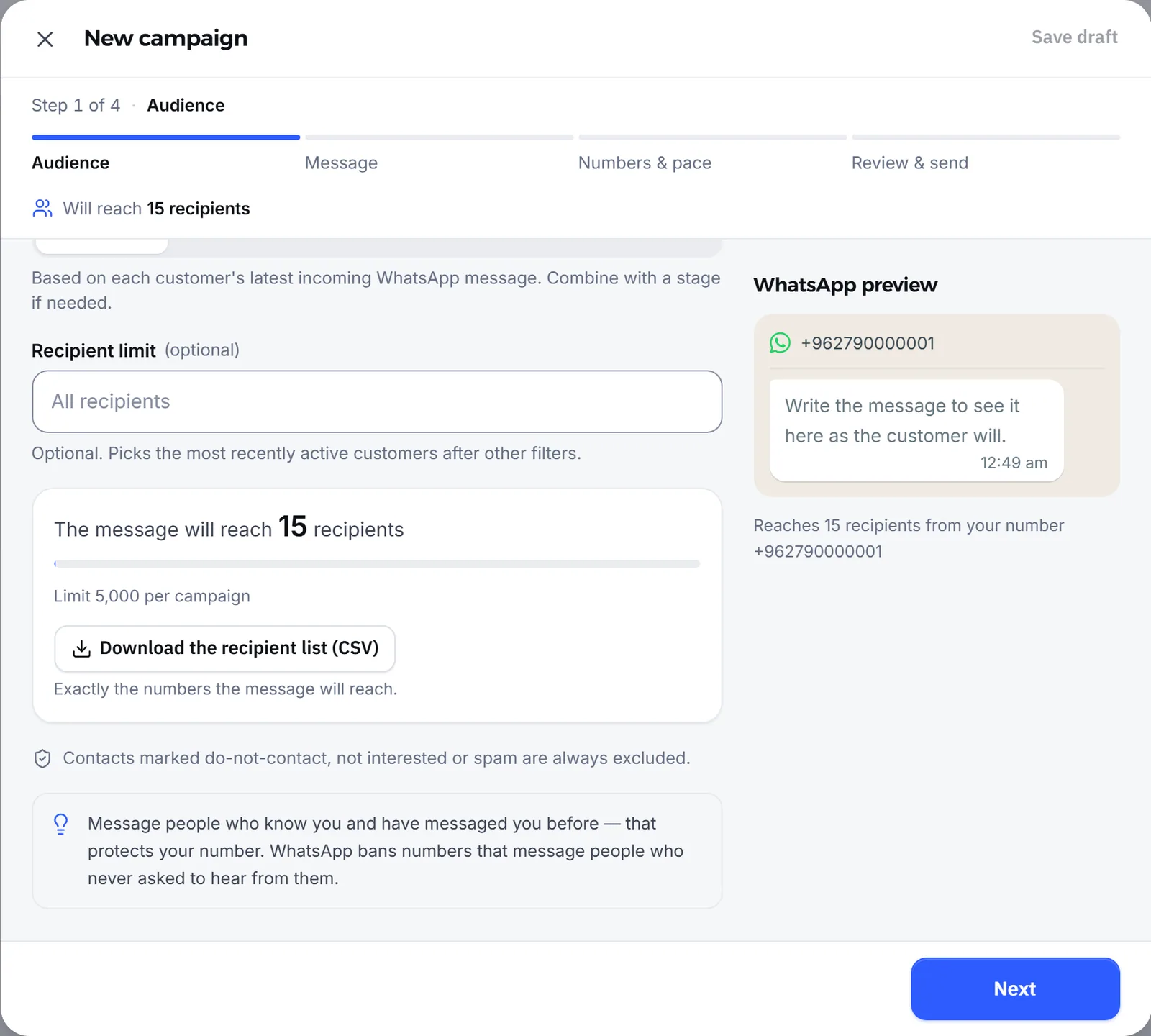
- Audience: enter the Campaign name, which only your team sees, then choose the recipients.
- Message: write the message, up to 2000 characters. A preview beside it shows how it will look on WhatsApp.
- Numbers & pace: choose the sending numbers and the gap between messages.
- Review & send: check the count, the text and the pace, tick I understand the risk and accept responsibility, then press Save and send and confirm. Sending cannot be undone.
Before you write, keep three things in mind: Text only — no images or files in a campaign. No automatic customer name — write a greeting that suits everyone. Customer replies reach the inbox — and the agent answers them when it is on.
Who receives the campaign?
Section titled “Who receives the campaign?”Everyone who matches your choice on the audience step, after Mujib leaves out the people it may not or cannot message. You pick the recipients one of two ways:
- From contacts: with no filter, every contact that has WhatsApp. You can filter by Stage, switch on Only people we have messaged on WhatsApp, or set Recipient activity to Any time, Last 7 days, Last 30 days or Custom date range.
- Custom numbers: a list of numbers you paste or upload from a file, even people who are not contacts yet.
Recipient limit is optional and picks the most recently active people first, after the filters. The final count is taken at the moment of sending, so it can differ a little from what you saw while writing. Download the recipient list (CSV) downloads exactly the numbers the message will reach, so you can check them first.
Can I upload the numbers from a file?
Section titled “Can I upload the numbers from a file?”Yes. Choose Custom numbers, then paste one number per line, or press Import numbers file to upload a CSV file.
- Press Download number template (CSV) to get the right layout: a
phonecolumn and one number per row. - Write international numbers with
+and the country code. - Upload the file; it holds up to 5000 numbers.
The page flags any invalid number before saving. If the list includes the number of a customer who opted out, Mujib refuses to create the campaign until you remove that number.
Who does the campaign not reach?
Section titled “Who does the campaign not reach?”A campaign misses the people Mujib leaves out, the people past a limit, and the messages that could not be delivered.
| Who it misses | Why |
|---|---|
| Anyone marked Do not contact, Not interested or Spam | Always left out, whatever the filters |
| A contact that cannot be reached on WhatsApp | There is no WhatsApp address to send to |
| People past the Recipient limit | The limit keeps only the most recently active |
| People who no longer match the filters when you send | The count is taken at sending, not at writing |
| Failed messages | Delivery failed; you see them by name in the Recipient list |
After sending, each campaign shows how many were Delivered and how many Failed, and the link who did not get it? lists the people it missed; each row opens their conversation in the inbox.
How do the gap and number rotation work?
Section titled “How do the gap and number rotation work?”Messages go out one at a time, with a gap between each two that you set on the Numbers & pace step.
- Fixed gap: the same time between every two messages, starting at 30 seconds.
- Random gap: a different time each message, between two bounds, closer to a person sending by hand.
- The gap is between 1 and 120 seconds, and it holds until the last message, even if sending is delayed or interrupted and resumes.
- Hourly cap per number is optional and caps how many messages each number sends in an hour.
- Sender numbers: with more than one number connected, the campaign rotates across the numbers you select. Your subscription sets how many numbers you can connect; see Connect WhatsApp.
The step shows an estimate of the total time if you start now. You can close the page after sending; sending carries on on our side.
What are the campaign limits?
Section titled “What are the campaign limits?”Each campaign has a ceiling, all campaigns together have a daily limit, and the feature itself follows your subscription.
- One campaign reaches at most 5000 recipients. If your audience is bigger, split it into more than one campaign.
- Campaign recipients have a limit in any twenty-four hours, which never falls below one full campaign a day.
- Campaigns are not included in every plan. If yours does not include them, a message says so when you save or send. Plans are at https://mujib.ai/pricing.
- When the sending number is disconnected, you see The sending number is disconnected and the campaign does not start until you reconnect it; you can save it as a draft meanwhile.
- When a campaign stopped before it finished, Retry carries on to the same recipients; nobody who already got the message gets it twice.
Frequently asked questions
Can I send an image or a file in a campaign?
No. A campaign is a text message only, and every recipient gets the same text.
Is the customer's name added to the message automatically?
No. Mujib adds no customer name, so write a greeting that suits everyone.
Can I send a campaign on Messenger or Instagram?
No. Campaigns go out from a connected WhatsApp number only. Without a connected number you can still save the campaign as a draft until you connect one.
What happens if the WhatsApp number disconnects while sending?
When the number is back within a short while, the remaining messages wait for it and the campaign carries on. When the outage lasts longer, the messages that did not go are marked “Failed” and listed by name in the campaign details. Nobody who already got the message gets it twice.
Does a campaign reach someone who asked not to be contacted?
No. Mujib always leaves out everyone whose outcome is “Do not contact”, “Not interested” or “Spam”, whatever filters you chose.