
Reports in Mujib for specialists, renewals and subscription movement
The Reports page holds the reports that measure your branches’ work: each specialist’s bookings and their outcome, whose subscription ends and who renewed, sales and freezes, and who referred customers to you. You pick the period, the branch and the specialist, then download the report as a CSV file or print it.
When does the Reports page appear?
Section titled “When does the Reports page appear?”It appears when your business uses the calendar, because its main report counts bookings. Every account with the analytics permission sees it, and always the account owner and admins.
| Tab | What it shows | When it appears |
|---|---|---|
| Specialists | Each specialist’s bookings, and who attended and subscribed | With the calendar |
| Renewals & endings | Whose subscription ends in the period, who renewed and who is not renewing | With the subscriptions section |
| Subscription movement | Sales, freezes, gift days and visits | With the subscriptions section |
| Referred by | The referral recorded on each appointment in the selected period. Includes every booking status; entered names are grouped exactly as recorded. | With the calendar |
Each tab keeps its own period: the specialists report looks back, the renewal list looks ahead, and subscription movement shows a whole month.
What does the specialists report show?
Section titled “What does the specialists report show?”One row per specialist, with their bookings in the chosen period and how each ended.
- Bookings, Attended, No-show, Cancelled and Unrecorded. Bookings = attended + no-show + cancelled + attendance not recorded.
- If your business sells packages, attendance at a first visit splits into Attended and subscribed, Attended, did not subscribe and No outcome, and you also see Conversion rate, Subs sold and Revenue.
- Under the table, the First-time customers list names every customer whose first visit fell in the period, and with which specialist; press Print the list to print it.
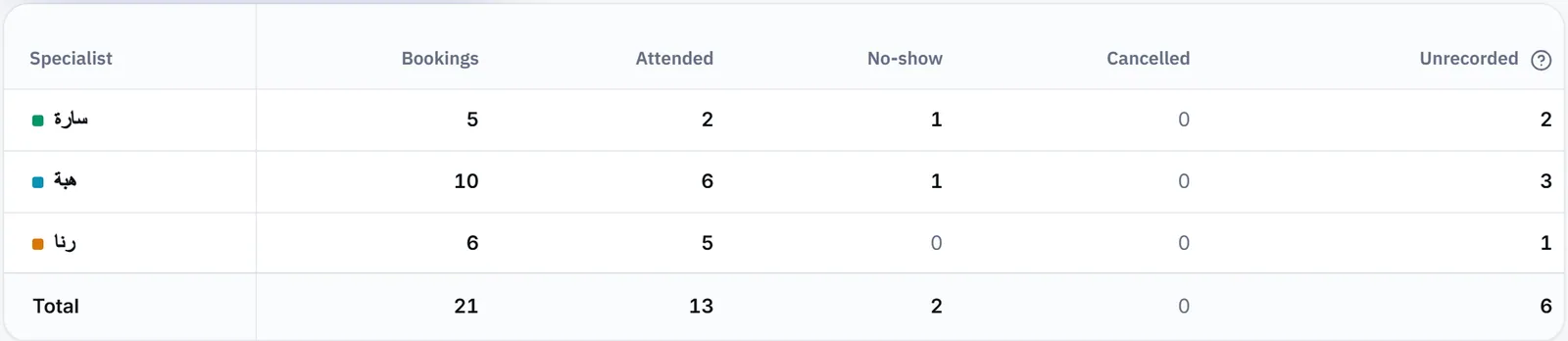
The report reads each booking’s outcome from the stage the appointment sits in. When some of your stages have no meaning set yet, a notice offers Classify the stages, and the account owner classifies them on the Branches page. See Attendance stages.
How do I use the renewal list?
Section titled “How do I use the renewal list?”Open Renewals & endings and pick a period ahead: you see every subscription that ends in it and who renewed. The Monthly renewal list → link on the Subscriptions page opens this same list.
- Pick the period; it can also look back, to see who ended and did not renew.
- Check the figures at the top: Ending in the period, Renewed, Not renewing and Still open.
- For a customer who decided not to renew, press Not renewing and, if you know it, fill in Why are they not renewing?. No message goes to the customer.
- Switch on Include renewed to see those who renewed as well.
The list is split Renewals by specialist, By branch and By plan. The specialist here is the last one who saw the customer: the one set on the subscription, or the specialist of their latest appointment at the same branch. Frozen and cancelled aren’t counted
What does subscription movement show?
Section titled “What does subscription movement show?”The tab shows what happened to subscriptions during one month you pick, branch by branch.
- Sales: New subscriptions, Renewals and Sales value.
- Freezes: who froze their subscription, when they came back, and how much the term was extended.
- Gift days: the days given as a gift, and who gave them.
- Visits by type and Why they did not subscribe: each visit’s outcome as recorded on the appointment sheet, with no guessing.
What does the referrals report show?
Section titled “What does the referrals report show?”The Referred by tab shows who referred customers to you, as the referral was recorded on each appointment in the chosen period, across every booking status.
- Three figures at the top: All bookings, Referral recorded and No referral recorded.
- Under them, one row per referrer name, with its Bookings, Known customers and the Latest appointment. Recorded referrals come first, the most bookings on top.
- Names are grouped exactly as they were written, so agree with your team on one way to write each referrer.
How do I download or print a report?
Section titled “How do I download or print a report?”From the options button at the top of the page; every tab downloads and prints with the period and filters you see.
- Download CSV: a file with the same period and filters.
- Print report: the full table on a landscape page, or, for the renewal list, a portrait page per specialist.
A branch account sees its own branch only: Your account belongs to this branch, so everything here is this branch’s. For conversation, channel and agent figures, see Conversation analytics.
Frequently asked questions
Why do I not see the renewals and subscription movement tabs?
Because the subscriptions section is off for your business. Those two tabs appear only for a business that sells packages; the specialists and referrals tabs remain.
What does "attendance not recorded" mean?
“Appointments with nothing recorded: still “requested” and never confirmed, or confirmed and nobody pressed “Attended” or “No-show” — even once the time has passed.”
Does marking a customer as not renewing send them a message?
No. The mark is saved on the subscription only, and shows in the renewal list and in the CSV file.
Does a branch account see every branch's reports?
No. A branch account belongs to its branch, so everything it sees in reports is that branch's.