
WhatsApp appointment reminders for your customers
Mujib sends WhatsApp appointment reminders to your customer before the visit, by the lead time you choose, 24 hours by default, into their own conversation. Reminders are on by default for every business that takes appointments, and you switch them off or change their timing in Branches → Booking settings.
Every upcoming appointment that is confirmed or pending gets a reminder, whether the agent or your team booked it, as long as the customer has a valid WhatsApp number or an ongoing conversation with you.
When does the customer get the reminder?
Section titled “When does the customer get the reminder?”The reminder arrives before the appointment by the lead time you chose, and only in daytime.
- Sending hours: between 09:00 and 21:00, branch time. No reminder is ever sent at night.
- When its time falls at night: it goes out in the morning, or the evening before when the morning would leave too little time before the appointment.
- Spreading: a reminder may leave up to 60 minutes before its exact time, so reminders for appointments close together do not all go at once.
- Busy days: reminders leave one after another, safely spaced for your WhatsApp number, so some may arrive a little later than the lead time you chose.
- The cut-off: when less than 2 hours are left before the appointment and the reminder has not gone, that appointment’s reminder is dropped.
A lead time shorter than 3 hours is treated as 3 hours, so there is still time to send before the cut-off.
How do I turn reminders on or off, or change their timing?
Section titled “How do I turn reminders on or off, or change their timing?”You set reminders in the booking settings on the Branches page, which the owner and admins can open.
- Open Branches, then the Booking settings tab on a phone, or scroll down to Booking settings on a computer.
- Under Visit length and reminder, switch Send the customer a WhatsApp reminder on or off. The switch saves the moment you flip it.
- In Remind the customer before the appointment, pick 2, 6, 12, 24, 48 and 72 hours, or Custom with a number from 1 to 168 hours, up to 7 days.
- Press Save booking settings to save the lead time.
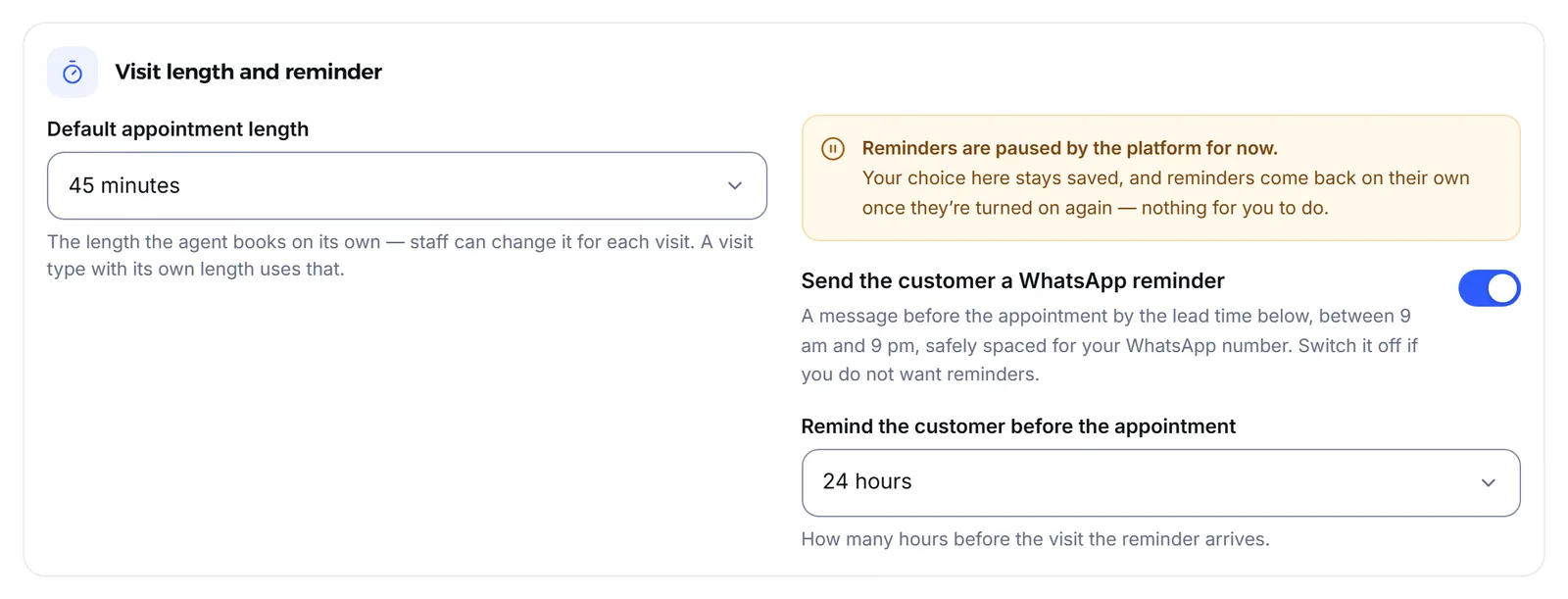
The setting applies to every branch. A summary also shows beside Calendar under Booking settings.
What does the reminder say?
Section titled “What does the reminder say?”A short message with the visit type in your own words, the branch, and the day and time. For an English-language business it reads like this:
Reminder ⏰ You have a consultation appointment at our Main branch on Thursday 5 November at 10:30. See you there! 💚- The message is written in your business’s language.
- When the same person has more than one appointment on the same day at the same branch, they get one message with all the times.
- When your business has a single branch with no address and no map location, the message leaves the branch name out.
- The reminder lands in the customer’s own conversation. When they have no earlier conversation, the reminder’s conversation stays out of Inbox until the customer replies.
Who does not get a reminder?
Section titled “Who does not get a reminder?”Mujib skips the reminder in a few specific cases and records why in the Notification log.
| Case | What happens |
|---|---|
| Booked less than 12 hours before its time | No reminder: the booking was only just confirmed |
| Less than 2 hours left | Less than 2 hours to go — too late for a reminder |
| An appointment at a night hour, from 22:00 to before 06:00 | The appointment is at a night hour (likely an AM/PM slip) — fix the time |
| No number on the booking | The booking has no customer phone |
| The number is not on WhatsApp | The number is not on WhatsApp |
| The customer is marked do-not-contact | The customer is marked do-not-contact |
| The number belongs to a branch, the owner or the team | The number is the business's own (branch, owner or team) — not reminded |
| A Messenger or Instagram customer who has not written in 24 hours | The reminder waits until the customer writes again |
| Your business’s WhatsApp number is disconnected | The reminder waits until it reconnects |
Cancelled appointments, appointments already marked attended or no-show, and appointments imported from old records get no reminder either. If you switch the Bookings module off, reminders stop, and they resume for upcoming appointments when you switch it back on.
Where do I see the reminders that went out?
Section titled “Where do I see the reminders that went out?”In Settings → Notifications → Notification log. Each reminder shows its recipient and its status, such as Delivered, and why it was skipped when it did not go.
- The reminder also shows in the customer’s conversation, so you see exactly what they received.
- The customer’s reply to a reminder lands in that same conversation, and the agent answers it when it is working in that conversation.
- When the customer or your team moves the appointment, a new reminder is scheduled for the new time.
The Meta and WhatsApp cases in detail: The 24-hour window.
Frequently asked questions
When does the customer get the reminder?
Before the appointment by the lead time you chose, 24 hours by default, and only in daytime, between 09:00 and 21:00 branch time.
Are reminders on from the start?
Yes. Reminders are on for every business that takes appointments, and you switch them off in the booking settings on the Branches page.
Why did a customer not get a reminder?
Open the “Notification log” in Settings. Every reminder that did not go shows why, for example a booking made too close to its time or a number that is not on WhatsApp.
Do reminders still go out if I turn the agent off?
Yes. A reminder is about an appointment that is really booked, so it goes out even while the agent is off, as long as the reminder switch itself is on.
Do reminders reach Messenger and Instagram?
Yes, when the customer booked there and wrote to you within the last 24 hours, which is what Meta allows. Otherwise the reminder waits until they write again.