
Public holidays and closing days for bookings
Public holidays appear in Mujib automatically for your country, but they close nothing until you decide. In Settings → Public holidays you choose for each holiday: Closed, Short day or Open as usual, and the agent and the calendar follow your decision.
The agent knows each branch’s weekly hours, but it only knows tomorrow is a holiday from your decision. So every Eid and occasion needs an answer from you before it arrives.
How do I decide each holiday?
Section titled “How do I decide each holiday?”Pick your country and year, then answer each holiday in the list.
- Open Settings → Public holidays.
- Choose the Country and the Year. Available countries: Jordan, Saudi Arabia, the UAE and Egypt. Next year is already there.
- Next to each holiday, choose one of the decisions in the table below.
- If you choose Short day, type that day’s hours, add another window with Add another window if needed, then press Save these hours.
| Decision | What the agent does | What your team sees in the calendar |
|---|---|---|
| Not set | Books as usual from branch hours | An ordinary day |
| Closed | Says the branch is closed, names the occasion, and books nothing | A closed day that takes no booking |
| Short day | Offers only times inside that day’s hours | That day’s special hours |
| Open as usual | Books as usual | An ordinary day |
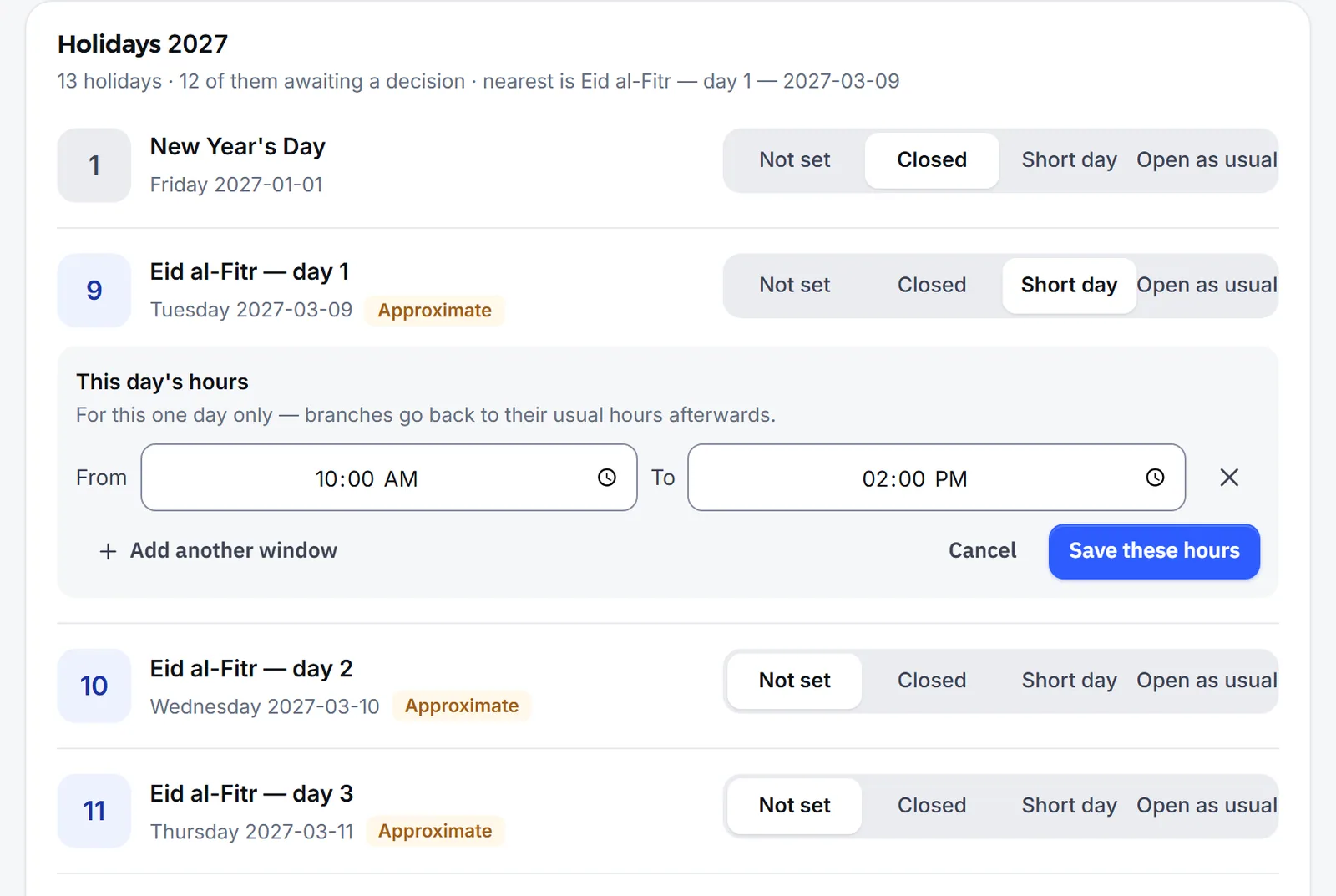
The decision applies to every branch. After a short day, branches go back to their usual hours.
What does “Not set” mean?
Section titled “What does “Not set” mean?”"Not set" means the agent carries on from your branch hours — nothing is closed until you say it is.
The difference between Not set and Open as usual is that the second records that you answered, so the holiday no longer waits for your decision. The top of the section shows how many holidays still need a decision, and the nearest one.
Why do some holidays show “Approximate”?
Section titled “Why do some holidays show “Approximate”?”Because some holidays, such as the Eids, follow the moon sighting. An astronomical date — the state announces the official day after the moon sighting, so it can shift by a day. Confirm it nearer the time.
Mujib works out these dates every year, so you never type them in. The decision stays yours, and these holidays carry the Approximate mark.
How do I add a day off of my own?
Section titled “How do I add a day off of my own?”Add it under Your own days off in the same section: Stock-taking, a team day off… a day you’re closed at every branch.
- Press Add a day.
- Choose the Date and type the Occasion.
- Press Add.
The day shows in its year’s list marked Added by you, and counts as a closed day at every branch. To remove it, press Remove this day next to it.
What does the agent do on a holiday?
Section titled “What does the agent do on a holiday?”The agent follows your decision to the letter whenever that day comes up.
- Closed day: it says the branch is closed, names the occasion, books nothing on it, and offers the nearest days with a free time.
- Short day: it offers only the times where the whole visit fits inside that day’s hours.
- Open as usual, or no decision: it books from the branch’s weekly hours.
The decision binds your team too: the calendar takes no appointment on a closed day, and a short day applies even to a specialist with hours of their own.
Does Mujib remind me about coming holidays?
Section titled “Does Mujib remind me about coming holidays?”Yes. When a holiday you have not decided is coming, the owner and admins get a notification in the Mujib app up to 10 days before it, at most once a day.
- It only reaches people who turned on app notifications on their device. See App and notifications.
- This notification is for you alone; nothing is ever sent to your customers.
- Choosing a decision for the holiday is enough to stop the reminders about it.
Frequently asked questions
Does Mujib close booking on public holidays by itself?
No. The holidays appear in Settings, but the agent keeps booking from branch hours until you choose “Closed” or “Short day”.
Which countries' holidays does Mujib know?
Jordan, Saudi Arabia, the UAE and Egypt. You pick your country in the public holidays section of Settings.
Can the decision differ from one branch to another?
No. A holiday decision in Settings applies to every branch, and so do the days off you add yourself.
Why are some holidays marked approximate?
They follow the moon sighting, so the official day can shift by one day. Confirm your decision the day before.
Can my team book a day I marked closed?
No. A day you closed is closed for the agent and for your team alike, and a short day can only be booked inside its hours.