
Data deletion in Mujib, from the dashboard or at a customer's request
Data deletion in Mujib works two ways: you delete customers, conversations, messages, images and staff accounts from the dashboard, and a customer can ask for their own data to be deleted by email, which is done within 30 days of verifying the request. Deleting the whole workspace is done by the Mujib team at your request.
How do I delete a customer’s data from the dashboard?
Section titled “How do I delete a customer’s data from the dashboard?”Delete the customer from the Leads page, and their whole conversation and message history goes with them.
- Open Leads and select the customer or customers you want to delete.
- Press the delete button that appears with the number selected.
- In the Delete the selected leads? dialog, press Delete.
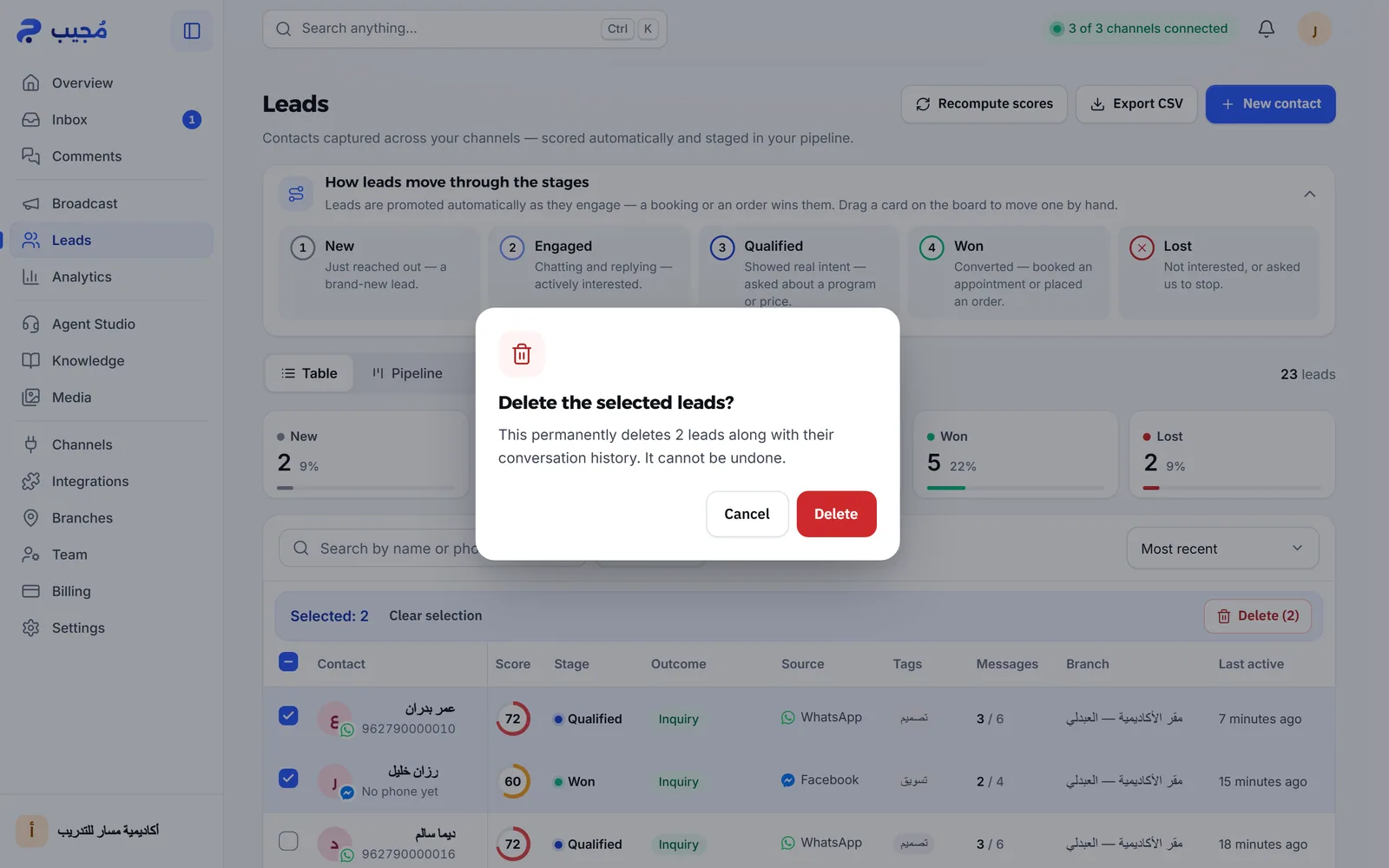
- What is deleted: the customer, their conversations, and their messages with their text, photos and voice-note transcripts.
- What stays: appointments and orders recorded for them stay, with the name and phone number written on them, because they are your business’s records. Delete or edit them from their own pages if you want.
- Who can do it: anyone with permission to manage leads. A branch account can delete only its own branch’s customers.
What else can I delete?
Section titled “What else can I delete?”You can delete conversations, messages, images and staff accounts, each from its own place and with its own effect.
| What you delete | Where | What happens |
|---|---|---|
| A conversation | Inbox: Select, pick the conversations, press Delete and confirm Delete permanently? | The conversation and its messages are deleted for good; the customer stays |
| A WhatsApp message | On the message in the conversation: Delete for everyone | It is deleted for the customer too, within 47 hours of sending, and its text and media are wiped from Mujib |
| A reply that failed to send | On the message: Remove from the conversation | It is removed from the conversation in Mujib |
| An image in the media library | Media | It is deleted and the agent stops sending it at once |
| A staff account | Team: Delete account | The staff member loses access at once; the conversations and customers they handled stay |
- Delete for everyone is on WhatsApp only; it is not offered for Messenger and Instagram messages.
- You cannot delete a single message the customer wrote, but deleting the conversation deletes all of its messages. If the customer deletes their own message on WhatsApp, it shows as deleted in the inbox.
See Download and delete media for details.
How does my customer ask for their data to be deleted?
Section titled “How does my customer ask for their data to be deleted?”They email Mujib at the address given in the Data Deletion Instructions, or they ask you directly, since your business is responsible for their data.
According to the Data Deletion Instructions:
- The customer gives the phone number or account handle they used to contact you, and your business’s name if they know it.
- Once the request is verified, Mujib deletes their messages and conversation history, the photos and voice notes they sent with their transcripts, their identifier and display name, and any lead record created from their messages.
- Deletion is completed within 30 days of receiving and verifying the request, and the customer gets an email confirmation.
- A minimal record may be kept where the law requires it, for example for accounting or fraud prevention.
This is also the page registered with Meta as the data deletion instructions URL, so it is the route for people who messaged your business on Facebook and Instagram too. If a customer asks you instead, delete them yourself from Leads as in the steps above.
How do I delete the whole workspace?
Section titled “How do I delete the whole workspace?”There is no button to delete a workspace in the dashboard; you ask the Mujib team through the contact page.
- Download a copy of your data with Export my data in Settings.
- Ask the Mujib team to delete the workspace, and give your business’s name.
- The team carries out the deletion after confirming the request, and deleting a workspace is permanent.
The export includes your settings, branches, agents, customers, conversations, messages, bookings and campaigns. When the message history is very large, the export is partial, and the file says so.
What happens to the data when I disconnect a channel?
Section titled “What happens to the data when I disconnect a channel?”The connection token or session is deleted, and the conversations stay in the inbox until you delete them.
- A Facebook Page or Instagram account: Disconnect deletes the access token stored for the Page, and the agent stops receiving its messages.
- A WhatsApp number: Delete number unlinks it from Linked devices in WhatsApp and removes its session from Mujib, while Disconnect pauses it and keeps the link.
Frequently asked questions
Can I restore a customer or a conversation after deleting it?
No. Deleting a customer or a conversation from the dashboard is permanent, and there is no undo.
How does a customer ask Mujib to delete their data?
They email Mujib at the address on the Data Deletion Instructions page, giving their phone number or account handle and the business's name. Or they ask the business itself.
How long does an emailed deletion request take?
The Data Deletion Instructions page commits to completing deletion within 30 days of receiving and verifying the request, with an email confirmation when it is done.
Can I delete my workspace myself?
There is no button for it in the dashboard. Contact the Mujib team, and download a copy of your data first, because the deletion is permanent.
Does disconnecting a Facebook Page delete its conversations?
No. Disconnecting deletes only the access token stored for the Page; the conversations stay in the inbox until you delete them.