
WhatsApp bulk messages: consent, pacing and content
No method can guarantee that WhatsApp bulk messages won’t get your number banned, but three things lower the risk: message only people who agreed to hear from you, send at a calm pace, and send what customers expect from you. WhatsApp restricts accounts whose activity looks like spam or automated bulk messaging.
This article gathers what WhatsApp’s official pages say about consent and restrictions, and turns it into practical steps before every campaign.
Why does WhatsApp restrict numbers that send bulk messages?
Section titled “Why does WhatsApp restrict numbers that send bulk messages?”WhatsApp restricts an account when its recent activity looks like spam, automated or bulk messaging, because that breaks its Terms of Service, as WhatsApp’s help page on restricted accounts explains.
- What a restriction blocks: starting chats or calls with new contacts, creating groups or adding members, and using linked devices; you may also be logged out of some of them.
- What stays available: the chats and groups you have talked to before.
- How long it lasts: the restriction ends automatically after its set time, and WhatsApp warns that continuing this behaviour can lead to a ban.
Because the restriction covers linked devices, reply tools that connect to your number as a linked device, Mujib among them, also stop while the account is restricted. One rushed campaign can silence your replies to the customers you already have.
For the business broadcast feature inside the WhatsApp Business app, the help page on why business broadcasts can’t be sent explains that when many people report or block a business over unwanted messages, the account first gets a warning and then a temporary suspension of the feature, which grows longer if it repeats. None of these pages gives a safe number of messages: what they judge is the sending pattern and how recipients react.
What does customer opt-in mean?
Section titled “What does customer opt-in mean?”Opt-in means the customer confirms they want to receive your messages on WhatsApp before you send them, and it is the first requirement of the WhatsApp Business Messaging Policy.
The policy sets two rules and adds one recommendation in its best practices:
- Contact people only when you have opt-in permission confirming they wish to receive your messages; you decide how to collect it.
- Respect every request to block, stop or opt out, whether it reaches you on WhatsApp or elsewhere.
- The recommendation: give clear instructions for opting out of each category of messages, and honor those requests.
Practical ways to collect consent:
- At booking or checkout: a clear box such as “I agree to receive offers on WhatsApp”.
- In the chat itself: a direct question, such as “Would you like to get our offers here?”, and keep the answer.
- At the branch: a form the customer signs, with the date of consent.
What is not consent: a bought list, numbers copied from groups, or a customer who once asked about a price. The help page on business broadcasts also recommends separate opt-in for each category of message; someone who agreed to appointment reminders has not necessarily agreed to offers.
Who should receive the campaign?
Section titled “Who should receive the campaign?”Send to people who engaged with you recently and agreed to your messages, not to every number in your phone.
- Start with the closest: someone who wrote in recent months knows you; someone silent for a long time may not remember your business.
- Remove the inactive: the same WhatsApp page recommends removing contacts who have not engaged with your business recently.
- Segment the audience: an offer on one service suits the people who asked about it, not all your customers.
- Exclude anyone who asked to stop, in every campaign, not just the next one.
How do I send a campaign at a pace that doesn’t hurt my number?
Section titled “How do I send a campaign at a pace that doesn’t hurt my number?”Send in batches with gaps between messages, start with a small part of the audience, and watch the reaction before you continue.
- Gaps between messages, ideally of varying length.
- An hourly cap for each number, especially in your first campaigns.
- A small first batch: send to part of the audience, see whether people reply or block, then continue.
- Sensible hours: not when your audience is asleep or at its busiest.
A calm pace reduces the burst pattern, but it does not make an unwanted message welcome: someone who never agreed may still block you even if your message reached them an hour after everyone else’s.
What should a bulk message say?
Section titled “What should a bulk message say?”Write a message where the customer knows who sent it and why, and can stop it if they want.
- Your business name at the start.
- One clear purpose: an offer, a reminder or news, not all three.
- Complete honesty: the policy says not to confuse, deceive, mislead, spam or surprise people with your messages.
- A way to stop: a line such as “To stop these messages, reply STOP”, and then actually honour it.
- One clear link if you need one, whose name points to your business.
Example:
Elite Center: consultation sessions are available this week at the main branch. To book, reply “book”. To stop these messages, reply “stop”.
Send it first to yourself and to one or two colleagues, and read it on a phone as a customer would, before it goes to anyone else.
How do Mujib campaigns help you send responsibly?
Section titled “How do Mujib campaigns help you send responsibly?”The Broadcast page in Mujib puts these steps into one flow, and whether it is available depends on your subscription.
| Step | What you find in Mujib |
|---|---|
| Audience | Filter by Stage, Recipient activity or Only people we have messaged on WhatsApp, and download the exact list with Download the recipient list (CSV) |
| Exclusions | Customers you marked Do not contact, Not interested or Spam are never included, and a number list containing one of them is refused |
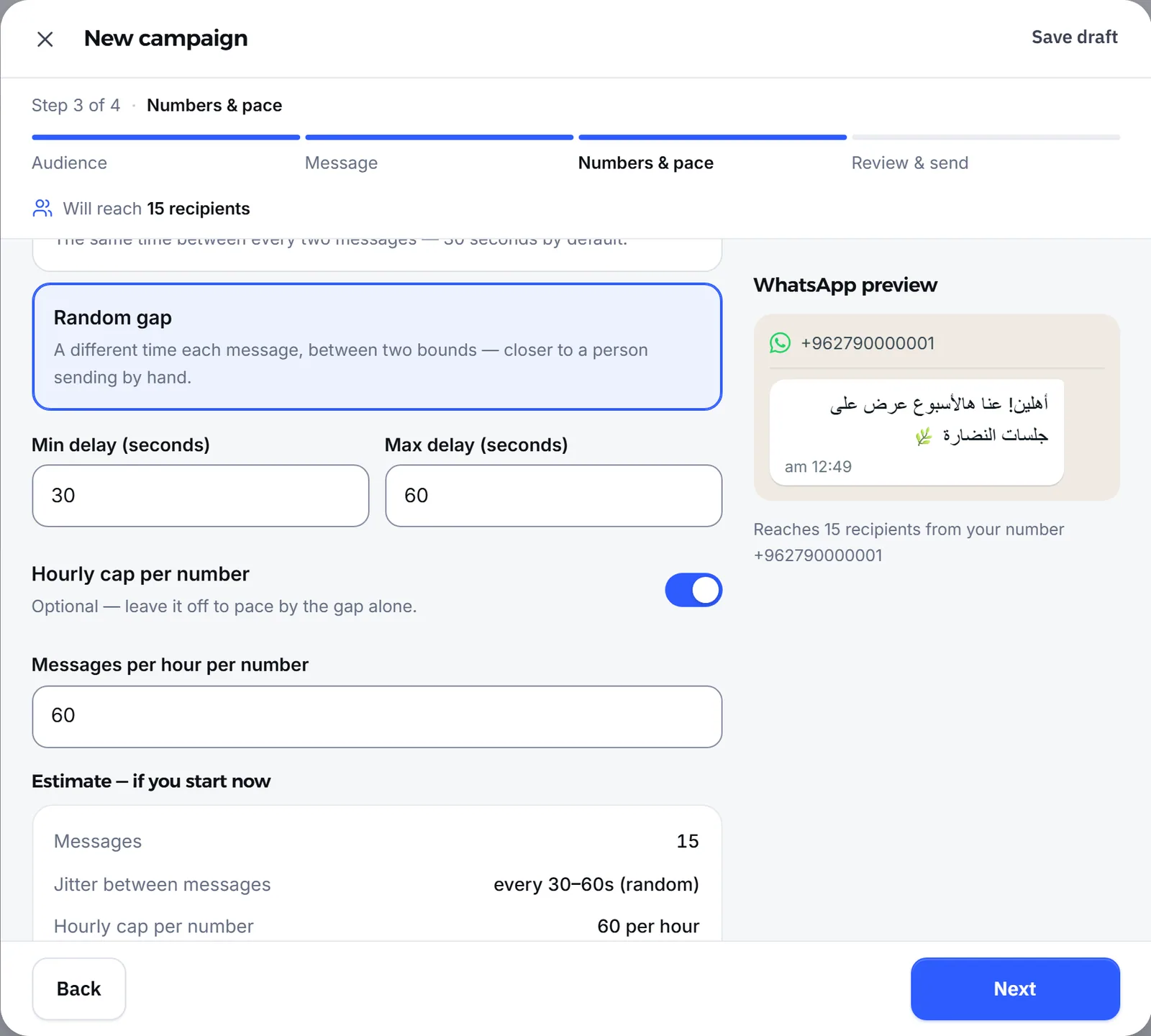
| Numbers & pace | A Fixed gap or a Random gap between messages, Messages per hour per number if you want one, and rotation across numbers when more than one is connected |
| Review & send | The Bulk sending puts your number at risk of a ban notice appears, and the campaign is not sent until you confirm I understand the risk and accept responsibility |
Customer replies to the campaign arrive in Inbox like any conversation. The details are in campaigns, and how Mujib’s connection to WhatsApp differs from the official API is explained in WhatsApp Business app vs. WhatsApp API.
What do I do if my number is restricted?
Section titled “What do I do if my number is restricted?”Stop all bulk sending at once, wait for the restriction to end, and review who you sent to and what before you start again.
- Stop campaigns, both scheduled and running.
- Wait for the restriction to end: the restricted accounts page says you can see the time left by starting a new chat with someone you have never messaged, and WhatsApp notifies you when it ends.
- Review your audience: remove anyone who did not agree, and anyone inactive for a long time.
- Relink your linked devices if they were logged out during the restriction. If your number shows as disconnected in Mujib, follow WhatsApp disconnected.
- Come back with a small campaign to an audience that recently agreed, and watch the reaction.
A successful WhatsApp campaign is not the one that reached the most people, but the one that reached the people waiting for it without costing you your number.
Frequently asked questions
Is there a way to guarantee my number won't be banned for bulk messages?
No. No tool can guarantee it. What lowers the risk is messaging only people who agreed to hear from you, sending at a calm pace, and sending content they expect from you.
How many messages a day can I send without being restricted?
The WhatsApp pages this article relies on give no safe number. What they judge is the sending pattern and how recipients react, not a specific count.
Is a number that once messaged me with a question an opt-in to offers?
No. The WhatsApp Business Messaging Policy requires opt-in that confirms the person wants to receive your messages. A question about a price or an appointment is not consent to marketing campaigns.
What happens if my number is restricted?
Until the restriction ends you cannot start chats with new numbers or use linked devices, while your existing chats stay available. The restriction ends on its own after its set time.
Does Mujib send campaigns to people who asked us not to message them?
No. Customers you marked “Do not contact”, “Not interested” or “Spam” are never included in a campaign, and a number list that contains one of them is refused.