
WhatsApp webhook: receive WhatsApp, Instagram and Messenger events
A Mujib WhatsApp webhook is a URL on your server that receives a signed POST whenever something happens in your business: a new customer, a booking made or cancelled, a conversation handed to staff, or a new message on WhatsApp, Instagram or Messenger. You create it on the Integrations page, and Mujib retries on its own when a delivery fails.
Everything that happens in your conversations reaches your internal system or automation tool the moment it happens, without your system polling Mujib. To read the data whenever you like instead, use the Mujib API with an API key.
Which events does the Mujib WhatsApp webhook send?
Section titled “Which events does the Mujib WhatsApp webhook send?”Mujib sends 5 events, and each webhook subscribes to the ones it needs. Every event arrives as a separate request with a JSON body.
| Event in the dashboard | Code | When it is sent |
|---|---|---|
| New customer | contact.created | On the first message from a new sender on any channel, when you message a new number from your business phone, or when someone on the team adds a customer in the dashboard |
| New booking | booking.created | When the agent books an appointment or someone on the team adds one in the calendar |
| Booking cancelled | booking.cancelled | When an appointment is cancelled, by the agent or from the calendar |
| Handed to staff | conversation.handoff | When the agent hands a conversation to staff |
| New message | message.received | With every message a customer sends, on any channel |
- The booking events appear in the list only when your business uses bookings.
- Replies from the agent or the team are not sent: the message event covers incoming customer messages only.
- Every field of every event is in the webhook events reference.
How do I create a webhook in the Mujib dashboard?
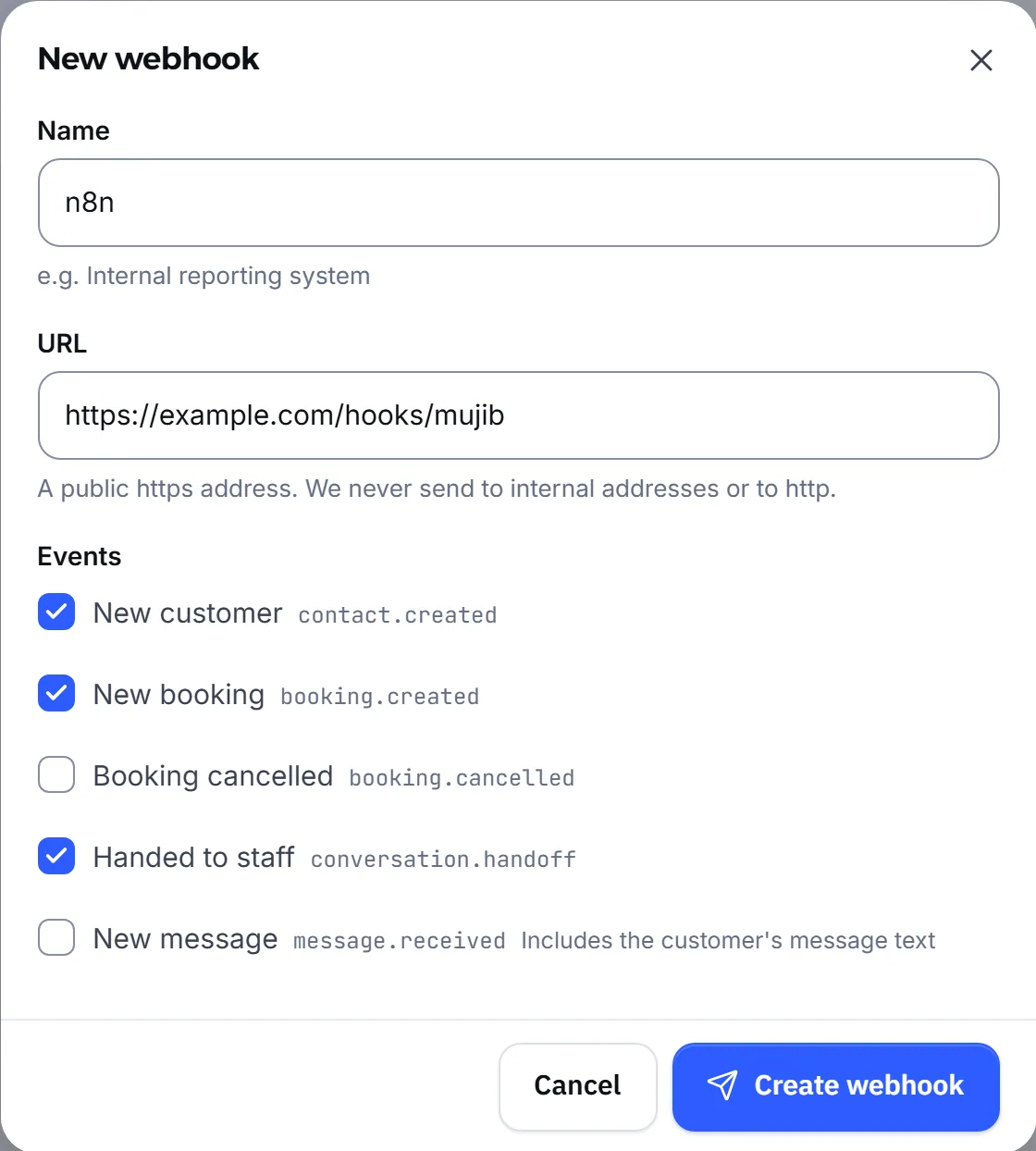
Section titled “How do I create a webhook in the Mujib dashboard?”You create it in the For developers section of the Integrations page, signed in as the owner or an admin.
- Open Integrations, then open the For developers section.
- Press New webhook.
- In Name, type a name that reminds you which system receives it, for example “Elite Center system”.
- In URL, paste your receiving URL, for example
https://example.com/hooks/mujib. - Under Events, pick at least one event, then press Create webhook.
- You see Signing secret — shown this once with a secret that starts with
whsec_. Press Copy the secret and store it in your system’s settings: it is never shown again. - Press Send a test to send your URL a
webhook.testevent, then press Done.
A business can have up to 10 webhooks, each with its own secret. To change the events later, open the webhook and press Change next to its events.
What must the receiving URL meet?
Section titled “What must the receiving URL meet?”Mujib accepts only a public internet address that starts with https://, and checks it when you save and again on every delivery.
- HTTPS only: a URL starting with
http://is refused. - A public address: the domain must point to public internet addresses;
localhostand internal or private networks are refused with This URL points to an internal or private address — it must be a public address on the internet. - A name that exists: when the domain cannot be found you see We couldn't find this address on the internet — check the name.
- No credentials: do not put a user name or password in the URL; verify requests with the signature instead.
- The port: the default 443, or any port from 1024 up.
- The final address: Mujib does not follow redirects, so a
3xxanswer counts as a failure. Use the address that takes the request directly.
What does the request to my URL look like?
Section titled “What does the request to my URL look like?”Each event arrives as a POST with a JSON body and these headers:
| Header | Value |
|---|---|
Content-Type | application/json |
User-Agent | Mujib-Webhooks/1.0 |
X-Mujib-Event | The event type, for example booking.created |
X-Mujib-Delivery | The id of this delivery; it stays the same on every retry |
X-Mujib-Signature | The signature as t=…,v1=…, explained in Verify a webhook signature |
Every event has the same envelope: id is the event id, type its type, createdAt when it happened in UTC, workspaceId your business’s id, and data its details. Here is a new-customer event, formatted for reading; the real body arrives on one line with no spaces:
{ "id": "5d7c1e2a-3b4f-4c6d-9e8f-0a1b2c3d4e5f", "type": "contact.created", "createdAt": "2026-01-01T00:00:00.000Z", "workspaceId": "7f3e9a10-2c4b-4d5e-8f60-71829a0b1c2d", "data": { "contact": { "id": "c1a2b3c4-d5e6-4f70-8192-a3b4c5d6e7f8", "name": "سارة", "phone": "962790000000", "channel": "whatsapp", "stage": "new", "createdAt": "2026-01-01T00:00:00.000Z" } }}Mujib reads the event’s data once, moments after the event, and every retry carries that same body. To know the state now, read the record from the Mujib API. An event never carries the team’s internal notes, images or files.
What must my server answer?
Section titled “What must my server answer?”Any 2xx status within 10 seconds of the request starting is enough; anything else counts as a failure.
- The secure connection to your server must complete within 3 seconds, or the log shows We couldn't open a secure connection to your URL within 3 seconds.
3xx,4xxand5xxanswers are all failures that Mujib retries, and so are a dropped connection and a timeout.- Mujib neither uses nor stores your response body, so an empty answer is fine.
- Verify the signature, store the event, answer at once, and do any long processing after answering so you never run past the deadline.
What happens when a delivery fails?
Section titled “What happens when a delivery fails?”Mujib retries on its own, up to 6 attempts in all: it waits 30 seconds before the first retry and doubles the wait each time, so the last attempt comes about 15 minutes after the first.
- Every retry carries the same body and the same
X-Mujib-Delivery, with a fresh timestamp and signature. - The same delivery can reach you twice, for example when your server processed it but answered late. Store
X-Mujib-Deliveryand skip anything you already handled. - Mujib does not guarantee the order in which events arrive; use
createdAtwhen order matters. - A URL that is refused outright, such as an internal address, is not retried.
- When the attempts run out, the delivery shows as Didn't arrive in the log, and you can resend it by hand.
How do I read the delivery log and resend a failed delivery?
Section titled “How do I read the delivery log and resend a failed delivery?”Open the webhook from the list to see Recent deliveries: the latest 20 deliveries, each with its status, response code, duration and, when it failed, the reason.
| Status | What it means |
|---|---|
| Arrived | Your server answered with a 2xx status |
| Sending… | Being sent, or waiting for a retry |
| Didn't arrive | The attempts ran out; the reason and a Retry button show under it |
- Retry sends the same body with a fresh signature, up to 3 attempts.
- Send a test sends one test event with a single attempt and no retries, and works even while the webhook is paused.
- Test sends and manual retries together are limited to 30 an hour per business.
- Mujib keeps the latest 100 deliveries of each webhook.
Why did my webhook pause itself, and how do I resume it?
Section titled “Why did my webhook pause itself, and how do I resume it?”Mujib pauses a webhook after 20 failed deliveries in a row, so it stops sending to a URL that does not work. Its page then shows We paused it after 20 deliveries failed in a row
- Read the failure reason in Recent deliveries and fix your URL or server.
- Press Send a test and check that the test shows Arrived.
- Press Resume. The failure count starts again from zero and new events flow again.
What is the difference between pausing, rotating the secret and deleting?
Section titled “What is the difference between pausing, rotating the secret and deleting?”All three are on the webhook’s page; they differ in what is left afterwards.
| Action | What happens |
|---|---|
| Paused | New events stop, and you resume whenever you like. Nothing that happens meanwhile is sent |
| Rotate secret | A new secret is shown once and the old one stops at once, so update your system right away or signature checks fail |
| Delete the webhook | Sending stops for good and the secret stops working; what already reached your system stays there |
A lost secret cannot be shown again: press Rotate secret and store the new one.
Frequently asked questions
Does the webhook also cover Instagram and Messenger?
Yes. Customer, message and handoff events come from all three channels, and the channel field says which one, as whatsapp, instagram or facebook for Messenger.
Can the same event arrive twice?
Yes, when your server answers late and Mujib retries. Use the X-Mujib-Delivery header to skip anything you already handled.
Do events that happened while the webhook was paused arrive later?
No. Nothing that happens during a pause is sent after you resume, whether you paused it or Mujib paused it after repeated failures.
How many webhooks can I create?
Up to 10 per business, each with its own URL, secret and events.
Does Mujib send images or voice files in the event?
No. A message event carries only its text, and the transcript of a voice note when one is available. It never carries a file.
Who can create a webhook?
Only the account owner and admins; the Integrations page is not shown to the rest of the team.