
Meta 24-hour window on Messenger and Instagram, explained
The 24-hour window is a Meta rule: your business can reply to a customer on Messenger and Instagram within 24 hours of the last message that customer sent, and after that no reply gets through until they write again. Every new message from the customer reopens the window. The rule does not apply to WhatsApp in Mujib.
The rule is part of Meta’s messaging policy, not Mujib’s, and Mujib cannot get around it. What it does is tell you about it before you type a reply that cannot arrive.
What exactly does the 24-hour window allow?
Section titled “What exactly does the 24-hour window allow?”It lets your business send the customer anything within 24 hours of their last message, and blocks every message after that.
- It starts with the customer’s message: each message they send restarts the count, so an active conversation stays open.
- It covers everything the Page sends: the agent’s reply, your team’s reply from the inbox and appointment reminders.
- It does not cover WhatsApp: conversations on your business WhatsApp number are not limited by it in Mujib.
- You cannot start the conversation: a customer who never messaged the Page has no window at all.
Meta’s policy has a separate exception for manual staff replies after that, but it is not available in Mujib: the limit is 24 hours for the agent’s replies and your team’s alike.
Does the 24-hour window affect the agent?
Section titled “Does the 24-hour window affect the agent?”Rarely, because the agent replies moments after the customer’s message, always inside the window. The rule shows up when a reply comes late:
- a reply someone on your team writes on an old conversation;
- a reminder for a distant appointment to a customer who has not written for more than a day.
What does Mujib show after the window closes?
Section titled “What does Mujib show after the window closes?”It shows a notice where you would reply from, and blocks the send before the reply is written.
| Where | What you see |
|---|---|
| The reply box in the conversation | A notice that replies are closed until a new message from the customer, a disabled Send button, and Write an internal note |
| A conversation the customer never wrote in | This customer has not messaged the page yet — Meta does not let the page start the conversation. |
| A reply that did not arrive | Not delivered — this message failed to send. with a reason saying 24 hours have passed since the customer’s last message |
| The channel card in Channels | Connected — with an issue with the same reason, and Nothing for you to do — the agent replies again as soon as they message you. |
| An appointment reminder | Not sent while the window is closed; it may go out if the customer writes early enough before the appointment |
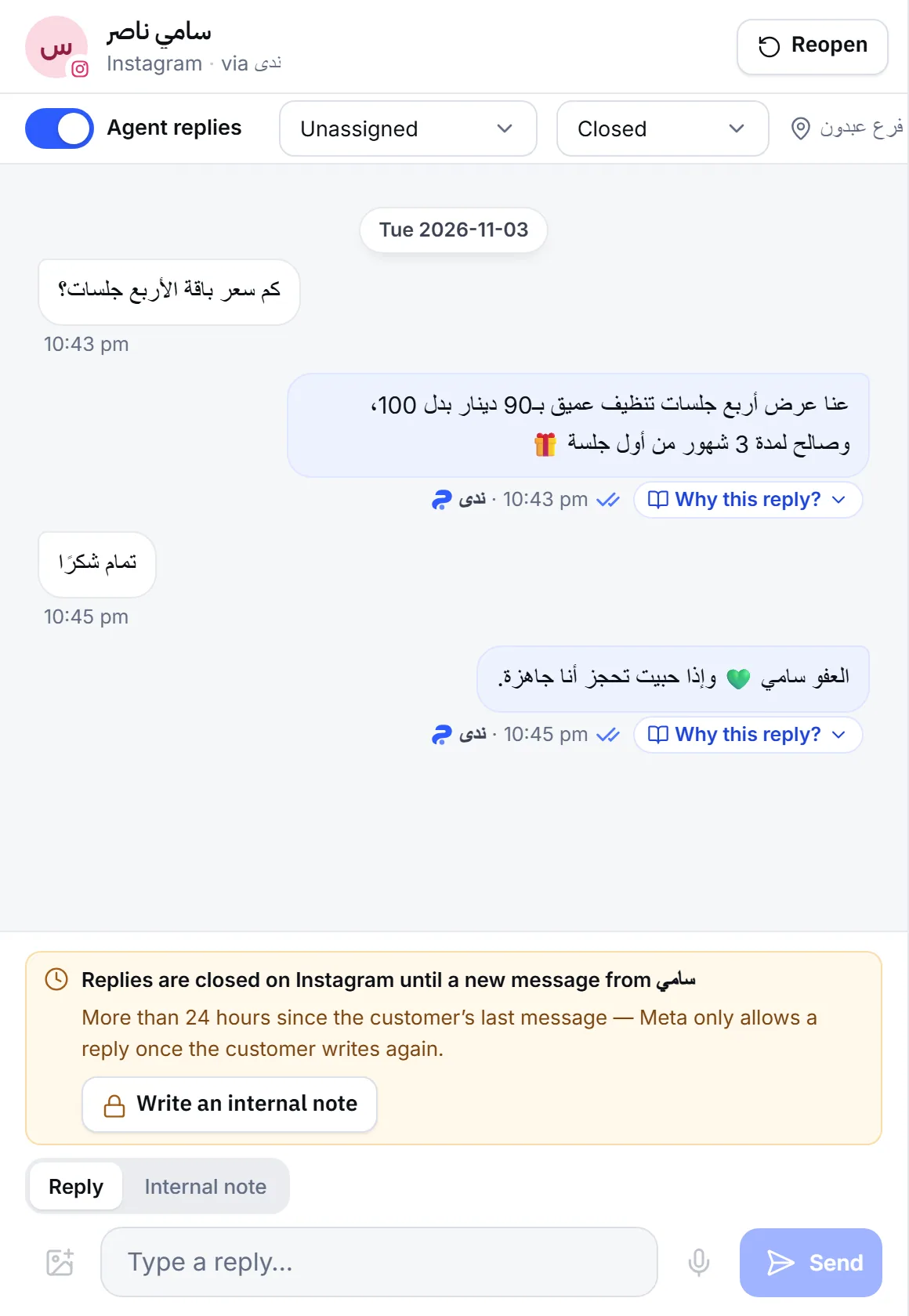
Mujib closes replies a little before the 24 hours are up, because a reply needs a moment to reach Meta, and one that lands a minute late is refused.
What do I do when the window has closed?
Section titled “What do I do when the window has closed?”Wait for the customer to write again; their first message reopens the window, and the agent and your team can reply straight away. Until then:
- Put what you want to say in an internal note. Press Write an internal note or open the Internal note tab; the note stays with your team, so whoever replies when the customer returns finds it.
- Reach the customer another way if they left a number in the conversation or on their card, for example on WhatsApp.
- Get back to conversations faster next time. Turn on phone notifications so you know the moment a message is waiting. See Notifications not arriving.
- If the customer is a commenter, a private reply to their comment does not open the window; the conversation starts when they answer. See Comment reply refused.
- Still stuck? If the window notice shows although the customer wrote a moment ago, write to abdalrahman@mujib.ai with the customer’s name, the channel and the time of their message.
Each channel is covered in Messenger and Instagram.
Frequently asked questions
Does the 24-hour window apply to WhatsApp?
No. The rule is for Messenger and Instagram only; Mujib does not limit WhatsApp replies by it.
Can I start a conversation with a customer on Messenger or Instagram?
No. Meta does not let a Page start the conversation, and the reply box shows “This customer has not messaged the page yet — Meta does not let the page start the conversation.”
Does a private reply to a comment open a new window?
No. The conversation starts when the commenter answers your private message, and the 24 hours count from their message.
Do Messenger and Instagram customers get appointment reminders?
Yes, if the window is open when the reminder is due. If it is closed the reminder is not sent, and it may still go out if the customer writes again early enough before the appointment.
Can I write an internal note after the window closes?
Yes. An internal note never reaches the customer, so the rule does not apply to it.