
Train your AI agent on your knowledge base
Your knowledge base is everything your agent knows about your business, and the only place it answers customers from: frequent questions, programs, policies, specialists and the documents you upload. What is not written there, the agent does not guess; it says it does not have that information. You manage it on the Knowledge page.
Training the agent takes no technical skill: you write a fact the way you would explain it to a new employee, and the agent puts it in its own words while keeping the fact exactly as you wrote it.
Where does the agent get its answers?
Section titled “Where does the agent get its answers?”Only from the entries in your knowledge base, and from the price list if your business sells packages and subscriptions. It does not take facts from the internet or from general knowledge.
- On every reply the agent reads the entries closest to the customer’s question, the entries you set to With every reply — critical, and your branch details.
- Branch details (locations, contact numbers, the specialists at each branch) come automatically from the Branches page, so you do not type them again here.
- Knowledge is information, not orders. A line such as “never mention prices” inside an entry is not treated as an instruction. How the agent talks belongs in its instructions.
To see where a reply came from, open the conversation and press Why this reply? under the agent’s reply: it lists Knowledge used for that reply.
How do I add an entry to the knowledge base?
Section titled “How do I add an entry to the knowledge base?”You add entries on the Knowledge page, and each one reaches the agent from the first reply after you save. Team members need the Manage knowledge permission.
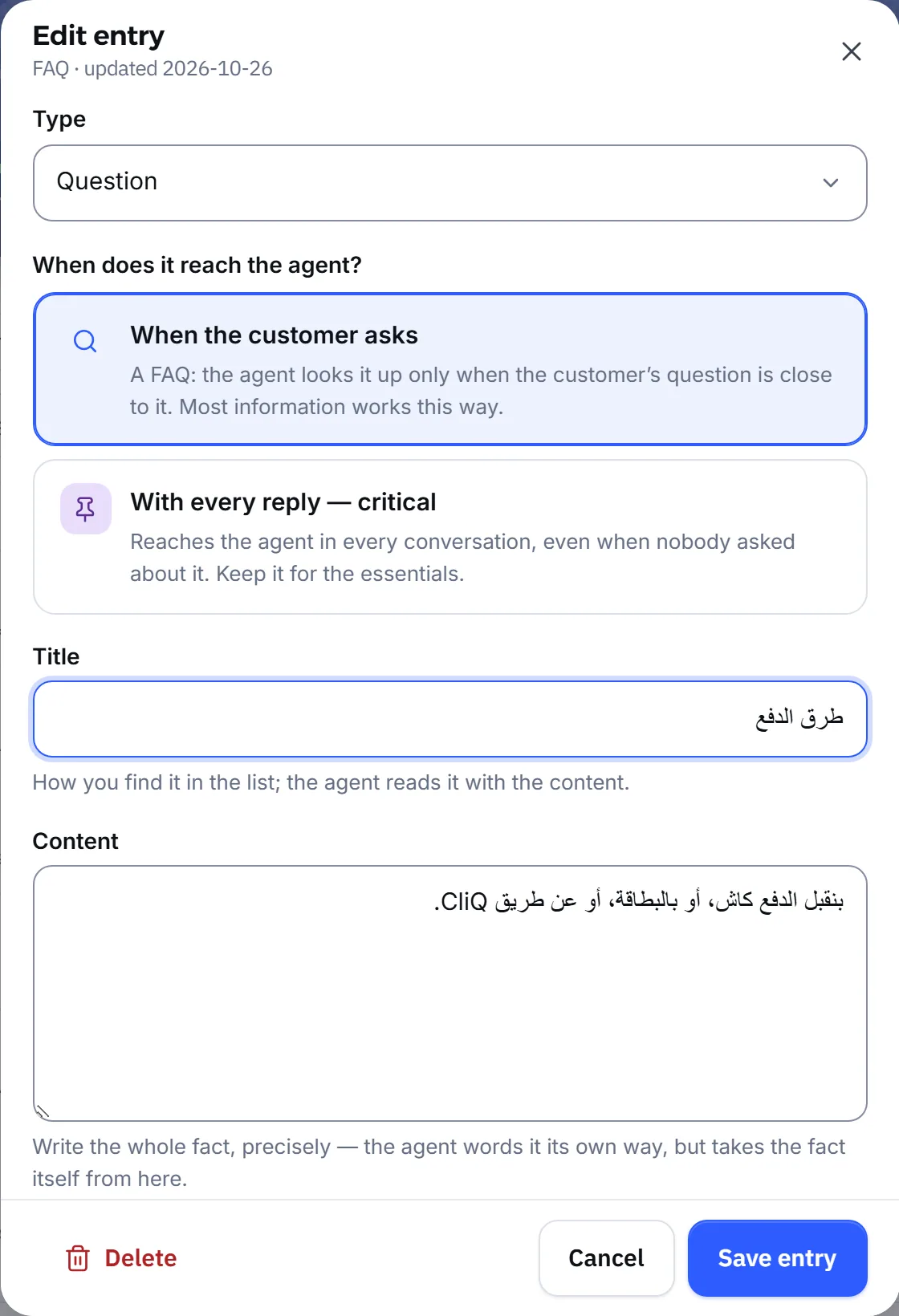
- Open Knowledge and press Add entry.
- In the Type list, pick the kind of entry: a question, Program, Policy, Specialist or Branch.
- For a question, choose under When does it reach the agent? when the agent reads it: When the customer asks or With every reply — critical.
- Write the Title in your customers’ own words, up to 200 characters.
- Write the Content in full and specific, up to 8000 characters: the price as a number, the duration, the conditions.
- Press Save entry.
What entry types are there, and when does the agent read each one?
Section titled “What entry types are there, and when does the agent read each one?”Each type has a purpose, and most of them reach the agent when the customer’s question is close to them.
| Type | What you write in it | When it reaches the agent |
|---|---|---|
| FAQ, set to When the customer asks | A frequent question and its answer | When the customer’s question is close to it |
| Critical FAQ, set to With every reply — critical | The essentials it needs in every conversation | With every reply, even if nobody asked |
| Program | A service, program or product and its details | When the customer’s question is close to it |
| Policy | Cancellation, refunds, payment and the like | When the customer’s question is close to it |
| Specialist | A specialist and what they do | When the customer’s question is close to it |
| Branch | A fact about a branch | With every reply |
| Document | A section of a file you uploaded | When the customer’s question is close to it |
| Correction | A fix your team wrote after a wrong reply | When the customer asks about the same thing |
Keep With every reply — critical for the essentials, with one copy of each fact. Document entries come from uploading files, and Correction entries from correcting the agent.
Does the agent make up information that is not there?
Section titled “Does the agent make up information that is not there?”No. When the agent cannot find a fact in the knowledge base, it tells the customer it does not have that information, and does not guess a price, a time, a name or an offer. It then hands the conversation to your team in the same reply, without promising to check and get back. If the agent is set never to hand off, it says it does not have the information and offers what it does know. See Handing off to your team.
- Missing is not the same as “no”. Asked about a discount you never wrote down, it says it has no information about discounts, not that there are none. It says “we don’t offer that” only when you wrote so explicitly.
- It does not calculate prices. It quotes the figure as you wrote it, never applies a percentage to a price, and never derives a figure from two different entries.
- When two entries disagree on a figure, it does not pick one: it hands the conversation to your team, or says it has no confirmed figure if the agent does not hand off.
- What the customer said in the conversation, such as their name or preferred time, the agent may repeat.
So the best way to improve replies is a knowledge base that is complete and has no duplicates. What the agent never does at all is on What the agent does not do.
How do I keep the information up to date?
Section titled “How do I keep the information up to date?”Edit the same entry when a fact changes; do not add a new one beside it. Two copies of one price are what confuses the agent most.
- Dates: under When is it live?, set Starts and Last day. Before the start day the agent does not see the entry, and after the last day it stops by itself, without you having to remember. This suits seasonal offers and holidays.
- Pause: Pause keeps an entry away from the agent while keeping it saved for later.
- Delete: permanent, with no undo. If in doubt, pause instead.
- Package prices: if your business sells packages, the agent takes their prices from Prices & offers, not from entry text, and an offer there ends by itself on its date. The page warns you when it finds a package price typed inside an entry. See Subscriptions.
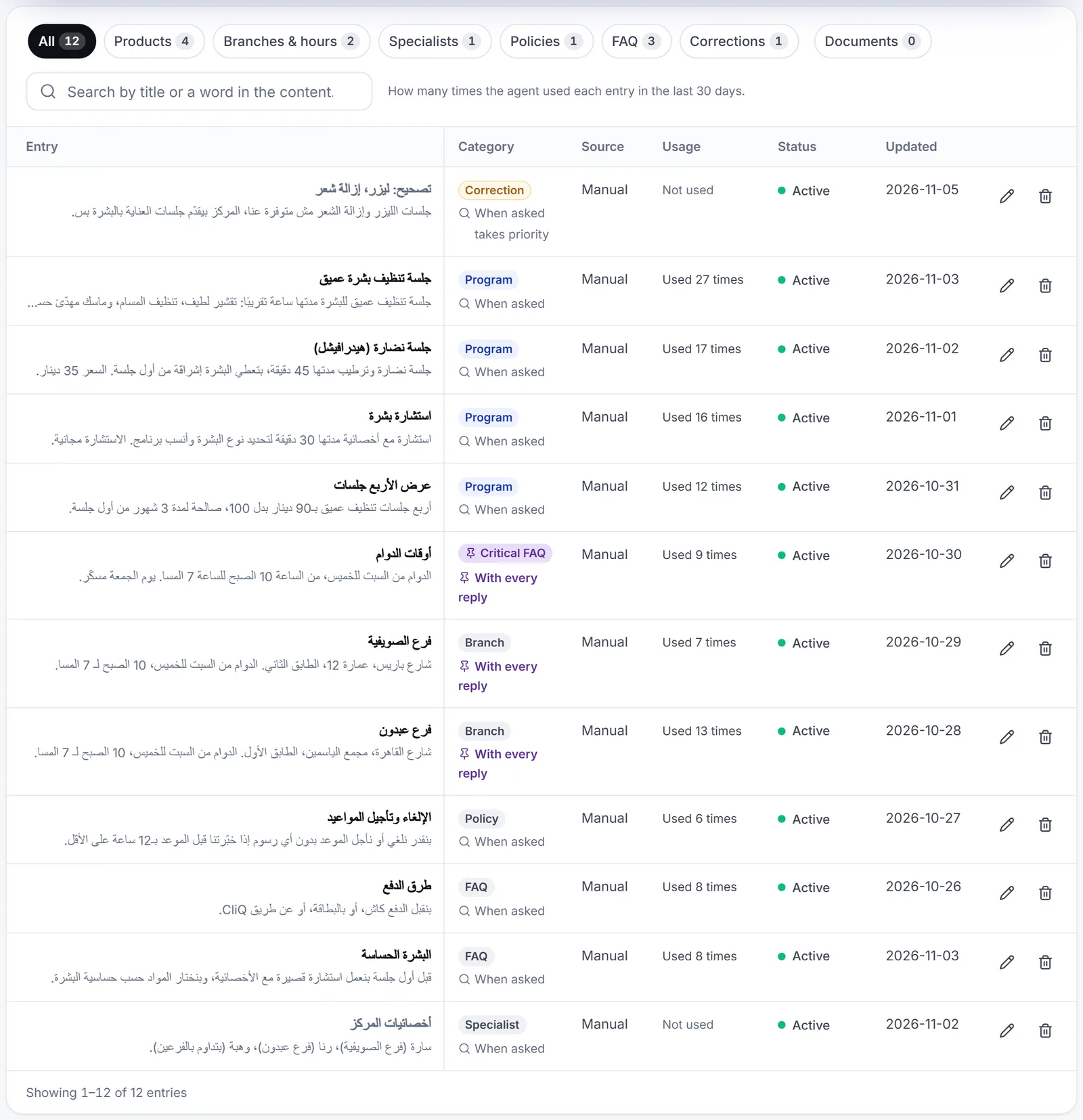
- Usage: the number beside each entry is how often it was used, as the page explains: How many times the agent used each entry in the last 30 days. An entry that is never used may be a duplicate, or its title may not match how customers ask.
Do my changes reach the agent right away?
Section titled “Do my changes reach the agent right away?”Yes. The agent reads the knowledge base on every reply, so anything you add, edit, pause or delete takes effect from the next reply, including in ongoing conversations. Replies already sent do not change.
Can Mujib read my website to fill the knowledge base?
Section titled “Can Mujib read my website to fill the knowledge base?”Yes, during setup. In the onboarding wizard you enter your website address, Mujib reads it and proposes information, and you review it before the agent uses any of it: nothing from the website reaches the knowledge base without your approval. To rebuild the setup later from a description of your business, an owner or admin presses Build from a description of your business in Agent Studio.
Frequently asked questions
Does the agent answer from general information on the internet?
No. The agent takes facts only from your business's knowledge base, plus the price list if you sell packages. What you have not written, it does not guess.
What does the agent say when a customer asks about something that is not written?
It says plainly that it does not have that information and hands the conversation to your team, never inventing a price, a time or a name. It only says a service is not offered when you wrote that explicitly.
When does the agent start using a new entry?
From the next reply after you save. The agent reads the knowledge base on every reply, so a change needs no restart and no waiting.
What is the difference between pausing and deleting?
A paused entry does not reach the agent but stays saved, so you can bring it back any time. Deleting is permanent and cannot be undone.
Should I type my branch addresses and hours into the knowledge base?
No need. Branch details, contact numbers and the specialists at each branch reach the agent automatically from the “Branches” page.