
Mujib: AI customer service agent for WhatsApp, Messenger, Instagram
Mujib is an AI customer service agent for businesses: it answers your customers’ messages on WhatsApp, Messenger and Instagram at any hour, in Modern Standard Arabic, Arabic dialects and English. It answers only from your business’s own information, books appointments, takes orders, and hands the conversation to your team when a person is needed.
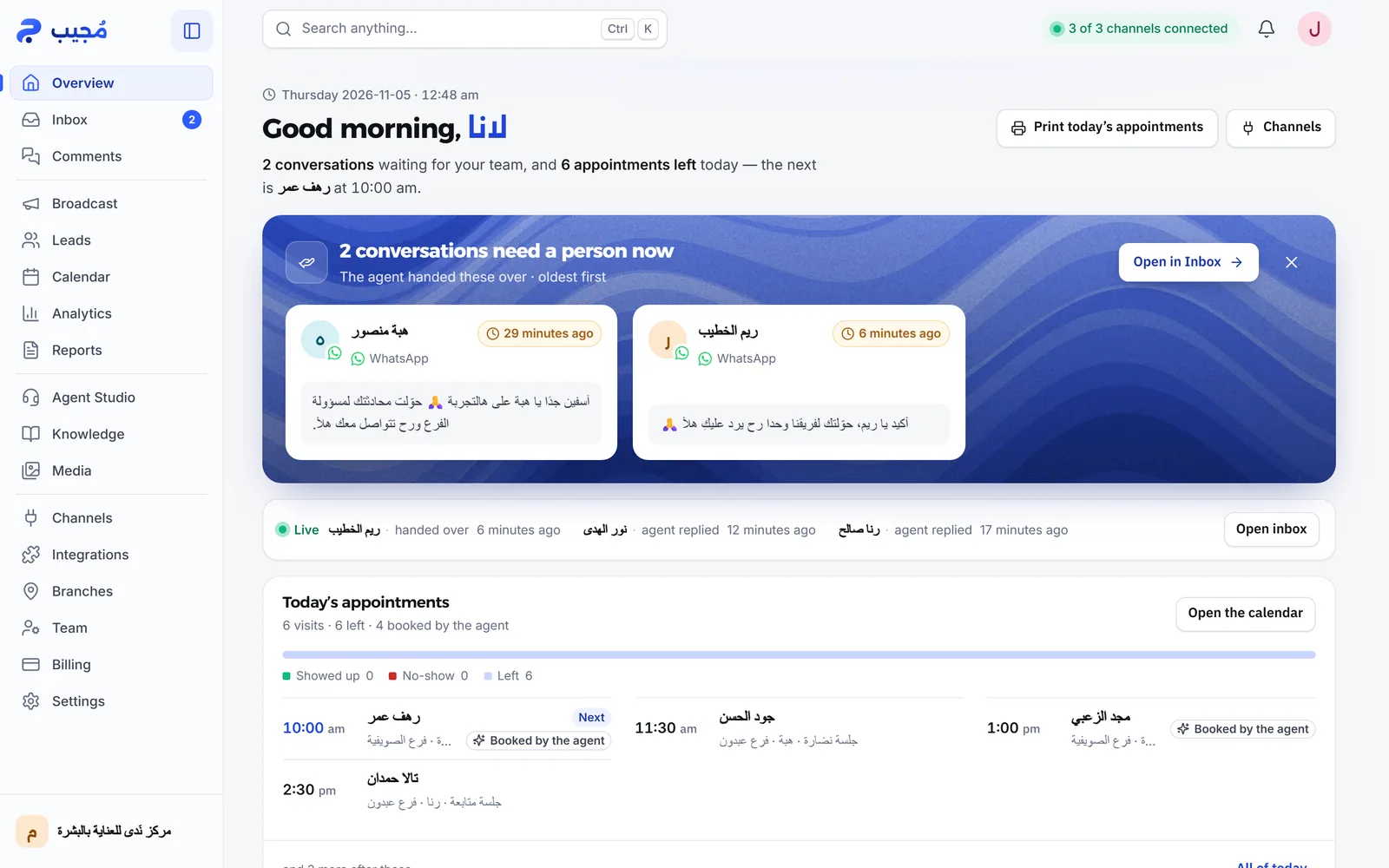
You run all of it from one dashboard, on a phone or a computer: conversations live in Inbox, you teach the agent in Knowledge, and you shape its personality in Agent Studio. Mujib is a product of المجيب الذكي لتكنولوجيا المعلومات, a limited liability company based in Amman, Jordan.
What does the Mujib agent do for my business?
Section titled “What does the Mujib agent do for my business?”The agent does the work of a customer service employee in written and voice conversations: it answers, books, records each customer’s stage, and passes your team whatever is not its job.
| What it does | How | Where you manage it |
|---|---|---|
| Answers customer questions | From the facts and files you approved for your business; it never guesses prices | Knowledge |
| Books, moves and cancels appointments | Within your branches’ hours, and tells you about every new booking | Calendar and Branches |
| Takes orders | From your product list, and tells customers where their order stands | Orders |
| Sends your location and photos | A map pin for the branch, and photos from your library | Branches and Media |
| Understands voice messages | Reads the voice note and answers it; on WhatsApp it can answer with a voice clip when voice replies are on | Agent Studio |
| Tracks leads | Records each customer’s stage from the conversation itself | Leads |
| Hands conversations to your team | When it does not know the answer or the customer asks for a person, and sends you an alert | Inbox |
Some of these sections depend on how your business works: a business that only answers inquiries has no need for a calendar, and one that sells products needs the orders section. You choose your business model in the setup wizard; see How booking works and Orders and menu.
Which channels does the agent answer on?
Section titled “Which channels does the agent answer on?”The agent answers on WhatsApp, Facebook Messenger and Instagram, and you connect each one from the Channels page.
- WhatsApp: Mujib links to your current business number as a linked device, like WhatsApp Web, so no new SIM is needed. See Connect WhatsApp.
- Messenger: you log in with Facebook and pick your business Page, and the agent answers its messages.
- Instagram: the account linked to your Facebook Page connects together with the Page, and the agent answers direct messages and story replies. See Connect Instagram and Messenger.
- Comments: when you turn it on, the agent can answer comments on your posts with a private message to the person who commented, and the Comments page gathers your posts’ comments so you can follow them up. See Comments.
For Messenger and Instagram, the Channels page shows Meta Verified Tech Provider · for Messenger & Instagram. Whether these two channels are available depends on your subscription.
Which languages does the agent speak with customers?
Section titled “Which languages does the agent speak with customers?”The agent speaks Modern Standard Arabic, the Jordanian, Levantine, Gulf, Saudi, Egyptian and Iraqi dialects, and English. You pick the dialect in the agent’s settings, then choose the reply language:
- Automatic: it answers in the language of each message, so a customer who writes in English gets English back.
- Arabic only or English only: it keeps to one language whatever the customer writes.
You also set its name, its conversation style and how many emojis it uses. See Tone, dialect and language.
Does the agent replace a customer service employee?
Section titled “Does the agent replace a customer service employee?”The agent does not remove your team’s role; it takes the repeated questions, bookings and orders off their hands at any hour, and leaves them what needs a person.
- When the answer is not in your information, or the customer asks to talk to someone, the agent hands the conversation to your team and stops replying in it.
- You get an alert for every handoff: a notification on your phone, and a WhatsApp message to your alert number if you set one.
- By default the agent returns to a handed-off conversation after a full day with no messages, and you can change that. See Human handoff and Auto-resume.
- When you or a teammate reply in a conversation, the agent stops replying in it. See Your reply pauses the agent.
What does the agent not do?
Section titled “What does the agent not do?”The agent does not act beyond what you allowed. Its main limits:
- It does not make things up: when the answer is not in your knowledge, it does not guess; it hands the conversation to your team.
- It does not answer before you switch it on: nothing reaches your customers during setup, and it starts answering only after you switch it on yourself and connect a channel.
- It writes no posts: it publishes nothing on your Page or account, and answers comments with a private message. Public replies under comments are available on request.
- It does not use tools you did not turn on: it does not book when your business takes no bookings, and takes no orders while the orders section is off.
The full list is in What the agent does not do, and how an agent differs from canned auto-replies is in Agent or auto-reply?.
Who is Mujib for?
Section titled “Who is Mujib for?”Mujib is built for service businesses that get many similar questions on WhatsApp and social media and need a fast answer at any time. During setup you choose how your business works, and the agent and the dashboard adapt to it:
| Business model | Example | What the agent does most |
|---|---|---|
| Questions and inquiries | A services office | Answers, and hands special requests to your team |
| Appointments | A clinic, a salon | Offers free slots and books them |
| Product orders | A restaurant, a shop | Shows the menu and takes the order |
| Subscriptions and visits | A nutrition center, a gym | Books visits and knows who already has a recorded subscription |
Ready-made guides by sector: clinics, nutrition centers, academies and training centers, salons.
Where do I start?
Section titled “Where do I start?”Start with Quick setup: create your account, go through the setup wizard that reads your website, then test the agent and connect your channel. After that:
- Go through the launch checklist before the agent takes real customers.
- Install the Mujib app on your phone to get notifications.
- Teach the agent more in the knowledge base.
- Connect Mujib to your other tools from Integrations, or build on it with the developer API.
- General questions: FAQ and About Mujib.
Frequently asked questions
Do I need a new WhatsApp number to use Mujib?
No. Mujib links to your current business number as a linked device, and the number keeps working on your phone as usual, whether it is a regular WhatsApp number or a WhatsApp Business number.
Does the agent make up prices or information?
No. It answers only from the information you approved for your business, and when it cannot find the answer it hands the conversation to your team instead of guessing.
Does the agent speak my customers' dialect?
Yes. You pick an Arabic dialect, Modern Standard Arabic or English, and by default it replies in the language the customer writes in.
What name does the agent use with customers?
A name you choose during setup. It introduces itself with that name when it talks to your customers.
How much does Mujib cost?
Plans and prices are on https://mujib.ai/pricing, and the billing page explains how billing works.