
Reduce appointment no-shows with reminders and easy rescheduling
To reduce appointment no-shows, work on two things you control: that customers remember their appointment at the right time, and that they can change it easily when it no longer suits them. A reminder fixes forgetting, and rescheduling by message turns a silent no-show into a new appointment, or into a free slot you can give to someone else.
You cannot prevent every no-show, but an empty chair you know about in advance costs far less than one waiting for a customer who will not come.
Which causes of no-shows can your business control?
Section titled “Which causes of no-shows can your business control?”Four causes of no-shows are in your hands: forgetting, hard rescheduling, appointments booked long ago, and unclear details.
| Cause | What it looks like | Fix |
|---|---|---|
| Forgetting | The customer booked, got busy and forgot | A reminder well before the appointment |
| Hard rescheduling | They want to change it but have to call during opening hours | Rescheduling and cancelling by message in the chat |
| Booked long ago | Booked weeks ago, and their plans changed | A reminder that implicitly asks whether the time still works |
| Unclear details | They are unsure of the branch, the address or what to bring | A reminder naming the branch, the location and any preparation |
Other causes, such as sudden illness or an emergency, cannot be prevented, but the same ease makes customers tell you instead of silently staying away.
When should an appointment reminder arrive?
Section titled “When should an appointment reminder arrive?”At its best, a reminder arrives early enough for the customer to plan their day, or to cancel in time for you to give the slot to someone else.
- The day before suits most ordinary visits: close enough to remember, far enough ahead to rearrange the day.
- Earlier for appointments that need preparation, such as fasting before a test or bringing documents.
- During the day: a reminder that lands at midnight annoys more than it reminds.
- No reminder for an appointment just booked: if the customer booked this morning for this evening, the booking confirmation is enough.
- One reminder per appointment in most cases; repeated messages about the same visit teach customers to ignore them.
What should an appointment reminder say?
Section titled “What should an appointment reminder say?”A reminder should hold everything the customer needs to turn up without asking: your business name, the type of visit, the day and time, the branch, and how to change it.
- Your business name first, since customers get messages from many senders.
- The type of visit as the customer knows it: “laser session” is clearer than “your appointment”.
- The day by name, with the date and time, plus “morning” or “evening” so the hour is not misread.
- The branch and its location if you have more than one.
- Any preparation the visit needs.
- A line about changes: “If you need to change the time, just reply here.” That sentence is what turns a likely no-show into a message.
Example:
A reminder from Elite Center: your consultation is on Thursday at five in the evening at the main branch. If you need to change the time, just reply here.
Because the customer asked for the appointment, the reminder is a message they expect, which is the heart of what the WhatsApp Business Messaging Policy asks when it says people should expect the messages they receive. If a customer asked you not to message them, respect that in reminders too.
How does easy rescheduling reduce no-shows?
Section titled “How does easy rescheduling reduce no-shows?”Easy rescheduling turns a no-show into one of two better outcomes: a new appointment for the same customer, or a free slot for another one.
- Make changes possible by message: a customer who replies “I need to move it” should get an answer, not a number to call during opening hours.
- Offer alternatives at once: times that are really free on the day or at the branch that suits them.
- Release the old time immediately so it can be booked again, rather than leaving it blocked until the end of the day.
- Tell the team about the change: a receptionist waiting for a customer who has cancelled is wasting time too.
If some customers asked for an earlier time and could not get one, keep their names and tell them when a slot opens; an early cancellation then becomes another customer’s appointment instead of an empty hour.
Do reminders reach customers on Messenger and Instagram the same way as WhatsApp?
Section titled “Do reminders reach customers on Messenger and Instagram the same way as WhatsApp?”Not always, because Meta allows standard messages on Messenger and Instagram within 24 hours of the customer’s last message.
The Messenger Platform and Instagram Messaging API policy says the standard messaging window lasts 24 hours for most user actions, and that sending outside it is limited to specific cases. So if a customer booked on Instagram a week ago and has not written since, you may not be allowed to send them a reminder there.
The practical answer is to confirm the full appointment details when the customer books, ask for a phone number so your team can reach them if needed, and remind them to write to you if they want to change anything. The window is explained in full in the 24-hour window.
How do I know reminders are really reducing no-shows?
Section titled “How do I know reminders are really reducing no-shows?”Record whether each customer came or not, and compare the no-show rate over a long enough period before and after you change your approach.
- Record attendance every day, not at the end of the month, when the details are forgotten.
- Keep no-shows apart from cancellations: a customer who cancelled in advance gave you a chance; one who never came gave you nothing.
- Watch customers who miss repeatedly: they may need a personal call, or a clear policy explained when they book.
- Change one thing at a time: the reminder’s timing or its wording, so you know which one made the difference.
How does Mujib help reduce no-shows?
Section titled “How does Mujib help reduce no-shows?”Mujib sends a reminder before every appointment, handles rescheduling and cancelling in the chat, and lets you record who came and who did not.
- Reminders: the customer gets one 24 hours before the appointment unless you change it, and you set the lead time for your whole business under Remind the customer before the appointment, in Booking settings on the Branches page. Reminders go out only between 09:00 and 21:00 in the branch’s time zone, never for an appointment booked shortly before it, and each appointment gets one reminder naming the visit type, the day and time, and the branch when the visit has one. Appointments your receptionist enters with the customer’s phone number get the reminder on WhatsApp too. Customers you marked Do not contact get no reminder. The details are in appointment reminders.
- Rescheduling and cancelling: when the customer replies asking to change the appointment, the agent moves it to a free time or cancels it, even when reception booked it on their number. The old time becomes free to book again, and your branch is alerted to the change. On Messenger and Instagram the reminder stays on the channel the appointment was booked from, so it is not sent once the 24-hour window has passed, and it goes out if the customer writes again early enough before the appointment. The details are in rescheduling and cancelling.
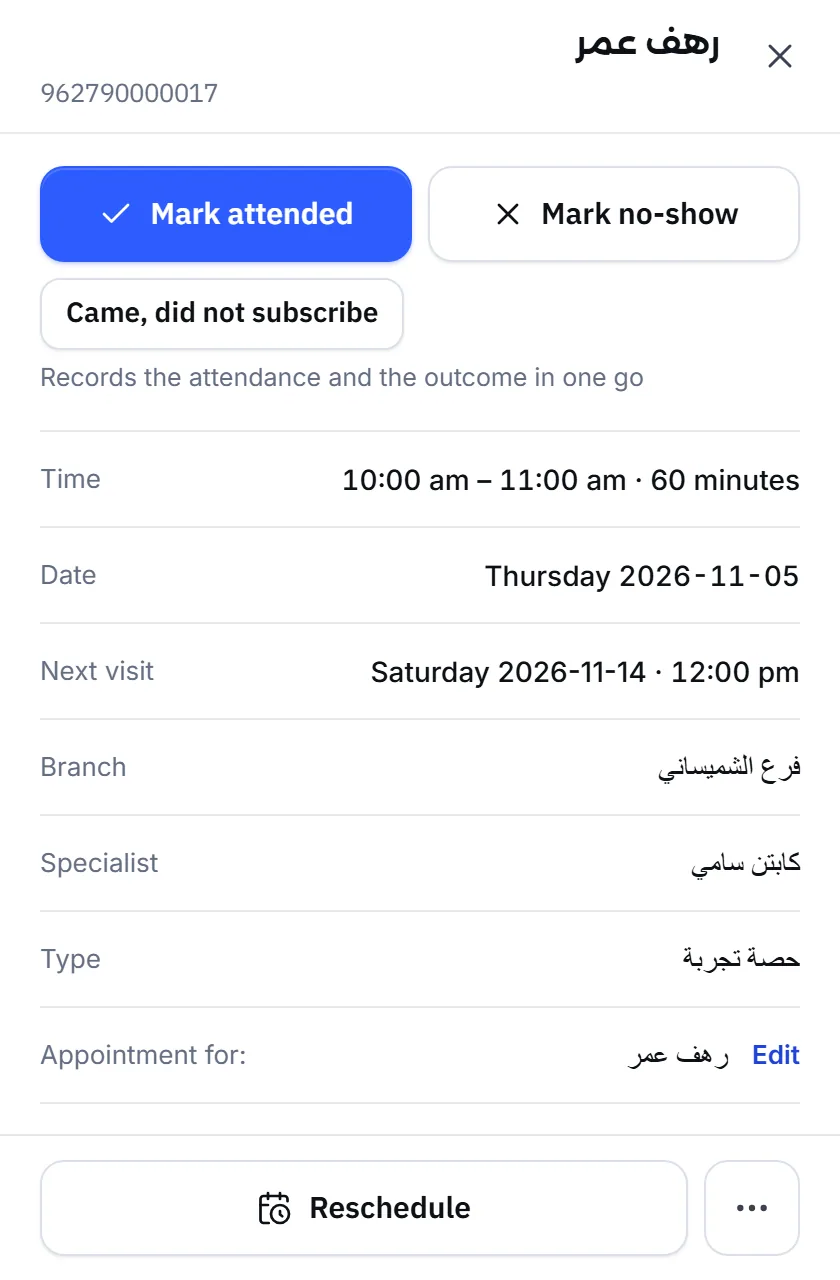
- Attendance: press Mark attended or Mark no-show in the appointment’s details in Calendar, and see how many came in Analytics. The details are in appointment attendance.
Frequently asked questions
When should an appointment reminder go out?
Early enough for the customer to plan their day, or to cancel in time for you to give the slot to someone else, and during the day rather than at night. The day before suits most ordinary visits.
Is a reminder enough on its own?
No. A reminder only fixes forgetting. A customer whose appointment no longer suits them needs an easy way to reschedule or cancel by message, or they will simply not turn up.
Can customers reschedule by replying to the reminder?
In Mujib, yes. The customer says in the chat that they want to move or cancel, the agent moves the appointment to a free time or cancels it, and your branch is alerted to the change.
Why didn't a customer who booked on Instagram get a reminder?
Meta allows standard messages on Messenger and Instagram only within 24 hours of the customer's last message. In Mujib, once that window has passed the reminder is not sent, and it goes out if the customer writes again early enough before the appointment.
How do I know reminders are working?
Record whether each customer came or not, and compare the no-show rate over a long enough period before and after you change your approach.