
Arabic dialects, reply language and tone of your AI agent
Your Mujib agent reads customer messages in Arabic and English, and writes its Arabic replies in the dialect you choose from 8 options that cover the main Arabic dialects and Modern Standard Arabic. The reply language follows the customer: Arabic gets Arabic, English gets English, unless you limit it to one language.
You set the dialect, language and tone in the Personality section of the agent editor. All of them change only the wording; facts come from your knowledge base as written.
Does the agent understand Arabic dialects?
Section titled “Does the agent understand Arabic dialects?”Yes. The dialect you choose sets how the agent writes, not what it understands, so it reads a customer’s message whatever their dialect and answers in the dialect you picked. The editor says so under the option: Affects Arabic replies only.
Which dialects can the agent write in?
Section titled “Which dialects can the agent write in?”The agent writes in one of 8 options: Jordanian, Levantine (Syrian/Lebanese/Palestinian), Gulf, Saudi (Najdi), Egyptian, Iraqi, Modern Standard Arabic and English. The default is Jordanian.
| Option in the editor | How the agent writes |
|---|---|
| Jordanian | Everyday Amman Arabic; the default |
| Levantine (Syrian/Lebanese/Palestinian) | Everyday Levantine Arabic |
| Gulf | Gulf Arabic |
| Saudi (Najdi) | Saudi (Najdi) Arabic |
| Egyptian | Egyptian Arabic |
| Iraqi | Iraqi Arabic |
| Modern Standard Arabic | Clear Modern Standard Arabic with no slang, suited to a formal business |
| English | Assumes the customer prefers English, and replies in English |
The agent keeps to the chosen dialect in its vocabulary and its greeting, and the dialect does not affect its English replies.
Does the agent reply in the customer’s language?
Section titled “Does the agent reply in the customer’s language?”Yes, with the default Auto: it answers each message in the language the customer wrote it in. You can limit replies to one language under Reply language.
| Option | What the agent does |
|---|---|
| Auto | Answers Arabic in Arabic, in your dialect, and English in English, and mirrors a customer who mixes the two |
| Arabic only | Always answers in Arabic, even when the customer writes English |
| English only | Always answers in English, even when the customer writes Arabic |
- The language comes from the customer only: the language of your knowledge or of branch names never changes it, and a short reply such as “yes” or «تمام» keeps the conversation’s language.
- The agent is built for Arabic and English. The editor says so: The agent always understands Arabic and English — here you pick which one it answers in.
- The English dialect with the auto language makes it answer in English even to Arabic messages. With Arabic only, the editor warns you about the conflict.
Does the agent write long replies?
Section titled “Does the agent write long replies?”No. The agent writes short, chat-style replies made for WhatsApp, whatever its dialect and tone:
- One idea per message, in a few lines rather than long paragraphs.
- It responds to what the customer said first, then answers.
- It asks one question at a time, and sends no long lists unless the customer asks for one.
- It varies its wording and does not repeat the same sentence in a conversation.
How do I change the agent’s dialect and reply language?
Section titled “How do I change the agent’s dialect and reply language?”You change both in the agent editor, and they apply from the next reply.
- Open Agent Studio and press Edit on the agent’s card.
- In the Personality section, pick from the Dialect list.
- Under Reply language, choose Auto, Arabic only or English only.
- Check the Illustration under the options, then press Save.
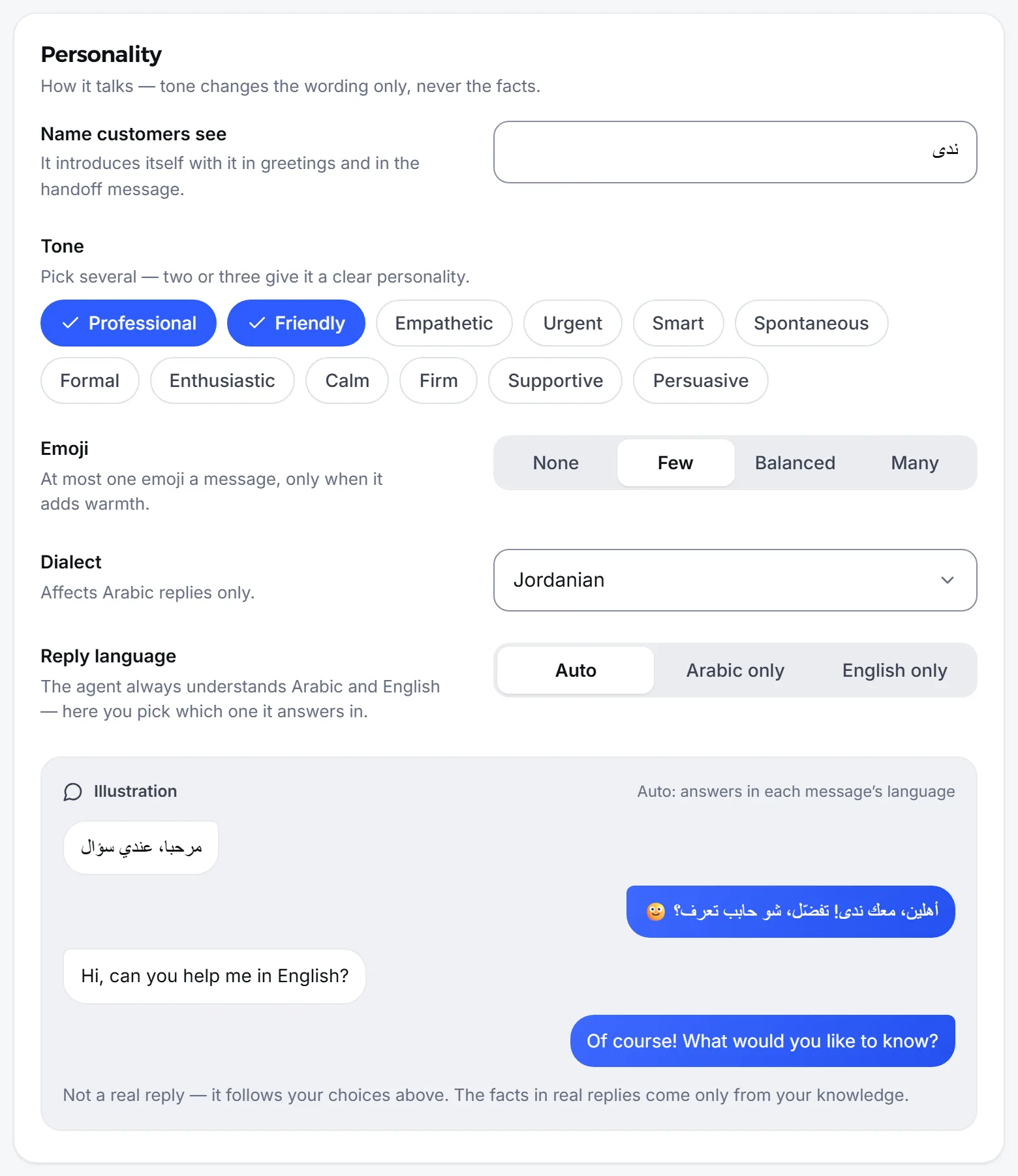
The illustration is not a real reply: it changes with your choices to show the style only, and the facts in real replies come from your knowledge.
How do I set the agent’s tone and words?
Section titled “How do I set the agent’s tone and words?”You set the tone in the same section and the words in Words. All of it changes the wording, not the facts.
- Tone: choose one or more of 12 tones, such as Friendly, Professional and Calm. Two or three give a clear personality.
- Emoji: None, Few, Balanced or Many. The default is Few.
- Preferred words: words and phrases it tries to use when they fit, such as a greeting you like.
- Forbidden words: words it never uses, such as a promise you dislike. A forbidden word changes only its wording; it does not hand the conversation to staff.
Each word list holds up to 50 words or phrases. Anything beyond style, such as the agent’s goal and rules, belongs in its instructions.
Frequently asked questions
What is the agent's default dialect?
Jordanian. Change it any time under “Dialect” in the agent editor.
Does the agent answer in English when a customer writes in English?
Yes, when “Reply language” is set to “Auto”, the default. It answers each message in that message's language.
Does the dialect change the information the agent gives?
No. Dialect and tone change only the wording; the facts stay exactly as you wrote them in the knowledge base.
Can one agent use one dialect and another agent a different one?
Yes. Each agent has its own dialect, language and tone in its editor. If your business runs more than one agent, set each one separately.
Does the dialect change the accent of voice replies?
No. The dialect sets how the agent writes; voice replies are spoken with a Jordanian accent, as in the samples you hear when choosing a voice.