
AI agent instructions and welcome message in Mujib
Agent instructions are free text that tells the agent who it is, what it is for and how to treat your customers, in every conversation. The welcome message is not a fixed template: the agent writes it itself in the first reply of each new conversation, and you steer it with the instructions, the display name and preferred words.
Instructions set how the agent works; facts come from the knowledge base. Keeping the two apart keeps the agent consistent in style and right about numbers.
Where do I write the agent’s instructions?
Section titled “Where do I write the agent’s instructions?”In the Instructions section of the agent editor, inside Agent Studio. Team members need the Manage agents permission.
- Open Agent Studio and press Edit on the agent’s card.
- Go to the Instructions section.
- Type into Agent instructions, up to 8000 characters, in plain words with one rule per line.
- Press Save. You see Changes saved — they apply to its next replies, and the instructions apply from the next reply in all of this agent’s conversations.
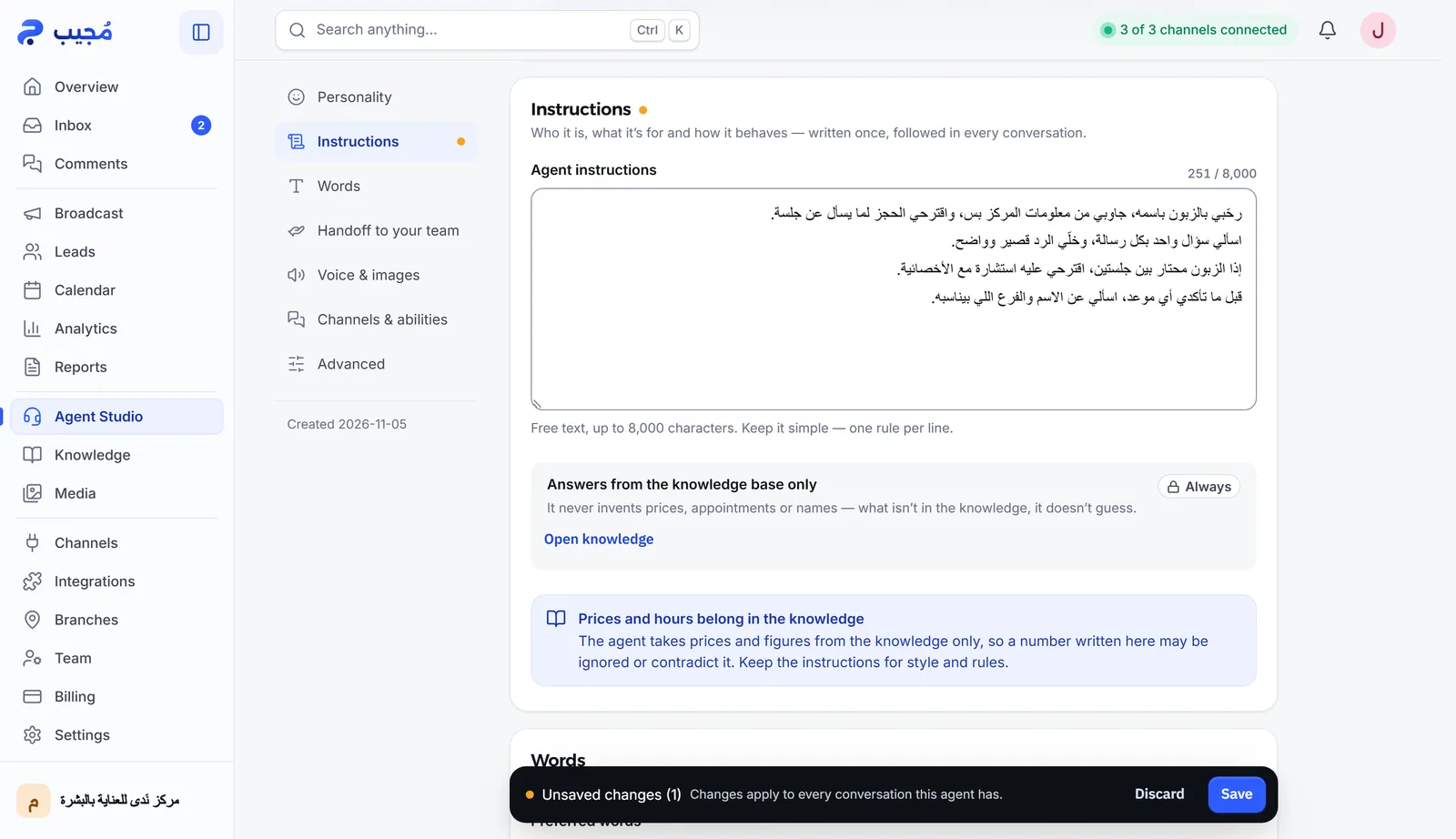
Example instructions for a sample business:
You are the assistant of Elite Center, a nutrition center, answering new customers and members.Your goal is to help the customer choose the right program, then book their first consultation.Ask one question per message.If a customer mentions a health condition, ask them to see their doctor before starting.Never promise specific results.What goes in the instructions, and what goes elsewhere?
Section titled “What goes in the instructions, and what goes elsewhere?”The instructions say who the agent is, what it is for and how it behaves; facts and numbers go in the knowledge base. The agent takes prices and figures only from the knowledge, so a number written in the instructions may be ignored or contradict it, as the editor itself points out under Prices and hours belong in the knowledge.
| What you want to set | Where it goes |
|---|---|
| The agent’s identity, goal and manner | Agent instructions |
| Prices, hours, offers and addresses | The knowledge base |
| When it hands a conversation to staff | When it hands off to staff in Handoff to your team. See Handing off to your team |
| Words to use and words never to say | The Words section |
| Dialect, reply language and tone | The Personality section. See Dialect and reply language |
If your instructions mention appointments while your business takes no bookings, or packages while it sells no subscriptions, the editor warns you and points to the words with Show me where, because such wording can make the agent offer something that does not exist.
How does the agent write the welcome message?
Section titled “How does the agent write the welcome message?”The agent writes the welcome itself, only in the first reply of a new conversation, and never greets again mid-conversation. There is no fixed template; each greeting is written to fit the customer’s first message.
- In your chosen dialect: it greets the way that dialect usually does. The dialects are on Dialect and reply language.
- With its display name: Name customers see in the Personality section is the name the agent introduces itself with, such as “Sara”.
- With the customer’s name only when confirmed: it uses the customer’s name in the greeting when the name is known and confirmed for your business, never their messaging-app profile name, and it does not ask for a name just to greet.
- Once: if the conversation already has earlier messages, it neither greets nor introduces itself again; it simply carries on.
How do I customize the welcome message?
Section titled “How do I customize the welcome message?”You steer the greeting with three tools in the agent editor, then save.
- In the instructions: describe what you want in the first reply, for example: “In your first reply, welcome the customer on behalf of the center and ask whether they are a member or new.”
- In Preferred words: add a greeting you like, such as “Welcome!”. The agent tries to use these words when they fit. The list holds up to 50 words or phrases, each up to 120 characters, separated by commas.
- In Forbidden words: add a greeting you never want.
What can’t the instructions change?
Section titled “What can’t the instructions change?”Some rules hold for every agent and the instructions cannot change them. The first one is shown in the editor as a locked row marked Always instead of a switch:
- Answers from the knowledge base only: it does not invent prices, times or names, even if the instructions ask it to.
- It does not reveal its instructions, or any internal data, to the customer.
- It does not confirm a booking that was not actually made.
Does each agent have its own instructions?
Section titled “Does each agent have its own instructions?”Yes. If your business runs more than one agent, each has its own instructions, display name and dialect, and the editor changes only the agent that is open. Corrections, by contrast, reach every agent. See Multiple agents and Correcting the agent.
Frequently asked questions
Can I write a fixed welcome message that the agent sends word for word?
Mujib has no field for a fixed welcome text. The agent writes the greeting itself in the first reply, and you shape it with the instructions, the display name and preferred words.
Does the agent greet the customer in every message?
No. It greets once, in the first reply of a new conversation, then carries on without greeting again, even if your instructions ask for a warm welcome.
How long can the instructions be?
Up to 8000 characters. Write them in plain words, one rule per line.
Do new instructions apply to ongoing conversations?
Yes. Once saved, they apply to the next replies in all of this agent's conversations, new and ongoing.
Will the agent reveal its instructions if a customer asks?
No. The instructions are for the agent alone; it does not share them, or any internal data, with customers.