
Reply from your phone or the dashboard and the AI agent pauses
When you reply to a customer yourself, the agent stops replying in that one conversation, whether your reply came from your phone in WhatsApp, from the Mujib dashboard, or from your Page inbox on Facebook and Instagram. That way you never both answer the customer’s next message, and every other conversation stays with the agent.
This happens on its own, with no button to press. The reason is simple: an agent and a person answering together can tell the customer two different things.
What happens if I reply to the customer from my phone?
Section titled “What happens if I reply to the customer from my phone?”The agent stops in that conversation, and your reply shows inside it in Mujib as Staff, just as if you had typed it in the dashboard.
Mujib joins your number as a linked device, so it sees what you send from WhatsApp on the phone that carries the number. When your reply arrives:
- The agent stops in this conversation, and it is tagged Agent off.
- If the conversation was tagged Needs human, it moves to Open, because someone on your team really did answer.
- Replying from your phone does not mark the conversation read in Mujib; the unread count stays until you open it in the dashboard.
- If you start a new conversation from your phone with a customer who has not written to you recently, it begins with the agent off and the agent never returns to it by itself. Switch it on yourself if you want.
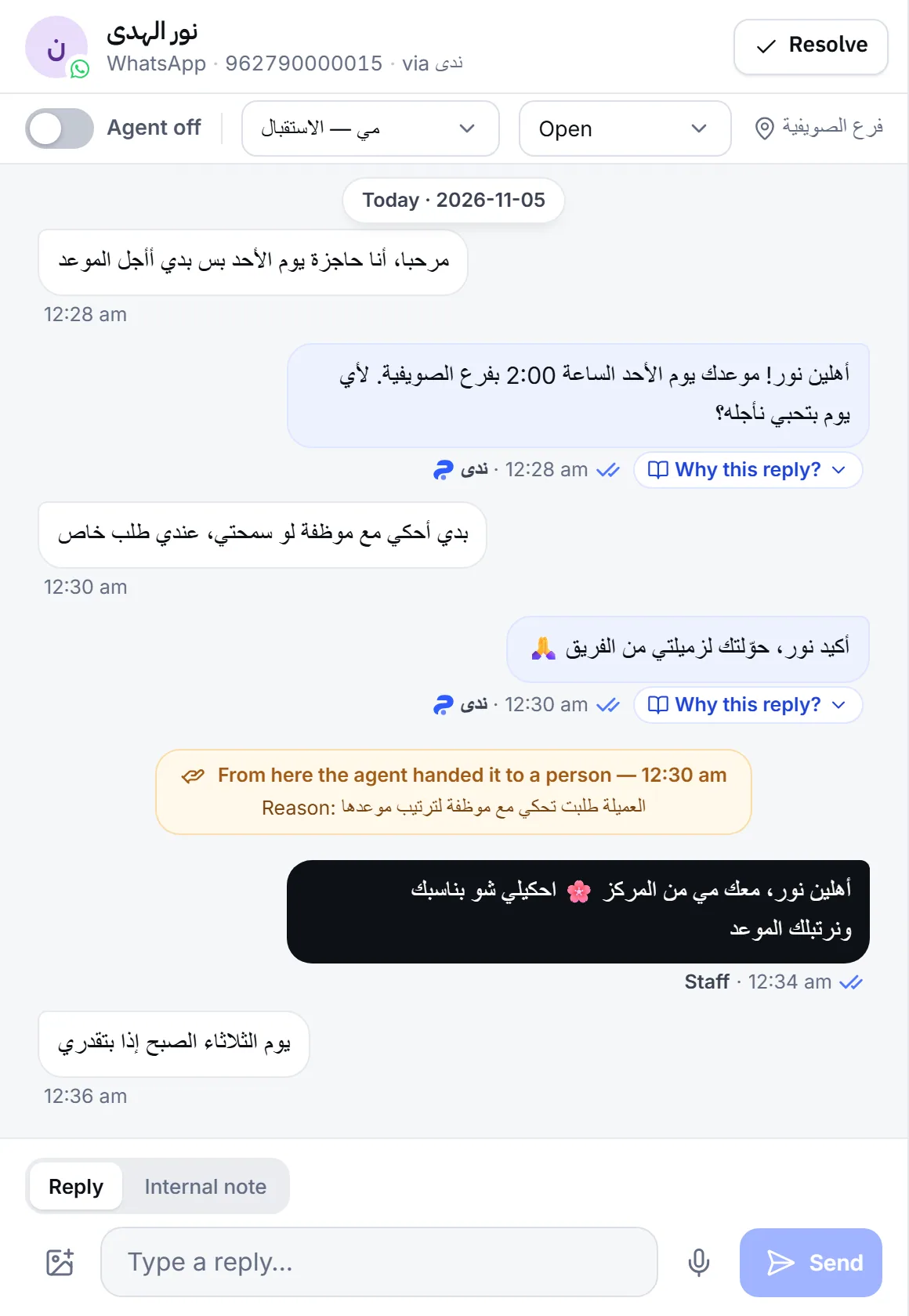
Does the agent pause when I reply from the Mujib dashboard?
Section titled “Does the agent pause when I reply from the Mujib dashboard?”Yes. Any reply you send from the reply box, whether text, a photo or a voice note, pauses the agent in this conversation and moves it from Needs human to Open.
The reply box reminds you before you send: while the agent is answering the conversation, Your reply pauses the agent here shows above the box. An Internal note never reaches the customer and does not pause the agent.
The agent also keeps going when you change an order’s status on the Orders page and the customer gets a notice about it, because an order notice is not a person stepping into the conversation.
Does the agent pause when I reply from the Facebook Page inbox or the Instagram app?
Section titled “Does the agent pause when I reply from the Facebook Page inbox or the Instagram app?”Yes. A reply you type in your Page inbox, in Meta Business Suite, or in the Instagram app reaches Mujib and pauses the agent exactly like a dashboard reply.
The one exception is the Page’s own automatic reply, such as an instant reply or an away message you set up in Meta: a message that leaves within 5 seconds of the customer’s message counts as automatic, since no person reads and types that fast. It shows in the conversation, but it does not pause the agent or change the conversation’s status.
| Where you replied | Does the agent pause? | Conversation status afterwards |
|---|---|---|
| The Mujib reply box | Yes | Open |
| WhatsApp on the phone that carries the number | Yes | Open |
| The Page inbox or the Instagram app | Yes | Open |
| The Page’s automatic reply in Meta | No | Unchanged |
| An order status notice | No | Unchanged |
| Internal note | No | Unchanged |
How do I know the agent is paused in a conversation?
Section titled “How do I know the agent is paused in a conversation?”The Agent off tag shows on the conversation’s row, and inside it the Agent replies here switch is off with Agent off beside it. On a phone the status line under the conversation header says so, with a Hand back to the agent button.
The pause is for this conversation only, as the line under the switch in Conversation actions says: Off here only — other conversations are not affected. To stop the agent for every customer at once, use the main switch; see Turn the agent on or off.
How does the agent start replying again?
Section titled “How does the agent start replying again?”It comes back in one of three ways, and each time it starts from the customer’s next message rather than answering what it missed:
- You bring it back: turn on Agent replies here in the control bar, or press Hand back to the agent on a phone.
- AI agent resume: if you turned it on for your business, the agent takes back a paused conversation after a stretch in which nobody writes. See AI agent resume.
- An appointment reminder: with auto-resume on, when a reminder goes out in a conversation where nobody on your team has written for 12 hours, the agent takes the conversation back to answer the customer’s reply.
Auto-resume skips Closed conversations, a reminder does not take back a conversation tagged Needs human, and neither returns a conversation the spam detector paused. Replying to a flagged conversation does not clear its flag; see Spam detection.
Why isn’t the agent replying in a conversation I never answered?
Section titled “Why isn’t the agent replying in a conversation I never answered?”Usually someone on your team replied from the phone or from the Facebook Page, or the agent handed the conversation to a person. Open it and look for the last message from Staff, or for a From here the agent handed it to a person line. If Auto-reply is off on this channel shows, auto-reply is off for the whole channel. For other causes, see The agent is not replying.
Frequently asked questions
Does the agent stop in every conversation when I reply to one customer?
No. It stops in that conversation only and keeps answering everyone else.
Does the customer see that the agent stopped?
No. They get no notice. They only get your reply, from your own number or Page.
Does the agent answer the messages it missed once it is back on?
No. It starts from the customer's next message and does not go back to what arrived while it was paused.
Does my Facebook Page's automatic reply pause the agent?
No. A message that leaves the Page within 5 seconds of the customer's message counts as the Page's own automatic reply. It shows in the conversation and does not pause the agent.
I started a chat with a customer from my phone. Why doesn't the agent reply there?
A conversation you start yourself begins with the agent off, because you are handling it. Switch it on in that conversation if you want it to answer.