
Download media, delete messages and delete conversations in Mujib
To download media in Mujib, open Message actions on any message with a photo, a voice note or a file and press Download; the file saves to your device. The same menu deletes a message you sent on WhatsApp for everyone, or removes a reply that never reached the customer.
How do I download a photo or a voice note from a conversation?
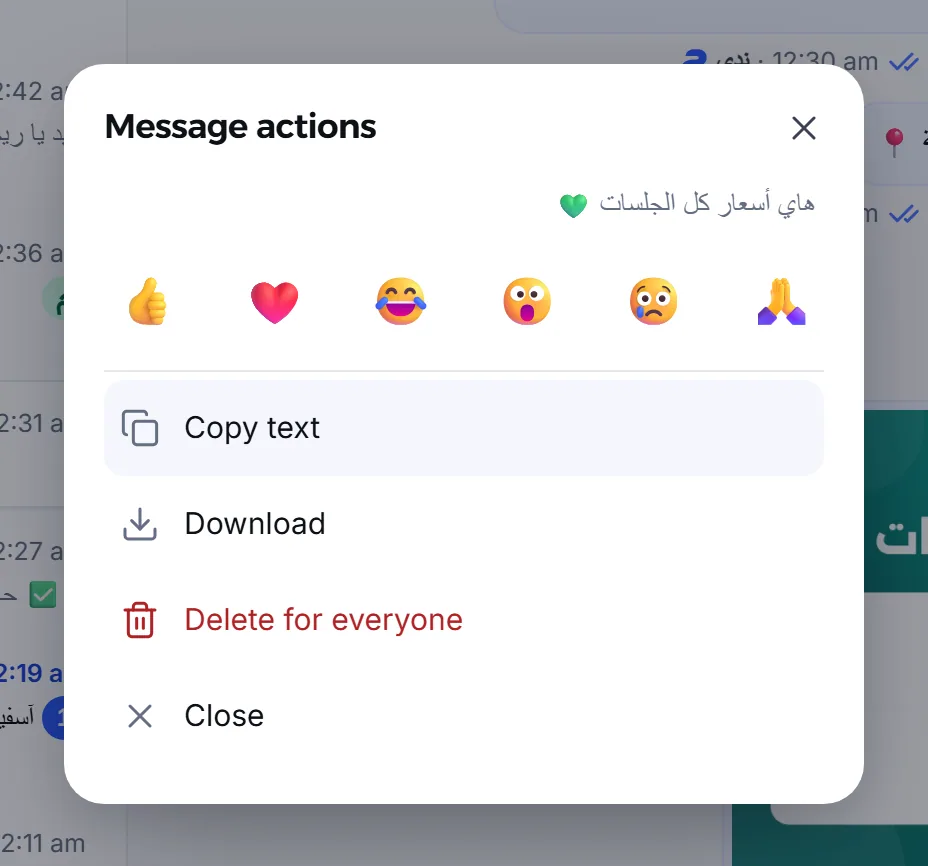
Section titled “How do I download a photo or a voice note from a conversation?”Open Message actions for the message, then press Download.
- On a computer, hover over the message and press Message options. On a phone, press and hold the message.
- In Message actions, press Download.
- The file saves to your device’s downloads folder.
Download appears for photos, stickers, voice notes, videos and documents, whenever the file is there. Clicking a photo in the conversation opens it full size in a new tab. An attachment that stayed a link on Meta’s side opens in a new tab from Download, and you save it from there.
Which media does Mujib keep?
Section titled “Which media does Mujib keep?”Mujib keeps the photos and voice notes your customers send, but not everything on every channel:
| Type | Messenger and Instagram | |
|---|---|---|
| Photos | Kept up to 5 MB, stickers too | Kept up to 5 MB |
| Voice notes | Kept up to 10 MB | Kept up to 5 MB |
| Videos and documents | Not kept; open them in WhatsApp on your phone | Stay a link on Meta’s side, which works while the link is valid |
| What your team or the agent sends | Kept | Kept |
- An attachment Mujib has no copy of shows Attachment unavailable in its place; the message’s own text still shows.
- On Messenger and Instagram, a file over the limit stays a link on Meta’s side, like a video.
- Some Meta messages cannot be shown in Mujib at all, and a line such as An Instagram message that can’t be shown here — open it in the app appears. Open them in that app.
How do I delete a message I sent on WhatsApp?
Section titled “How do I delete a message I sent on WhatsApp?”Choose Delete for everyone in Message actions, and the message is deleted from the customer’s WhatsApp chat.
- Open Message actions for the message.
- Press Delete for everyone, shown in red just before Close.
- Mujib asks: Delete this message for the customer? They may have read it already. Press Delete for everyone again to confirm, or Cancel.
- The message shows Deleting…, then This message was deleted.
- The option appears on every message that went out from your side on WhatsApp: the agent’s replies, your team’s dashboard replies, and messages sent from the business phone. Only accounts with Reply to customers see it.
- It stays available for 47 hours after sending, then disappears.
- In Mujib, the message’s text, attachment and reactions are cleared, and a line saying it was deleted keeps its place.
- The customer may have read it before you deleted it; deleting does not change that.
- If the delete does not go through, Could not delete — make sure WhatsApp is connected and try again. shows; make sure WhatsApp is connected and try again.
How do I remove a reply that never reached the customer?
Section titled “How do I remove a reply that never reached the customer?”A reply that failed to send, on any channel, is removed from the conversation in Mujib only, because it never reached the customer.
- If Not delivered — this message failed to send. shows under the message, open Message actions, choose Remove from the conversation and confirm. An undelivered message was removed keeps its place.
- If the send fails right away in the dashboard, Send again and Delete show under the message, to send it again or discard it.
Which messages can’t be deleted?
Section titled “Which messages can’t be deleted?”Mujib offers a delete only when it can really delete:
| Message | Why it can’t be deleted |
|---|---|
| The customer’s messages | Mujib does not delete what a customer wrote |
| Your Messenger and Instagram messages once delivered | Meta does not let a Page delete a delivered message |
| A WhatsApp message older than 47 hours | WhatsApp no longer deletes it for the customer |
| A message still sending | Nothing has reached the customer yet to delete |
What happens when the customer deletes their message?
Section titled “What happens when the customer deletes their message?”The message stays visible to you in Mujib with a line such as The customer deleted this on WhatsApp, so nobody answers it as if it still stood.
- Its reactions go, as they did in the customer’s chat.
- The agent does not reply to a message the customer deleted, and does not rely on it.
- If you delete a message for everyone from WhatsApp on the business phone, it stays visible in Mujib with Deleted from the business phone.
How do I delete a whole conversation?
Section titled “How do I delete a whole conversation?”You select the conversation in the list and delete it, and the deletion is permanent.
- Choose Select conversations at the end of the filters.
- Tap the conversations to delete, or Select loaded.
- Press Delete, then Confirm.
- The customer and their details stay in Mujib, and if they write again, a new conversation starts.
- Nothing changes on WhatsApp, Messenger or Instagram: the chat stays in the customer’s app and in yours.
- Deleting needs the Reply to customers permission. Staff tied to a branch delete only their branch’s conversations, not the ones assigned to no branch.
- To request deletion of data from Mujib, see Data deletion.
Frequently asked questions
Does deleting a conversation in Mujib delete it from WhatsApp?
No. It removes it from Mujib only; the chat stays as it is in the customer's app and in yours.
Can I delete a message I sent on Messenger or Instagram?
Not once it is delivered. Meta does not let a Page delete a delivered message. You can only remove a reply that never arrived.
How long can I delete a WhatsApp message for everyone?
For 47 hours after sending it. After that the option disappears, because WhatsApp no longer deletes it for the customer.
Why can't I see a video the customer sent on WhatsApp?
Mujib does not keep videos and documents that arrive on WhatsApp, nor files over the size limit, so “Attachment unavailable” shows in their place. Open them in WhatsApp on your phone.
If the customer deletes their message, does it vanish from Mujib?
No. It stays visible to you with a line saying the customer deleted it, and the agent does not reply to it.