
WhatsApp connected but not receiving messages in Mujib
If your number shows Connected on the Channels page but you are not receiving messages in Inbox, the cause is usually a filter hiding them, an account that sees only its own branch, or messages Mujib never takes in, such as groups. Sometimes a connection that looks fine has stopped. Send a test message, then check the list in order.
How do I check that messages really are not arriving?
Section titled “How do I check that messages really are not arriving?”Send a test message from another phone and watch the inbox with no filters on. That tells you whether the problem is the number or the view.
- Open Channels and look at the number shown in the WhatsApp numbers card. That is the number Mujib sees.
- From another phone, not the business phone and not a number saved for one of your branches, send a short text message to that number.
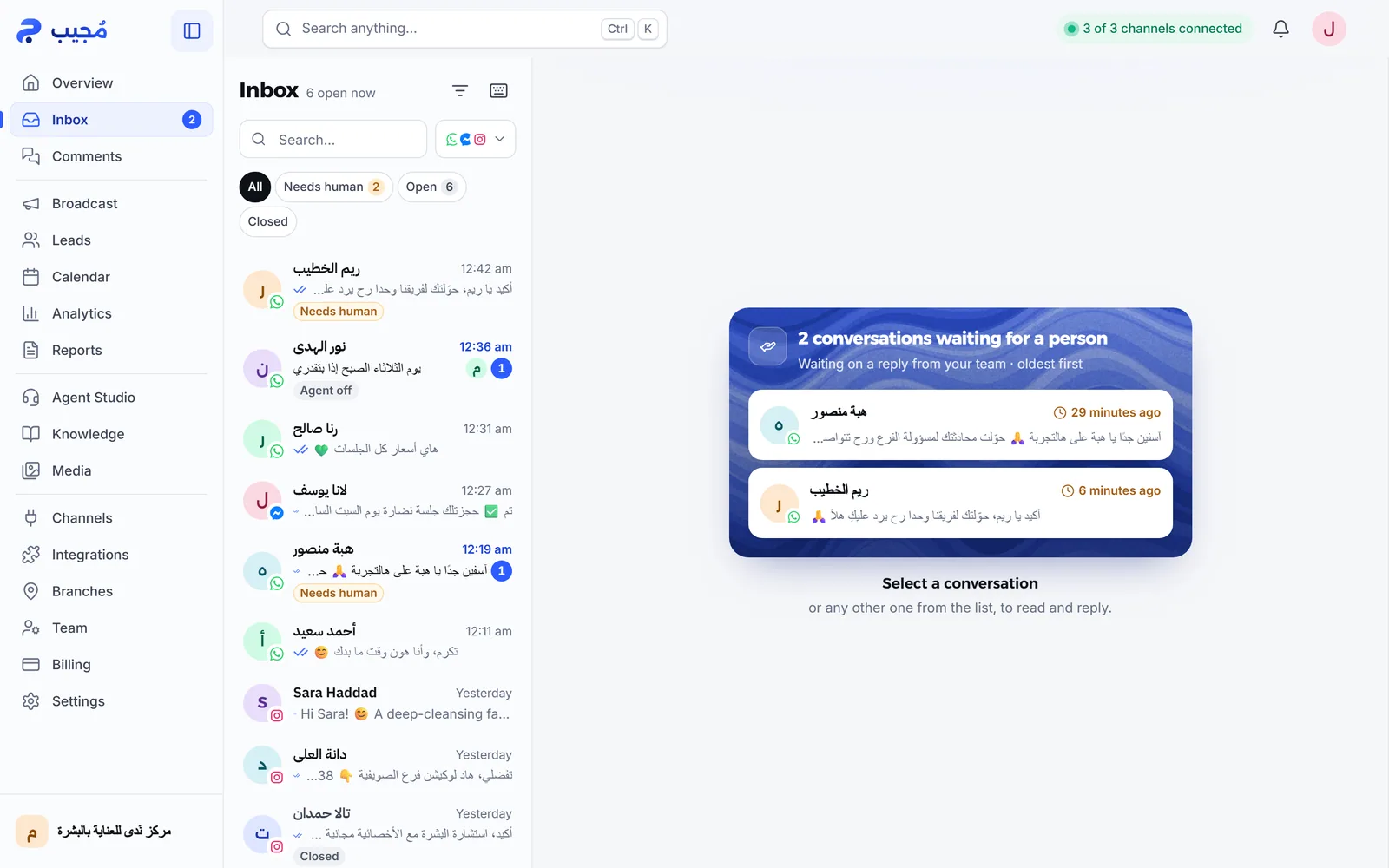
- Open Inbox, choose All among the status buttons, and make sure Filters is not narrowing the list.
- The conversation should appear at the top of the list within seconds.
Why am I not receiving messages when WhatsApp is connected?
Section titled “Why am I not receiving messages when WhatsApp is connected?”These causes run from most to least common. Check them in order:
- A filter is hiding the conversation: a status button other than All, one channel instead of All channels, Assigned to me, a single agent, or a date range. Clear the filters and search by the customer’s name or number. See Search conversations.
- Your account sees only its branch: a team member tied to a branch sees that branch’s conversations plus new ones no branch has taken yet, but not other branches’ conversations. Try from the owner’s account. See Team permissions.
- The customer wrote to a different number: check that the customer is messaging the number shown in the WhatsApp numbers card. With more than one number, each one has to be Connected on its own.
- Messages Mujib never takes in: group messages, status updates, broadcast lists and WhatsApp channels. These stay out of the inbox on purpose; the agent editor says so for groups under WhatsApp groups.
- A message from the business phone itself: what you send from the phone that holds the number appears inside the customer’s conversation as Staff; it does not open a new conversation.
- A connection that looks fine has stopped: on Channels, press Disconnect on the number and confirm, then Reconnect. If the link is still valid, it is back to Connected within seconds. If a link code appears, link it again as in Connect WhatsApp. Then repeat the test message.
What if messages reach the inbox but the agent does not reply?
Section titled “What if messages reach the inbox but the agent does not reply?”Then the number is fine, and the problem is replying, not receiving. The agent may be off, the conversation may be with your team, or the conversation allowance may be used up. Work through Auto reply not working.
Is it different on Messenger and Instagram?
Section titled “Is it different on Messenger and Instagram?”Yes. Messenger and Instagram are not linked to a phone but to your Facebook Page through Meta, and they have other causes:
- An Instagram message is missing: see Instagram message not showing.
- The card says Connected — with an issue: read the cause written on it, and see Page connection disabled.
- A reply is refused a day after the customer’s last message: see The 24-hour window.
When should I contact the Mujib team?
Section titled “When should I contact the Mujib team?”Contact us when you have reconnected, sent a test message from another phone, and it still does not appear in an unfiltered inbox on the owner’s account.
- Write to
abdalrahman@mujib.ai, or use Report a problem in your account menu. - Include the linked number, the number you sent the test from, and when you sent it.
Frequently asked questions
Do WhatsApp group messages show up in Mujib?
No. Group messages never enter the inbox, so the agent does not answer them. Mujib works in direct conversations with customers only.
I can see the message in WhatsApp on my phone but not in Mujib. Why?
Start with the inbox filters and your account's access; those are the most common causes. If it is neither, press “Disconnect” and then “Reconnect” on the Channels page.
Does the WhatsApp connection need a webhook or server settings?
No. Mujib links to your number as a linked device, so there is nothing to configure. Mujib's webhooks are for sending events to your own systems; they are covered in the developer section.
Where do the messages I send from the business phone appear?
Inside the customer's conversation, as “Staff”, not as a new conversation, and the agent pauses in that conversation.
Do messages from before I re-linked the number with a new code show up?
No. After linking with a new code, the inbox starts with the messages that arrive after it. You can see older messages in WhatsApp on your phone.